

Asset tracking is the process of recording where your organization’s physical assets are, who is responsible for them, and what condition they are in, from the day you buy them until the day you dispose of them. Each asset gets a unique identifier, such as a barcode, QR code, RFID tag, Bluetooth tag, or GPS tracker, and software keeps a central record that updates each time the asset is scanned or sends a signal.
Think about a company with 400 laptops, a contractor with 1,200 power tools, or a hospital with hundreds of infusion pumps. Without tracking, these assets end up in drawers, vans, and storerooms, and nobody knows which ones exist, who has them, or when they last had a service. Asset tracking replaces guesswork and spreadsheets with a living record that answers three questions at any moment: where is it, who has it, and what state is it in.
This guide explains asset tracking from the ground up. You will see how it works step by step, the technologies behind it and when to use each one, the key features of asset tracking software, what asset tracking means in IT management, how it fits into the asset lifecycle, what it costs, and how to roll it out without wasted effort.
Key takeaways:
- Asset tracking links each physical asset to a unique identifier and a digital record of its location, owner, status, and history.
- The technology ranges from low-cost barcode and QR labels that people scan, to RFID, Bluetooth, ultra-wideband, and GPS tags that report location automatically.
- In IT management, asset tracking combines discovery tools such as endpoint agents and network scans with physical tags to build a trusted inventory of hardware and software.
- Asset tracking feeds asset management: tracking tells you where things are, and asset management decides how to get the most value from them.
- A sensible rollout starts with clear goals, a clean asset register, and a pilot on one site or asset category before scaling.
What Is Asset Tracking?
At its simplest, asset tracking connects a physical object to a digital record. The record holds facts about the asset, and the identifier on the asset lets people or devices update that record quickly and accurately.
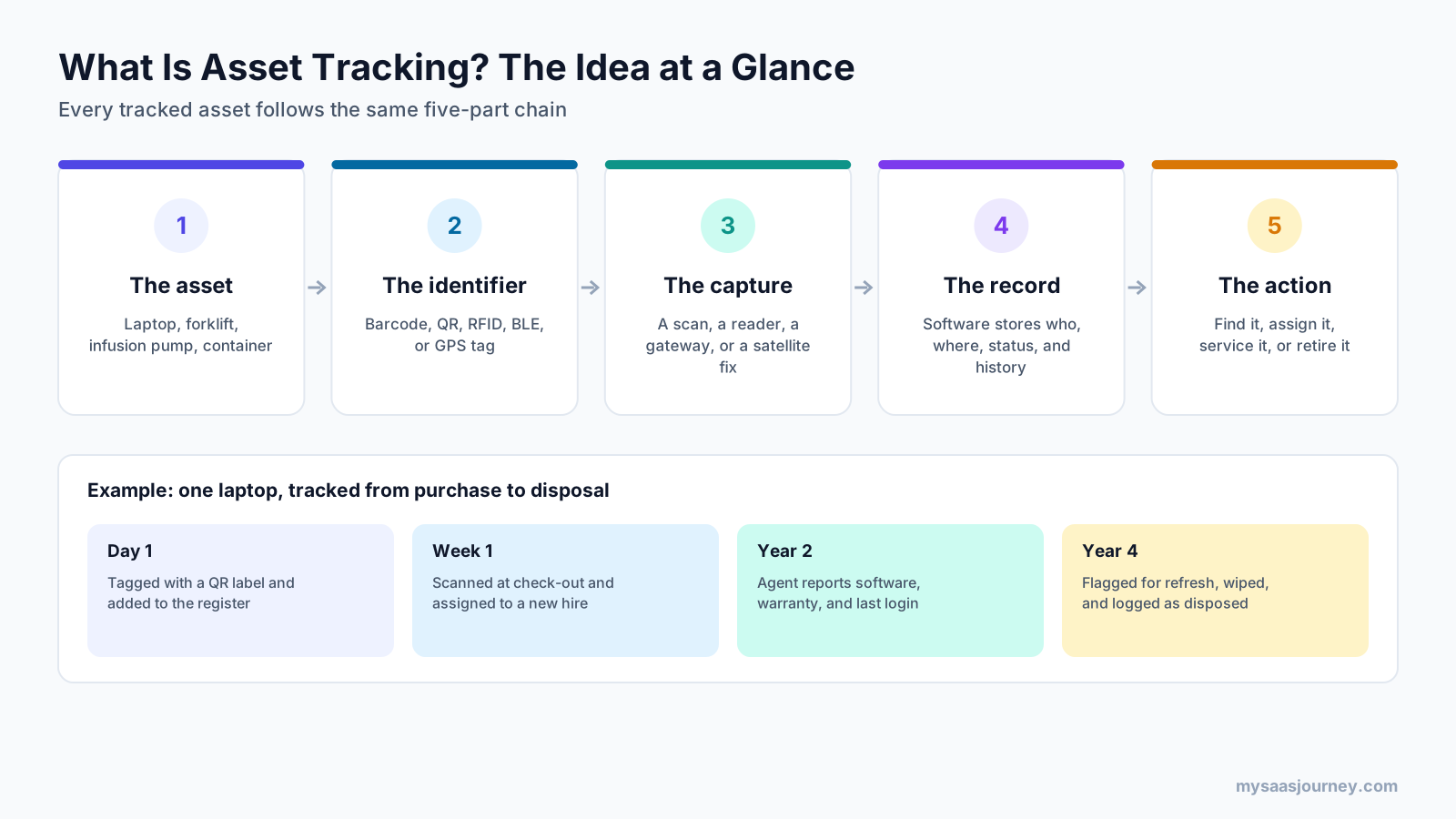
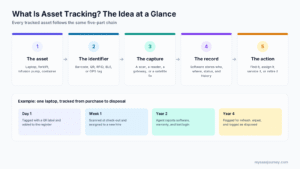
Every asset tracking setup has the same five parts:
- The asset: anything of value you want to keep track of, such as a laptop, forklift, infusion pump, or shipping container.
- The identifier: a barcode, QR code, NFC tag, RFID tag, Bluetooth beacon, or GPS device attached to the asset.
- The capture: the moment data is collected, such as a phone scanning a QR code, a reader detecting an RFID tag at a doorway, or a tracker reporting its GPS position.
- The record: asset tracking software that stores the asset’s details, location, custodian, status, and full history.
- The action: what people do with that information, such as finding a missing item, assigning it to someone, scheduling service, or retiring it.
The laptop example in the image shows how this plays out. On day one, the laptop gets a QR label and a record in the asset register. When it is handed to a new employee, a quick scan assigns it to that person. Over the following years, the record collects warranty, software, and maintenance details. When the laptop reaches the end of its life, it is wiped, logged as disposed, and removed from the books, leaving a complete audit trail.
What Counts as an Asset?
In asset tracking, an asset is usually an item you keep and reuse, rather than stock you sell. Common examples include:
- Office and IT equipment: laptops, monitors, phones, servers, and network devices
- Tools and equipment: power tools, test instruments, ladders, and generators
- Vehicles and mobile equipment: vans, trailers, forklifts, and construction machinery
- Facility assets: furniture, HVAC units, and production machinery
- Specialized equipment: medical devices, lab instruments, and audio-visual kits
- Returnable containers: pallets, kegs, totes, and roll cages
Asset Tracking vs Asset Tagging
Asset tagging is the physical step of attaching an identifier to each item. Asset tracking is the ongoing process of using those tags to keep records accurate over time. A tag on its own does nothing until it is linked to a record and scanned or read as the asset moves.
Asset Tracking vs Digital Asset Management
The word “asset” also appears in digital asset management (DAM), which organizes files such as images, videos, and brand documents. Despite the similar name, DAM tools manage digital content, while asset tracking manages physical equipment and IT hardware. If you are looking for tools to organize creative files and media libraries, our digital asset tracking systems category covers DAM platforms.
Why Asset Tracking Matters
Organizations rarely notice the cost of poor asset tracking until something goes wrong: an auditor asks for proof that equipment exists, a crew loses half a day searching for a generator, or finance discovers it has been paying insurance on machinery that was scrapped years ago.
The scale of the problem is larger than most teams expect. Kroll, a financial advisory firm, reports that studies show between 10% and 30% of assets on the average fixed asset register no longer exist, and that up to 65% of records are incomplete or inaccurate. These missing items are often called ghost assets, and they distort financial statements, insurance premiums, and tax bills.
Asset tracking addresses several everyday problems:
- Lost and stolen equipment: knowing who last had an item makes losses easier to prevent and investigate.
- Duplicate purchases: teams buy new equipment when existing items sit unused in another location.
- Wasted time: staff spend time searching for tools, devices, and equipment instead of using them.
- Missed maintenance: equipment fails early or becomes unsafe when service dates are forgotten.
- Audit and compliance risk: regulators, auditors, and insurers often require proof of what you own and where it is.
- Inaccurate financial records: ghost assets and unrecorded assets skew depreciation, insurance, and tax calculations.
How Does Asset Tracking Work?
Asset tracking works as a repeating loop. Each pass through the loop adds a new data point to the asset’s history, so the record gets more useful over time.
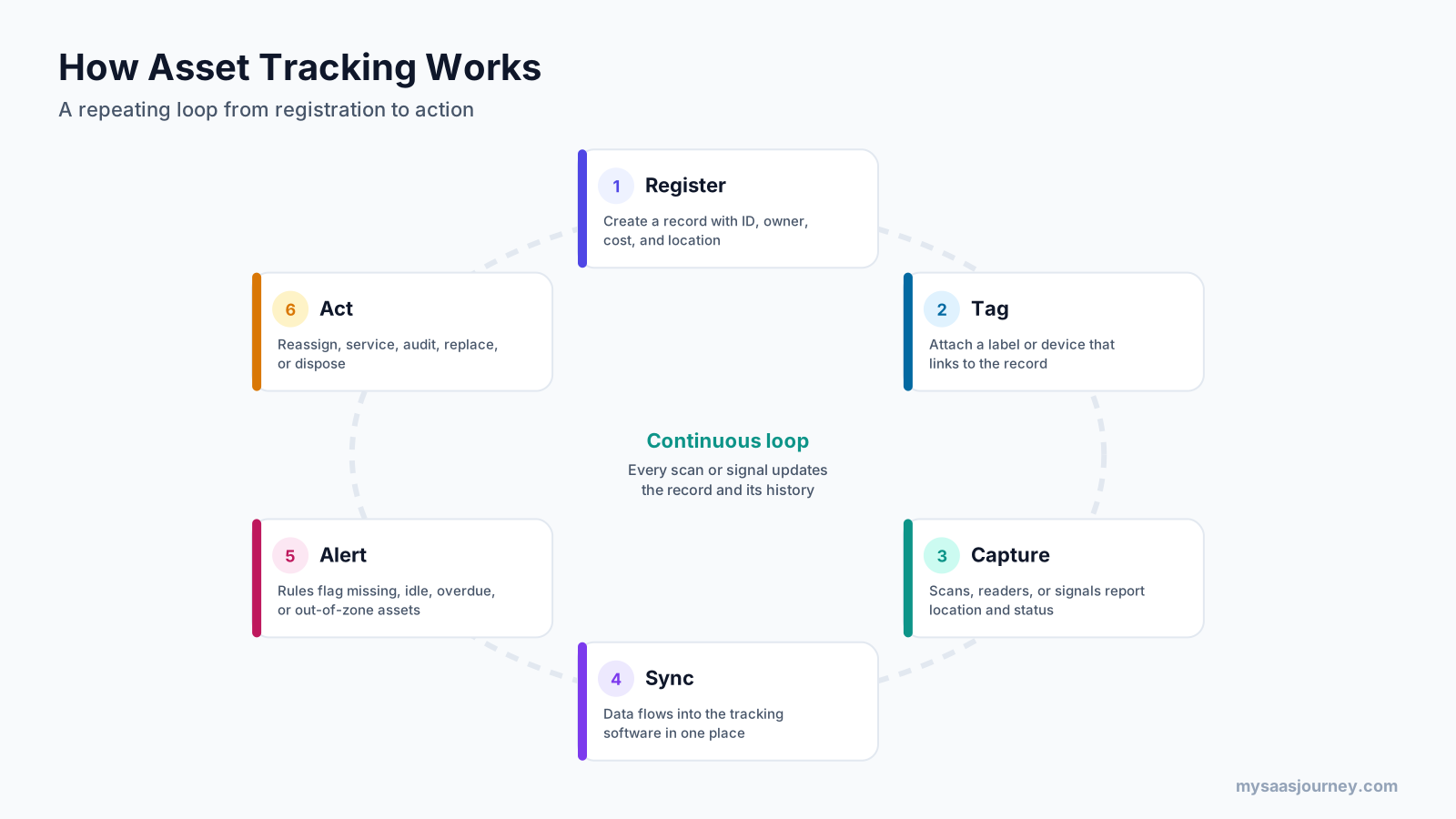
- Register: create a record for each asset with a unique ID, description, owner, purchase date, cost, and location.
- Tag: attach a label or device that links the physical asset to its record.
- Capture: collect location and status data when someone scans the tag, when a reader detects it, or when a tracker sends a signal.
- Sync: send the data to the asset tracking software so every update lands in one place.
- Alert: set rules that flag assets that are missing, idle, overdue for return, due for service, or outside an approved zone.
- Act: reassign, service, audit, replace, or dispose of the asset, and record that action.
Manual vs Automated Asset Tracking
There are two broad ways to capture data:
- Manual or scan-based tracking relies on people scanning barcodes, QR codes, or NFC tags with a phone or handheld scanner. It is low-cost and simple, but the record is only as current as the last scan.
- Automated or signal-based tracking uses RFID readers, Bluetooth gateways, ultra-wideband anchors, or GPS trackers to report location without anyone scanning. It costs more but keeps records current with little effort.
Many organizations use a mix of both approaches. Office equipment might use QR labels scanned during check-out and annual audits, while high-value mobile equipment carries Bluetooth or GPS tags that report location continuously.
Asset Tracking Technologies
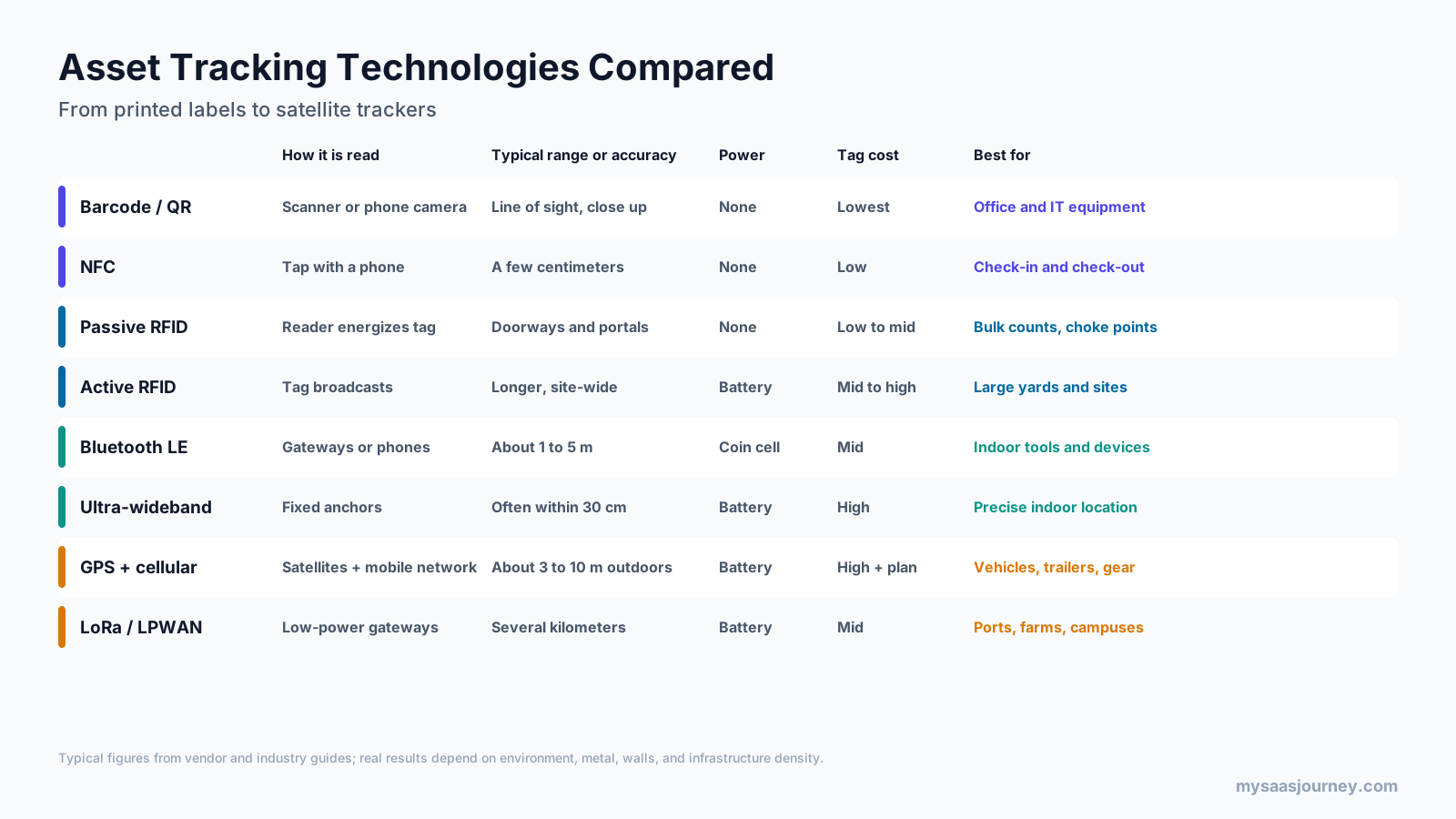
The right technology depends on where your assets live, how often they move, how precise the location needs to be, and how much you can spend per asset.
Barcodes and QR Codes
Barcodes and QR codes are the least expensive and most widely used asset tags. A person scans the code with a handheld scanner or a smartphone camera, and the software logs the asset’s location and status. QR codes hold more data than one-dimensional barcodes and can be read by most phones. The trade-off is that someone has to scan each item, and the code must be visible.
In practice: an IT team labels every laptop and monitor with a durable QR tag, scans items at check-out and check-in, and runs a scan-based audit once a year.
NFC Tags
Near-field communication (NFC) tags work by tapping a smartphone against the tag, typically from a few centimeters away. NFC suits quick check-in and check-out, inspections, and confirming that someone was physically present with an asset.
In practice: a facilities technician taps a phone on an NFC tag fixed to an HVAC unit to open its service history and log an inspection.
RFID Tags
Radio-frequency identification (RFID) uses radio waves to read tags without line of sight. Passive RFID tags have no battery and are powered by the reader, so they are often used at “choke points” such as doorways, loading docks, and portals. Active RFID tags have their own battery and broadcast over longer distances, which suits large sites.
In practice: a logistics company reads passive RFID tags on returnable containers as they pass through dock doors, so it knows which containers left and which came back.
Bluetooth Low Energy (BLE)
Bluetooth Low Energy tags are small, battery-powered beacons that broadcast continuously. Fixed gateways or smartphones detect them and estimate location, usually to the room or zone level. Typical accuracy based on signal strength is about 1 to 5 meters, and coin-cell batteries can last a long time.
In practice: a construction company fits BLE tags to power tools, and gateways in vans and site containers record which tools are on which job.
Ultra-Wideband (UWB)
Ultra-wideband measures the time radio pulses take to travel between tags and fixed anchors, which allows much more precise indoor positioning. Vendors commonly quote accuracy within about 30 centimeters, though real-world results depend on the environment and the number of anchors. UWB costs more than BLE because it needs dedicated infrastructure.
In practice: a factory uses UWB to track tools and work-in-progress carts precisely along a production line.
GPS and Cellular Trackers
GPS trackers use satellite signals to calculate position and send it over a cellular or satellite connection. They work almost anywhere outdoors, with typical accuracy of a few meters, and support geofences that alert you when an asset leaves an approved area. They are less reliable indoors, and most carry a monthly connectivity fee.
In practice: an equipment rental firm fits GPS trackers to generators and light towers, receives an alert if one leaves a job site out of hours, and uses engine hours to schedule servicing.
LoRa and Other LPWAN Networks
Low-power wide-area networks (LPWAN) such as LoRa send small amounts of data over long distances, often several kilometers, while using very little power. They work indoors and outdoors and suit large sites such as ports, farms, and campuses.
In practice: a port operator tracks trailers and containers across a large yard with LoRa tags and a few gateways rather than a dense reader network.
Wi-Fi Positioning and IoT Sensors
Wi-Fi positioning estimates location from the signal strength of existing access points, which avoids installing new infrastructure. IoT sensors go further by reporting condition as well as location, such as temperature, humidity, shock, or vibration, which matters for vaccines, food, and sensitive equipment.
Which Technology Covers Which Distance?
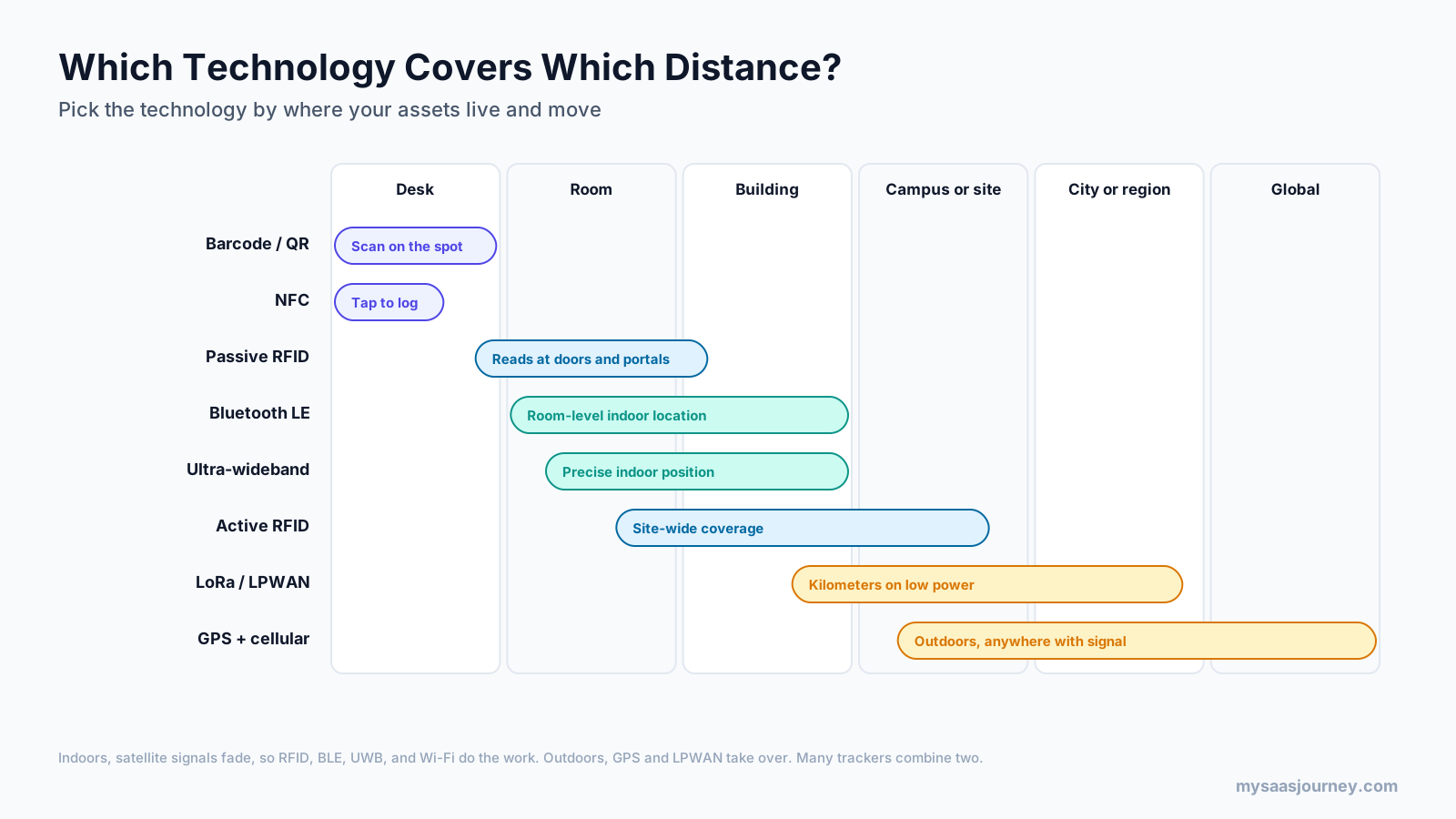
A simple way to choose is to start with where your assets live and move:
- At a desk or in one room, barcodes, QR codes, and NFC are enough, because people are already handling the items.
- Inside buildings, satellite signals fade, so RFID, BLE, UWB, and Wi-Fi do the work.
- Across a large site or campus, active RFID and LPWAN cover wide areas on low power.
- Across cities, regions, or countries, GPS with cellular or satellite connectivity is the standard.
Many modern trackers combine two technologies, such as GPS for outdoor location and BLE for indoor location, so a single tag can follow an asset from a warehouse to a job site.
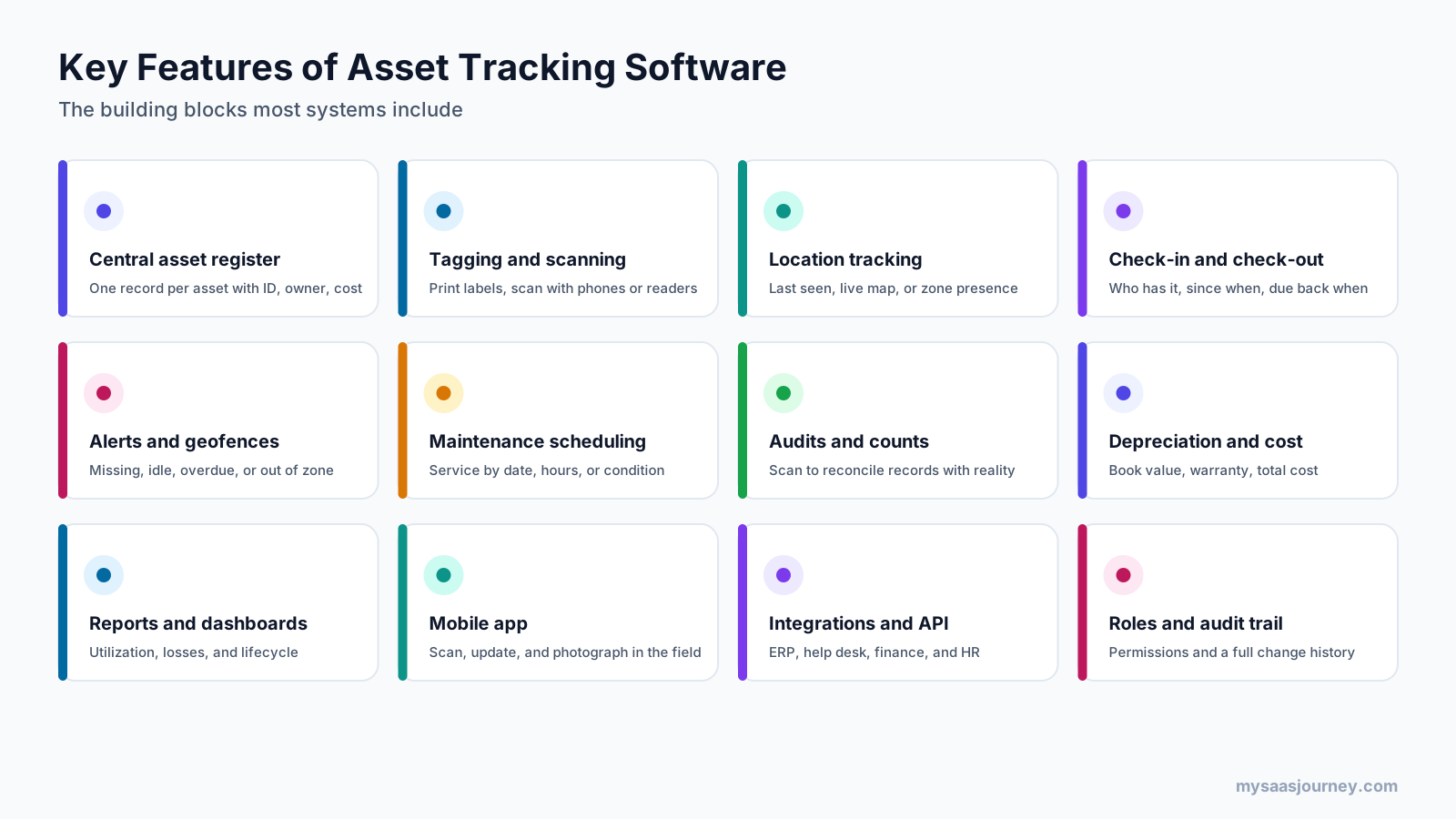
Key Features of Asset Tracking Software
The tags collect data, but the software turns it into something people can use. Most asset tracking software includes the following building blocks.
Central Asset Register
A single database with one record per asset, including ID, description, category, serial number, purchase details, owner, location, and status. Custom fields let you capture details specific to your assets, such as calibration dates or license keys.
Tagging, Scanning, and Mobile Apps
Most tools let you print barcode or QR labels, scan with a smartphone camera, and update records in the field. A good mobile app lets staff check items in and out, add photos, and report damage on the spot. Our barcoding software category covers label design and scanning tools that work alongside tracking systems.
Location Tracking and Maps
Depending on the technology, the software shows the last scanned location, the zone an asset is in, or a live map. Location history helps you see where assets spend their time and where they tend to go missing.
Check-In and Check-Out
Check-out records who has an asset, when they took it, and when it is due back. This is central for shared equipment, loaner laptops, tool cribs, and rental fleets.
Alerts and Geofences
Rules notify the right people when an asset is overdue, has not been seen for a set period, leaves a defined area, or is due for service. Alerts turn a passive record into an early warning system.
Maintenance Scheduling
Maintenance features schedule service by date, usage, or condition, and record the work done. Some organizations connect asset tracking to a computerized maintenance management system (CMMS) for detailed work orders. For instruments that need regular accuracy checks, see our calibration management software category.
Audits and Physical Counts
Audit tools let teams scan everything in a location and compare it with what the register says should be there. Differences reveal missing items, unrecorded items, and assets in the wrong place.
Depreciation and Cost Tracking
Finance teams use purchase cost, useful life, and depreciation method to calculate book value. Tracking warranty and contract dates also prevents paying for repairs that should be covered.
Reports and Dashboards
Reports show utilization, losses, overdue items, maintenance history, and lifecycle costs, which help teams decide what to buy, move, repair, or retire.
Integrations and API
Integrations connect asset data to ERP, finance, help desk, HR, and procurement systems, so records update automatically when someone joins, leaves, or raises a ticket. Our guide to what an API is explains how these connections work.
Roles, Permissions, and Audit Trail
Permissions control who can view or change records, and an audit trail logs every change, which matters for compliance and investigations.
Types of Asset Tracking
Asset tracking looks different depending on what you track. The image shows six common types and the method that usually fits each.

- IT asset tracking covers laptops, servers, phones, network devices, and software licenses. It relies on discovery agents and network scans for digital details, plus physical tags for location.
- Fixed asset tracking covers furniture, machinery, and other long-term assets on the balance sheet. It typically uses barcode tags and periodic audits to keep the fixed asset register accurate.
- Tool and equipment tracking covers power tools, test gear, and portable equipment that moves between people and sites. BLE tags and check-out workflows reduce losses.
- Fleet and mobile asset tracking covers vans, trailers, and heavy machinery. GPS trackers with cellular or LPWAN connectivity report location, usage hours, and geofence events.
- Medical equipment tracking covers infusion pumps, beds, monitors, and wheelchairs inside hospitals. BLE or UWB indoor location helps staff find equipment quickly and manage cleaning and maintenance.
- Returnable container tracking covers pallets, kegs, totes, and cages that move between partners. RFID readers at docks and portals show which containers left and returned.
What Is Asset Tracking in IT Management?
In IT management, asset tracking means keeping an accurate, up-to-date inventory of every hardware device and software item the organization owns or uses, along with who uses it, where it is, and how it is configured. It is a core part of IT asset management (ITAM).

IT asset tracking differs from tracking physical equipment because many IT assets can report their own details. Typical data sources include:
- Endpoint agents: small programs on laptops and servers that report hardware specs, installed software, and last login.
- Network discovery scans: tools that scan the network to find connected devices, including printers, switches, and devices nobody registered.
- Mobile device management (MDM): systems that manage phones and tablets and report device details.
- Cloud provider APIs: connections that list virtual machines, storage, and other cloud resources.
- Purchase and finance records: invoices, contracts, and warranty details.
- Barcode or QR audits: physical scans that confirm where devices actually are.
All of these feed an IT asset inventory, often stored in a configuration management database (CMDB). IT teams then use it for:
- Security and patching: you cannot protect devices you do not know about, which is why asset inventory underpins approaches such as zero trust security.
- License compliance: matching installed software with purchased licenses to avoid audit penalties and paying for unused seats.
- Help desk context: technicians see the device, owner, and history when a ticket arrives.
- Refresh planning: knowing device age and warranty status helps plan replacements and budgets.
- Audit and disposal records: proving that retired devices were wiped and disposed of correctly.
What Is Asset Tracking Software in IT Management?
Asset tracking software for IT management is a tool that collects and maintains this inventory automatically. It typically combines discovery, a central asset register, software and license tracking, lifecycle status, and integration with the IT service desk. Many IT teams use it alongside cloud services, so our explainer on what cloud computing is is useful background for tracking cloud resources.
The international standard ISO/IEC 19770-1 sets out requirements for an IT asset management system. It is a discipline-specific extension of ISO 55001, the asset management standard intended mainly for physical assets, and describes ITAM as the infrastructure and processes needed to manage, control, and protect IT assets throughout their life cycle.
Asset Tracking Across the Asset Lifecycle
Every asset moves through a lifecycle, and tracking data adds value at each stage.
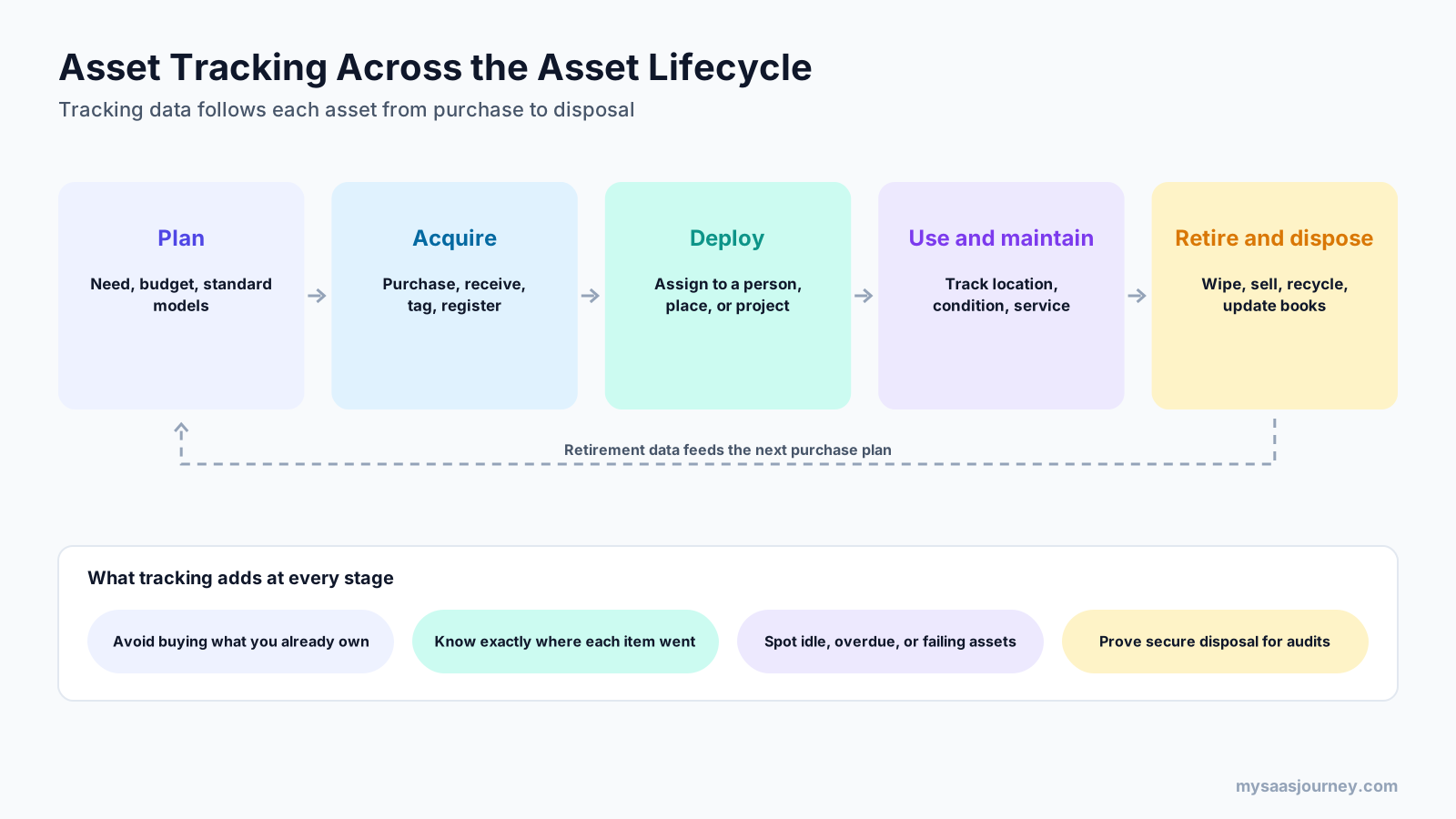
- Plan: decide what you need, set a budget, and choose standard models. Tracking data shows what you already own, so you avoid buying duplicates.
- Acquire: purchase, receive, tag, and register each item. Registering at receipt prevents assets from going untracked from day one.
- Deploy: assign the asset to a person, place, or project. Tracking records who is responsible.
- Use and maintain: monitor location, condition, and service history. Tracking highlights idle, overdue, or failing assets.
- Retire and dispose: wipe data, sell, recycle, or scrap the asset, and update the financial records. Tracking proves secure disposal for audits.
Retirement data also feeds the next planning cycle. If one laptop model fails early or one tool type keeps going missing, those patterns shape future purchases. Clear rules for how long you keep records after disposal also matter, and our glossary entry on data retention policies explains how to set them.
Asset Tracking vs Asset Management vs Inventory Management
These three terms are often used interchangeably, but they answer different questions.
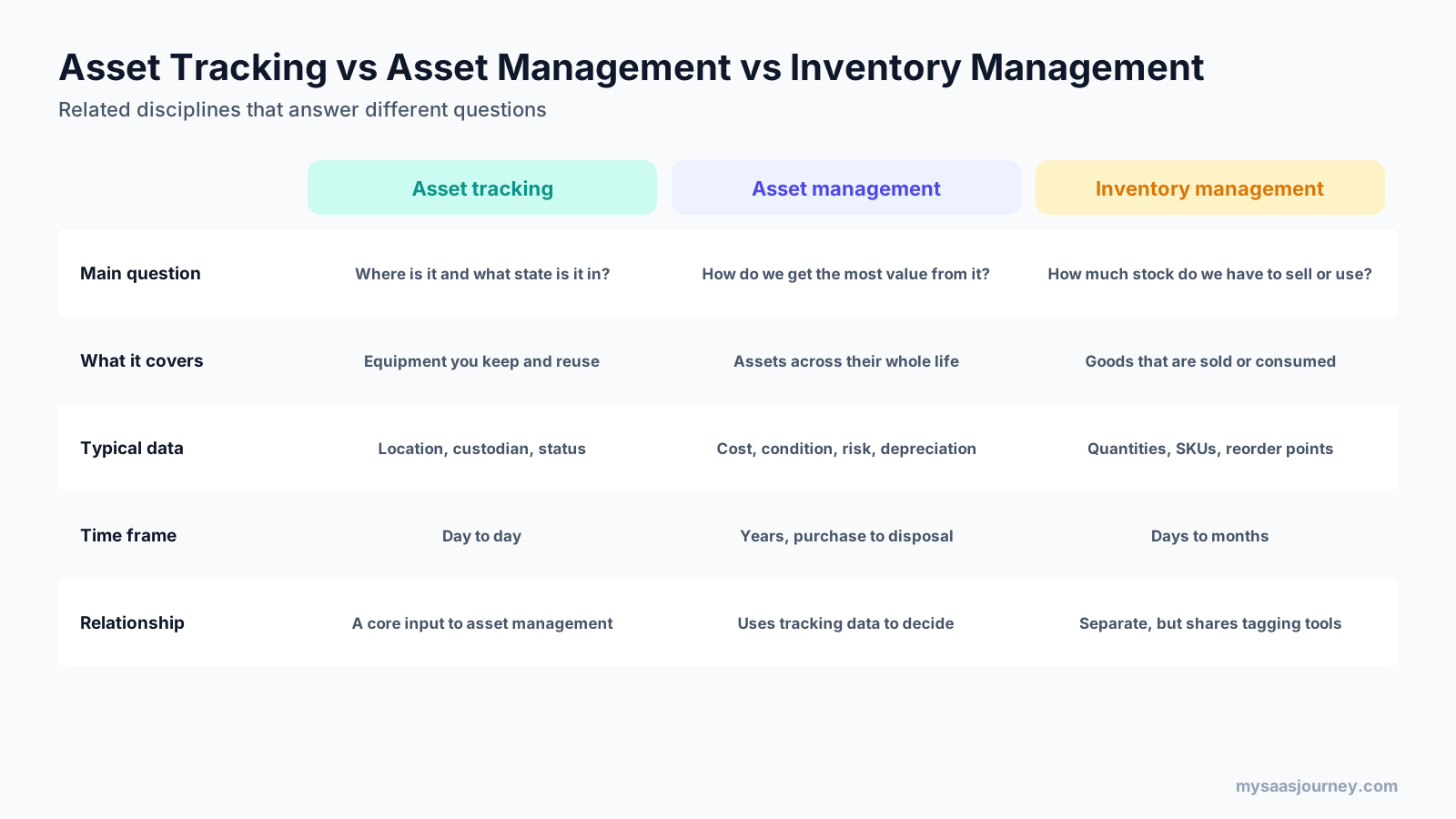
- Asset tracking answers “where is it and what state is it in?” It focuses on location, custodian, and status from day to day.
- Asset management answers “how do we get the most value from it?” It uses tracking data, along with cost, condition, risk, and depreciation, to make decisions across an asset’s whole life. Large organizations often use enterprise asset management (EAM) software for this.
- Inventory management answers “how much stock do we have to sell or use?” It covers goods that are sold or consumed, such as products and spare parts, and focuses on quantities, SKUs, and reorder points.
Asset tracking is a core input to asset management, and both share tagging and scanning tools with inventory management. Many businesses run all three, sometimes in the same platform.
Benefits of Asset Tracking
When asset tracking is in place and used consistently, organizations typically see:
- Fewer losses and less theft, because every item has a known custodian and location
- Less time spent searching for equipment
- Fewer duplicate purchases, because teams can see what already exists
- Better utilization, by spotting idle assets and moving them where they are needed
- More reliable maintenance, with service scheduled before failures occur
- Faster, more accurate audits and physical counts
- Cleaner financial records, with fewer ghost assets inflating insurance and tax bills
- Stronger security and compliance, especially for IT devices that hold sensitive data
- Better purchasing decisions, based on lifecycle cost and failure history
Common Asset Tracking Challenges
Asset tracking projects usually struggle because of process and data problems rather than technology:
- Inaccurate starting data: tagging assets on top of an outdated register copies old errors into the new system. Start with a physical count.
- Inconsistent scanning: if people skip scans at check-out or transfers, records drift. Make scanning part of normal workflows.
- Wrong technology choice: RFID can struggle near metal and liquids, GPS weakens indoors, and BLE needs gateways. Match the technology to the environment.
- Tags that fall off or wear out: choose labels and mounts suited to heat, chemicals, outdoor exposure, or rough handling.
- Battery management: powered tags need battery monitoring and replacement plans.
- Too much scope at once: tracking everything from day one overwhelms teams. Start with high-value or high-loss categories.
- Disconnected systems: asset data that does not flow to finance, IT, or maintenance tools creates duplicate work.
How Much Does Asset Tracking Cost?
The cost of asset tracking depends on the number of assets, the technology, and the software. Industry guides describe typical cost tiers like these:
- Barcode and QR labels: durable asset labels cost well under a dollar each in volume, and smartphones can act as scanners.
- Handheld scanners: from free smartphone apps to a few hundred dollars for a rugged handheld.
- RFID: tags cost more than printed labels, and fixed or handheld readers can cost thousands of dollars each.
- Bluetooth: tags typically cost tens of dollars each, plus gateways to detect them.
- GPS: tracker hardware plus a monthly cellular subscription per device.
- Software: cloud asset tracking software often has free tiers for small asset counts, with paid plans commonly ranging from tens to a few hundred dollars a month.
A small office tracking a few hundred items with QR labels and cloud software can start at a low cost. A large site tracking moving equipment continuously with UWB or active RFID needs a much bigger budget for infrastructure, installation, and maintenance. Our glossary entry on pricing models explains how per-asset and per-user pricing affect software costs.
How to Implement an Asset Tracking System
A structured rollout avoids the most common failures. The image shows eight steps, starting small and scaling once the process works.
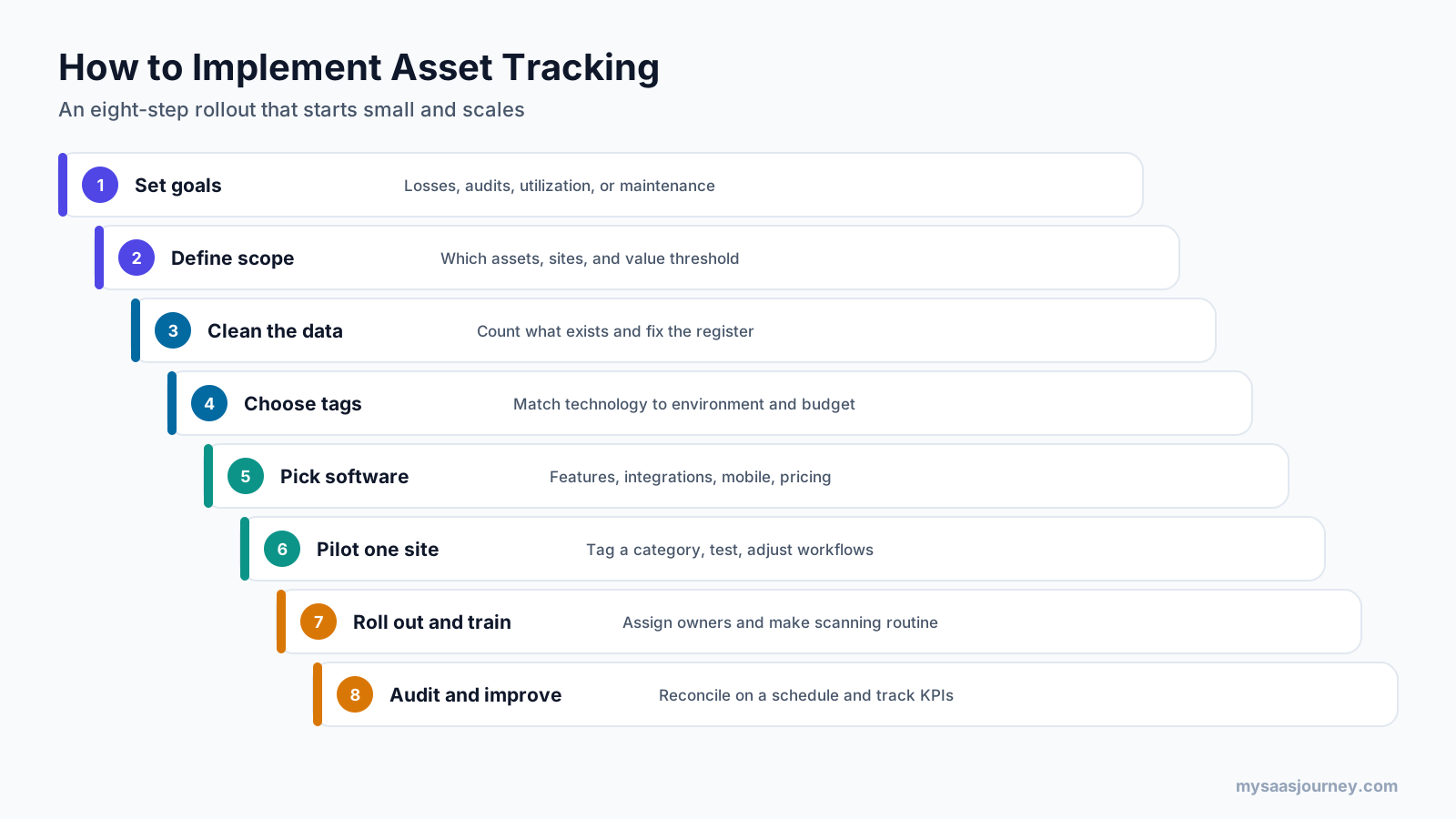
- Set clear goals first. Decide what you want to improve, such as fewer losses, faster audits, better utilization, or more reliable maintenance.
- Define the scope of the first phase. Choose which asset categories, sites, and value threshold to include first.
- Clean the asset data before tagging. Count what physically exists, remove ghost assets, and add unrecorded items before tagging.
- Choose tags that suit your environment. Match the technology to the environment, how often assets move, and your budget.
- Pick software that fits your workflows. Compare features, mobile apps, integrations, reporting, and pricing.
- Pilot the system on one site. Tag one category or location, test the workflows, and adjust before expanding.
- Roll out the system and train staff. Assign asset owners, make scanning part of daily routines, and explain why it matters.
- Audit results and keep improving. Reconcile records on a schedule and track measures such as loss rate, audit accuracy, and utilization.
How to Create an Asset Tracking System With a Spreadsheet
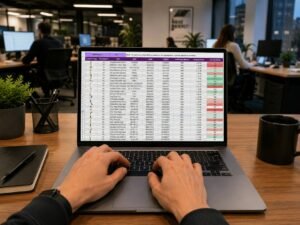
Very small teams sometimes start with a spreadsheet: one row per asset, columns for ID, description, location, custodian, purchase date, and status, plus printed QR labels that link to each row. This works for a few dozen items, but it breaks down as assets and people multiply, because there is no audit trail, no alerts, and no reliable way to stop people overwriting each other’s changes. Dedicated software becomes worthwhile once you need check-out, maintenance scheduling, or regular audits.
How to Choose Asset Tracking Software
Use these questions to narrow your options:
- What assets will you track, and where do they live and move?
- Does the software support the tag technology you need, from QR codes to RFID, BLE, or GPS?
- Is the mobile app easy enough for frontline staff to use every day?
- Does it handle check-out, maintenance, audits, and depreciation if you need them?
- Will it integrate with your finance, ERP, help desk, or HR systems?
- How is it priced: per asset, per user, or per site, and how will that scale?
- What reporting and permissions does it offer for audits and compliance?
For a broader framework, our guide on how to choose the right software for your business covers requirements, trials, and vendor evaluation.
Asset Tracking Examples by Industry
Asset tracking adapts to very different settings:
- Offices and IT teams: QR-labeled laptops, monitors, and phones, with endpoint agents reporting software and security status.
- Construction: BLE-tagged tools and GPS-tracked machinery across multiple job sites, with check-out for crews.
- Healthcare: indoor location for infusion pumps, wheelchairs, and monitors so staff can find equipment quickly and manage cleaning.
- Manufacturing: RFID or UWB tracking for tools, molds, and carts on the production floor, plus maintenance scheduling for machinery.
- Logistics and supply chain: RFID on returnable containers and GPS on trailers, with geofence alerts at depots.
- Education: tagged laptops, tablets, and lab equipment loaned to students and staff, with check-in at the end of each term.
- Government: fixed asset registers reconciled through barcode audits to meet accountability rules.
The Future of Asset Tracking
Several trends are shaping how organizations track assets:
- Hybrid trackers that combine GPS, BLE, and Wi-Fi in one device, so assets can be followed indoors and outdoors.
- More precise indoor positioning as BLE direction-finding and UWB become more affordable.
- Condition monitoring, with IoT sensors that report temperature, vibration, and usage alongside location.
- Smarter alerts that use AI to spot unusual movement or predict maintenance needs from usage patterns.
- Closer integration between asset tracking, finance, IT service management, and maintenance systems, so one record serves every team.
Final Thoughts
Asset tracking gives every physical asset a digital identity and keeps a running record of where it is, who has it, and what condition it is in. Whether you start with QR labels and a mobile app or use RFID, Bluetooth, ultra-wideband, or GPS to report location automatically, the goal is the same: a trustworthy record that reduces losses, saves time, and supports better decisions.
Start with the assets that cost the most or go missing most often, clean up your register before tagging, choose technology that fits where those assets live, and build scanning into everyday work. Once tracking is reliable, it becomes the foundation for maintenance planning, accurate financial records, IT security, and smarter purchasing.
Frequently Asked Questions
What is asset tracking?
Asset tracking is the process of recording where an organization’s physical assets are, who is responsible for them, and what condition they are in throughout their life. Each asset gets a unique identifier, such as a barcode, QR code, RFID tag, or GPS tracker, and software keeps a central record that updates when the asset is scanned or reports its location.
How does asset tracking work?
Asset tracking works in a loop. You register each asset in software, attach a tag that links to its record, and capture data when the tag is scanned or sends a signal. The software stores each update, sends alerts for missing, overdue, or out-of-zone assets, and helps people reassign, service, audit, or retire them.
What is asset tracking in IT management?
In IT management, asset tracking means keeping an accurate inventory of hardware and software, including who uses each device, where it is, and how it is configured. It combines endpoint agents, network discovery, mobile device management, and cloud APIs with physical tags, and supports security, license compliance, help desk work, and refresh planning.
What is asset tracking software?
Asset tracking software is a tool that stores a central record of each asset and updates it through scans, readers, or trackers. Typical features include an asset register, label printing and scanning, location tracking, check-in and check-out, alerts, maintenance scheduling, audits, depreciation, reports, and integrations with other business systems.
What is an example of asset tracking?
A common example is an IT team that labels every laptop with a QR code. The laptop is scanned when it is assigned to an employee, an agent reports its software and warranty status, and it is scanned again when returned, wiped, and disposed of. Another example is GPS tracking of construction equipment across job sites.
What is the difference between asset tracking and asset management?
Asset tracking records where an asset is, who has it, and what state it is in. Asset management is broader: it uses tracking data along with cost, condition, risk, and depreciation to decide how to buy, use, maintain, and retire assets for the most value. Tracking is a core input to asset management.
Which technology is best for asset tracking?
It depends on where assets live and move. Barcodes and QR codes suit items people handle regularly, RFID suits bulk reads at doorways, Bluetooth and ultra-wideband suit indoor location, and GPS suits vehicles and equipment outdoors. Many organizations combine low-cost labels for most items with powered trackers for high-value mobile assets.
How much does asset tracking cost?
Costs range widely. Barcode and QR labels cost well under a dollar each in volume and can be scanned with phones, while Bluetooth tags cost tens of dollars plus gateways, and GPS trackers add hardware and monthly connectivity fees. Cloud asset tracking software often has free tiers for small asset counts, with paid plans from tens to hundreds of dollars a month.
Why is asset tracking important?
Asset tracking prevents losses, reduces time spent searching for equipment, stops duplicate purchases, supports timely maintenance, and keeps financial records accurate. Kroll reports that studies show 10% to 30% of assets on the average fixed asset register no longer exist, which shows how quickly untracked records drift from reality.
Can you track assets with a spreadsheet?
Yes, for a small number of items. A spreadsheet with one row per asset and QR labels linking to each row can work for a few dozen assets. It becomes unreliable as assets and users grow, because it lacks an audit trail, alerts, check-out workflows, and protection against conflicting edits.