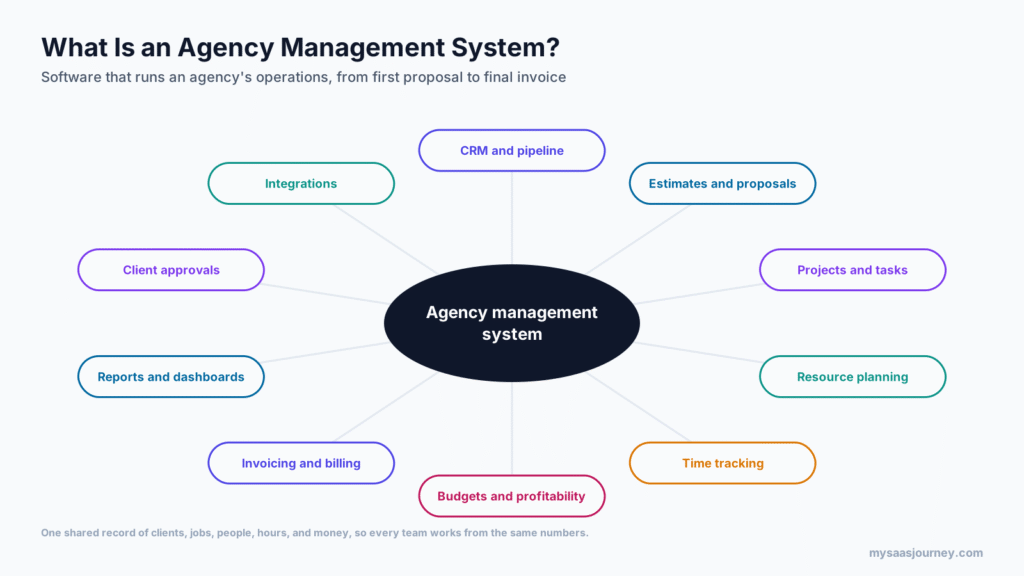

An agency management system (AMS) is software that runs the business side of an advertising, marketing, or creative agency in one place. It connects winning work, estimating, project delivery, resource planning, time tracking, billing, and profitability reporting, so leaders can see which clients and jobs make money and which do not. In short, it is the operating system for an agency that sells people’s time and expertise.
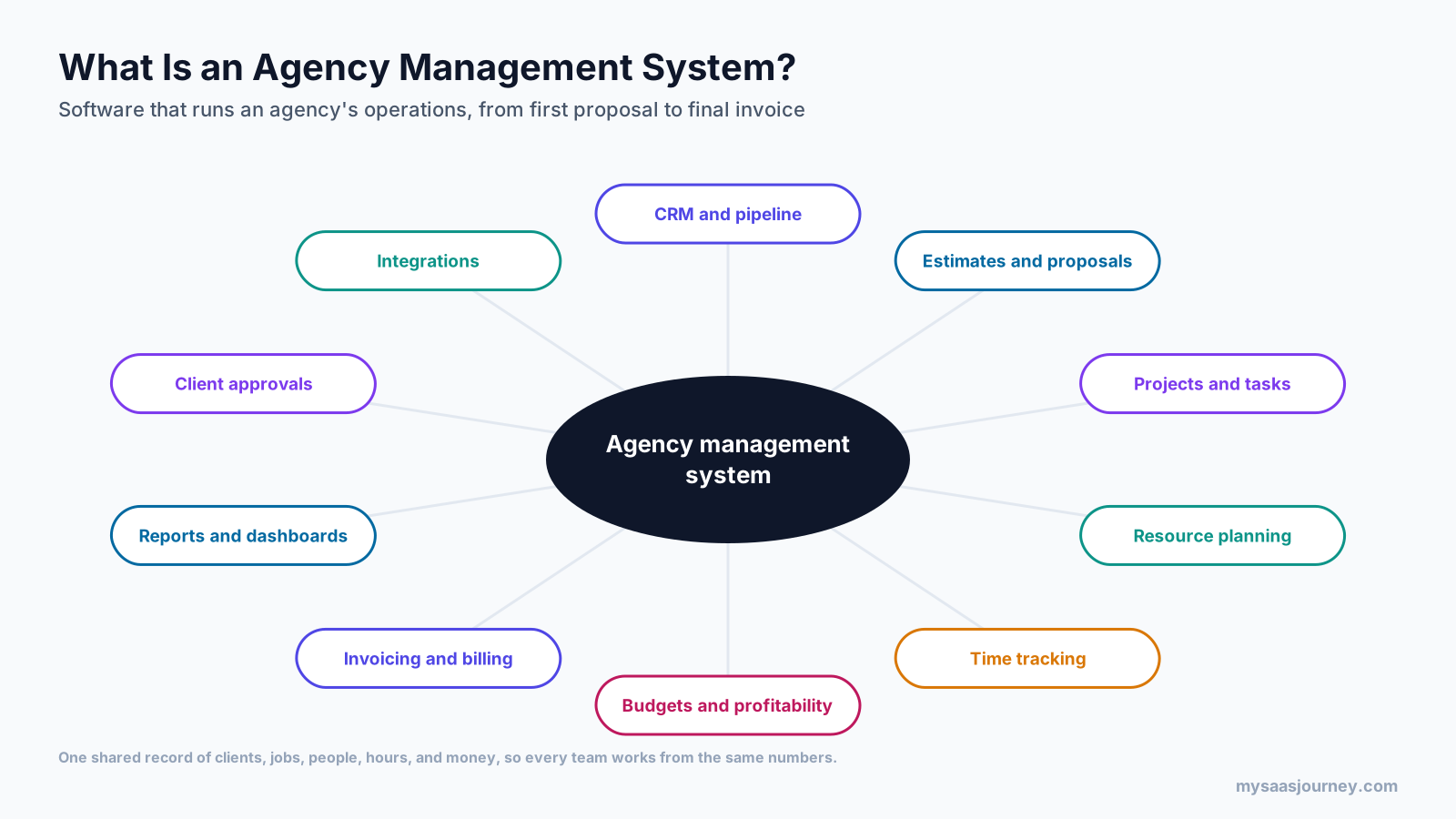
Many agencies start with a project management tool, a separate time tracker, a spreadsheet of estimates, and accounting software. That setup works until the agency grows. Then estimates no longer match budgets, timesheets arrive late, invoices miss billable hours, and nobody can say with confidence whether a retainer is profitable. An agency management system brings those pieces together around a shared record of clients, jobs, people, hours, and money.
This guide explains what an agency management system is, how it works from first proposal to final invoice, its key features, the metrics it tracks, how it differs from project management and CRM tools, the main types, what it costs, and how to choose and implement one. The term also has a separate meaning in insurance, which is covered near the end.
Key takeaways:
- An agency management system connects the full agency workflow: pipeline, estimates, jobs, resourcing, timesheets, approvals, billing, and reporting.
- Its main value is financial visibility, because it ties every hour and cost to a job and compares actuals with the estimate while work is still running.
- It supports the billing models agencies use, including retainers, fixed fees, time and materials, and media commissions or markups.
- Published prices for common agency platforms range from about $10 to $57 per user per month, with enterprise plans quoted on request.
- In insurance, “agency management system” means different software for managing policies, renewals, and commissions.
What Does Agency Management Mean?
Agency management is the work of running an agency as a business: winning and pricing work, staffing it, delivering it on time and on budget, billing for it, and keeping clients and staff happy. It sits alongside the creative and strategic work that clients see, and it decides whether that work is profitable.
An agency management system is the software that supports agency management. The term is used most often for advertising, marketing, digital, PR, and creative agencies, and for in-house creative teams that work like agencies. You will also see it described as agency management software, agency operations software, or, for larger firms, professional services automation (PSA) built for agencies.
The key idea is that agencies sell time, skills, and outcomes rather than physical products. That makes three questions central to the business:
- Are we pricing work correctly?
- Are our people busy on the right work?
- Are we billing for everything we deliver, and making a margin on it?
An agency management system exists to answer those questions with data instead of guesswork.
How an Agency Management System Works
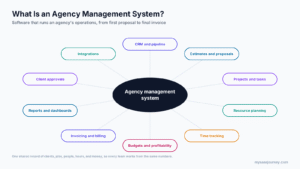
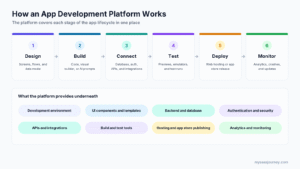
An agency management system follows work from the first conversation with a client to the final invoice and review. This is often called the quote-to-cash workflow.
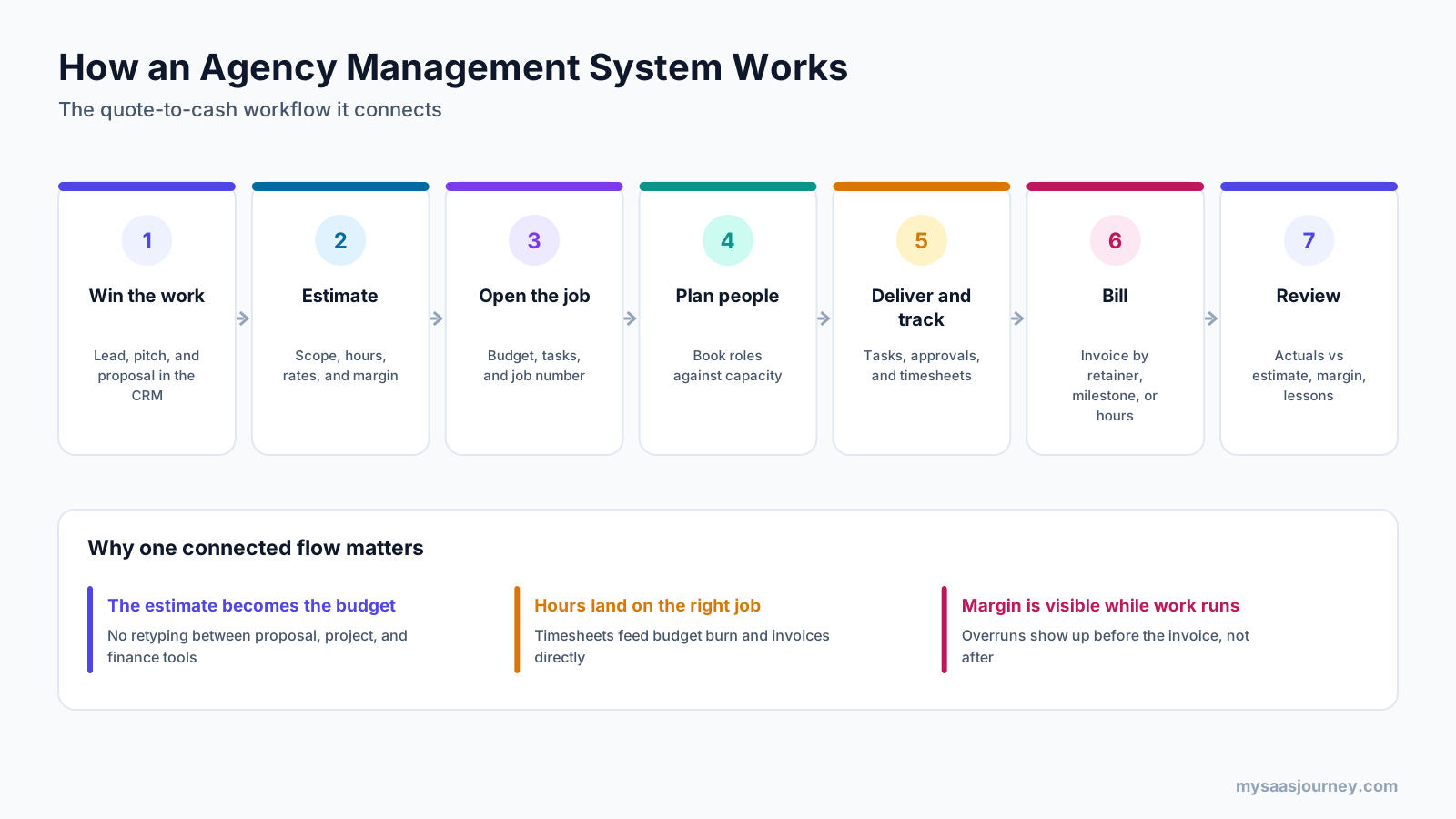
- Win the work through your sales pipeline. Leads, pitches, and proposals are tracked in a sales pipeline, so the agency can forecast new business.
- Estimate. The team scopes the work by role and hours, applies rate cards, adds third-party costs, and checks the expected margin before sending the estimate.
- Open the job and set its budget. Once the client approves, the estimate becomes the job budget, with a job number, tasks, and milestones.
- Plan people against the job. Resource managers book roles or named people against the job, based on skills and available capacity.
- Deliver the work and track every hour. Teams complete tasks, route work for internal and client approval, and log time against the job.
- Bill. The system builds invoices from the billing model, whether that is a monthly retainer, a fixed-fee milestone, or approved hours at agreed rates.
- Review. Leaders compare actual hours and costs with the estimate, check job margin, and feed what they learn into the next estimate.
The value comes from the connections between steps. Because the estimate becomes the budget, nobody retypes numbers. Because timesheets are logged against jobs, budget burn updates as work happens. And because billing draws on the same data, fewer hours slip through unbilled.
In practice, this means an account director can open a client dashboard on a Tuesday and see that a fixed-fee website project has already used most of its design hours, while the retainer for the same client is under-used. That is the moment to talk to the client about a change request, not after the invoice has gone out.
Key Features of an Agency Management System
Most agency management systems share a common set of features. Larger platforms add depth in each area, while lighter tools focus on a few.
CRM and New Business Pipeline
A built-in CRM tracks leads, opportunities, pitch stages, and expected value. For agencies, the important link is between the pipeline and resourcing: knowing what work is likely to land helps you plan hiring and freelance use. Some agencies keep a separate CRM and connect it to the AMS instead.
Estimates, Proposals, and Rate Cards
Estimating tools let you build quotes from roles, hours, rates, and costs, often from reusable templates. Rate cards store standard and client-specific rates, and margin calculations show whether a quote is profitable before it goes to the client. Some systems route estimates for internal financial approval above a set value.
Jobs, Projects, and Tasks
Each piece of client work becomes a job or project with tasks, deadlines, dependencies, and owners. Agency systems often add job numbers, job types, and templates for repeat work such as monthly social content or campaign launches. Creative agencies may also manage briefs, intake forms, and traffic, which is the scheduling of creative work through the studio.
Resource Planning and Capacity
Resource planning shows who is available, who is overbooked, and which roles will be short next month. You can book people by skill, role, or name, compare booked hours with capacity, and see the impact of new work before you say yes. This is often the feature that agencies outgrow spreadsheets for first.
Time Tracking and Timesheets
Timesheets record the hours each person spends on each job. In an agency, time data drives almost everything else: budget burn, utilization, billing, and profitability. Good systems make time entry quick, with timers, mobile apps, and reminders, and let managers approve timesheets before billing. Our guide to time tracking apps covers standalone options if you keep time tracking separate.
Budgets and Job Profitability
Budget tracking compares estimated and actual hours and costs for each job, phase, and client. Threshold alerts warn you when a job reaches a set share of its budget. Profitability reports show margin by job, client, service, and team, which helps you see which work to sell more of and which to reprice.
Invoicing and Billing
The billing module turns approved time, milestones, retainers, and costs into invoices, then passes them to your accounting system or handles them directly. Agencies usually mix several billing models, so the AMS needs to support all of them.
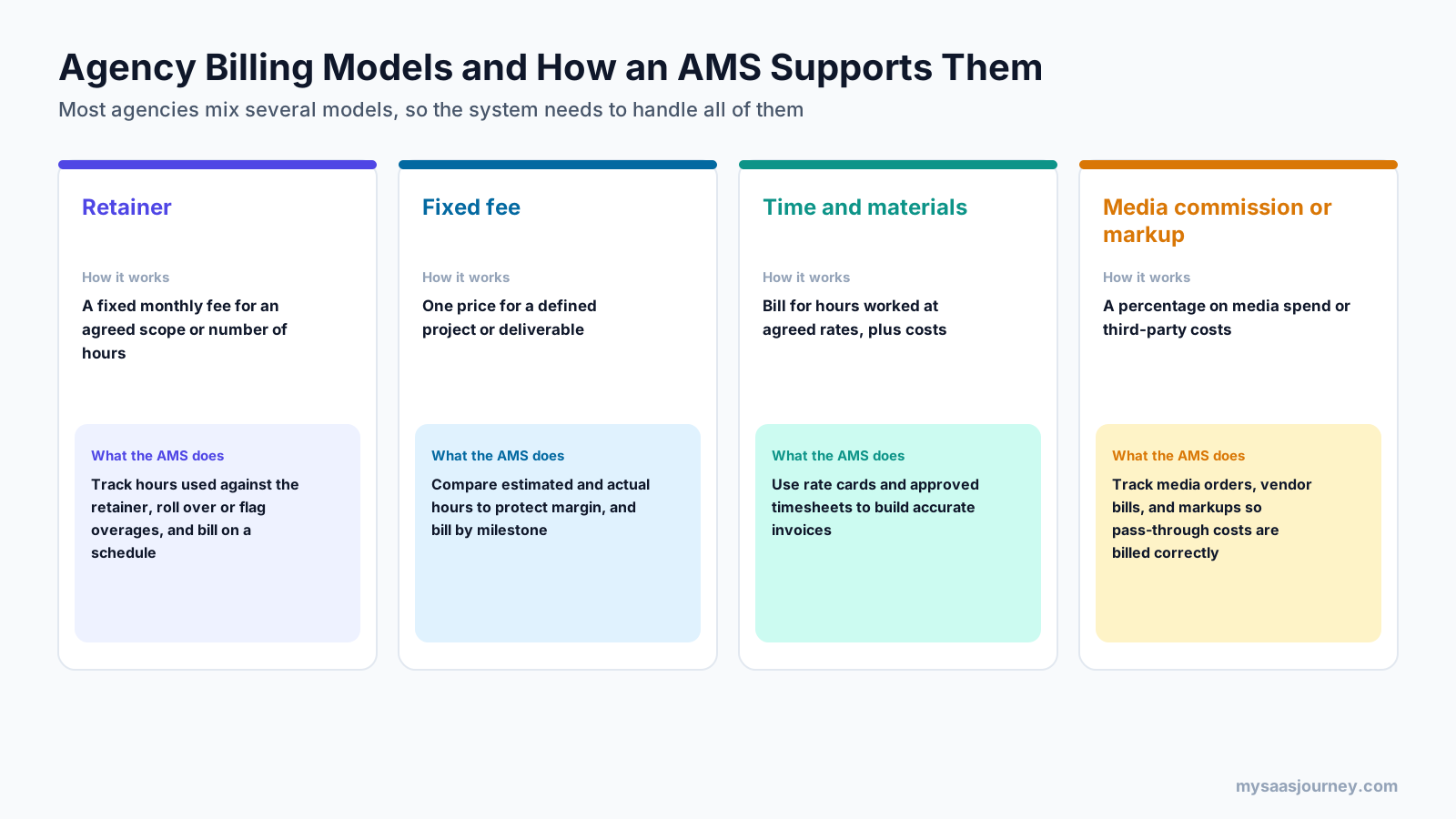
- Retainers: a fixed monthly fee for an agreed scope or number of hours. The AMS tracks usage against the retainer and flags overages.
- Fixed fees: one price for a defined project. The AMS compares estimated and actual hours to protect margin and bills by milestone.
- Time and materials: billing for hours worked at agreed rates, plus costs. The AMS uses rate cards and approved timesheets to build invoices.
- Media commission or markup: a percentage on media spend or third-party costs. The AMS tracks orders, vendor bills, and markups so pass-through costs are billed correctly.
For simpler billing needs, see our roundup of invoicing software for small businesses.
Approvals, Proofing, and Client Collaboration
Many agency platforms include review and approval workflows for creative work, with visual markup, version comparison, and a record of who approved what. Some add client portals where clients can view progress, approve work, and see invoices, which reduces email back and forth.
Reporting and Dashboards
Dashboards bring together pipeline, utilization, budget health, work in progress, and revenue. Scheduled reports keep leadership and account teams informed without manual spreadsheet work. Our project status report template shows the kind of summary many agencies send clients.
Integrations and Automation
An AMS rarely replaces every tool. Common integrations include accounting software, CRM, calendars, Slack or Microsoft Teams, file storage, and digital asset management. Automation handles routine steps such as creating jobs from approved estimates, sending timesheet reminders, and alerting managers to budget overruns. Our glossary entry on workflow automation explains the basics.
Agency Metrics an AMS Tracks
The biggest change an agency management system brings is a shared, reliable set of numbers. These are the metrics most agencies watch.
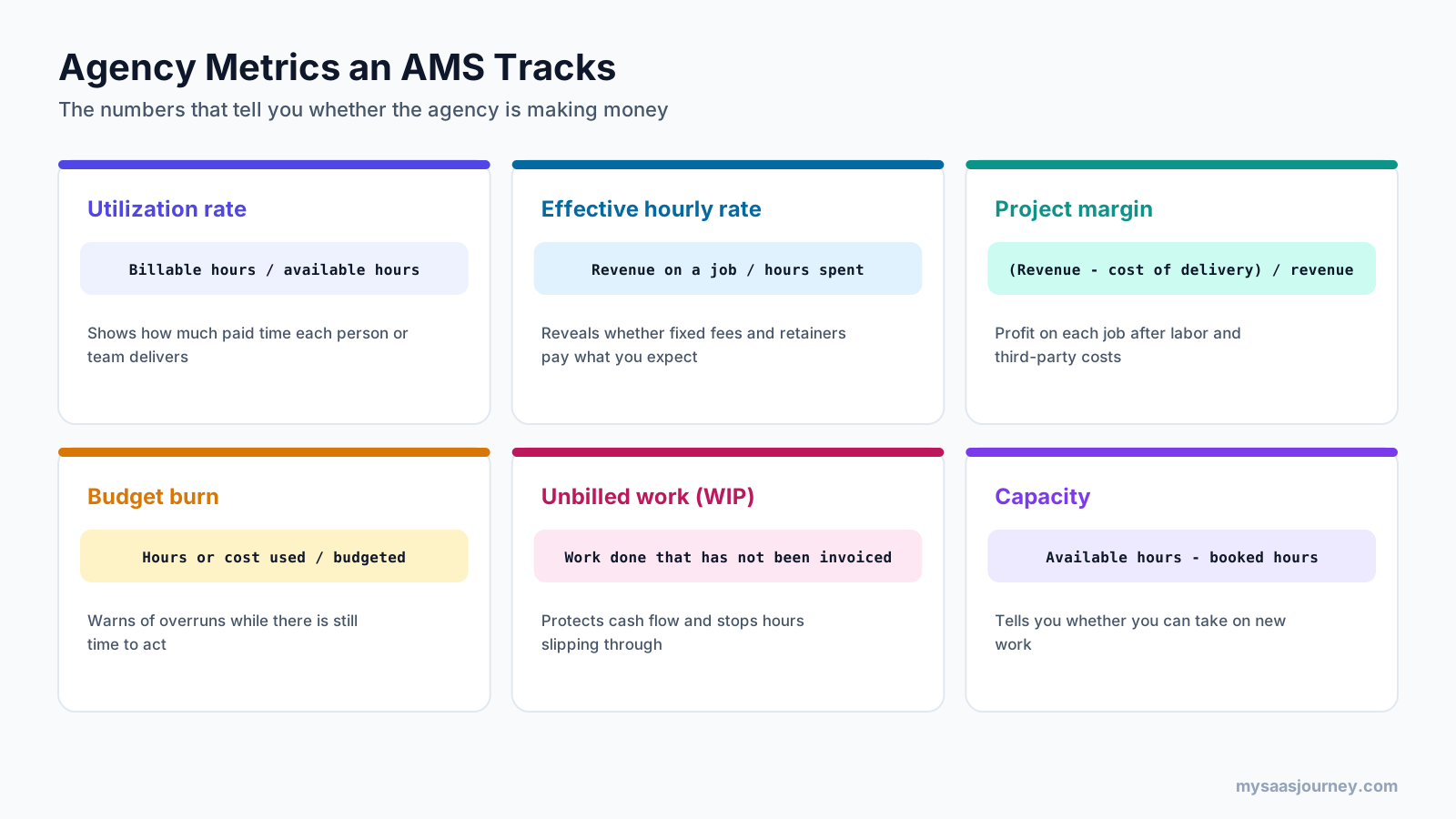
| Metric | How it is calculated | What it tells you |
|---|---|---|
| Utilization rate | Billable hours divided by available hours | How much paid work each person or team delivers |
| Effective hourly rate | Revenue on a job divided by hours spent | Whether fixed fees and retainers pay what you expect |
| Project margin | Revenue minus cost of delivery, divided by revenue | Profit on each job after labor and third-party costs |
| Budget burn | Hours or cost used divided by hours or cost budgeted | Whether a job is on track or heading for an overrun |
| Unbilled work (WIP) | Work done that has not yet been invoiced | Cash tied up in delivered work, and hours at risk of slipping |
| Capacity | Available hours minus booked hours | Whether you can take on new work without overloading the team |
Targets vary by agency size, role, and service mix, so the most useful comparison is often your own trend over time. Utilization for a designer will look different from utilization for a managing director, and a retainer-heavy agency will watch different signals from a project-based one. For background on margin, see our glossary entry on profit margin.
In practice, effective hourly rate is often the most revealing number. Two clients may pay the same monthly retainer, but if one consistently needs far more hours than agreed, its effective rate is much lower, and the AMS makes that visible.
Agency Management System vs Project Management, CRM, and Accounting Software
Agency management systems overlap with several other tools, which causes confusion when you compare software.

| Capability | Agency management system | Project management tool | CRM | Accounting software |
|---|---|---|---|---|
| Main job | Run the agency end to end | Plan and track tasks | Manage leads and deals | Keep the books |
| Estimates and budgets | Core | Limited | Quotes only | No |
| Resource capacity | Core | Some tools | No | No |
| Time tracking | Core | Add-on or basic | No | Sometimes |
| Client invoicing | Core | No | No | Core |
| Job profitability | Core | No | No | Company level |
A project management tool is built to organize tasks and timelines. It is often the first tool an agency adopts, and many agencies keep using one for day-to-day task work. Our guide to free project management software covers popular options. The gap is that most project tools do not handle estimates, rate cards, billing, or job margin.
A CRM manages relationships and sales opportunities. It can feed new work into an AMS but does not manage delivery or profitability. If you only need a CRM, see our list of the best free CRM software.
Accounting software manages the general ledger, payables, receivables, and tax. It knows what the agency earned and spent overall but not which job or client produced the profit. Most agencies keep their accounting software and connect it to the AMS.
Professional services automation (PSA) software overlaps most closely with agency management systems. PSA tools serve consultancies, IT services firms, and agencies, with strong resource and financial management. Agency-specific systems add features such as creative briefs, proofing, traffic, and media billing.
Types of Agency Management Software
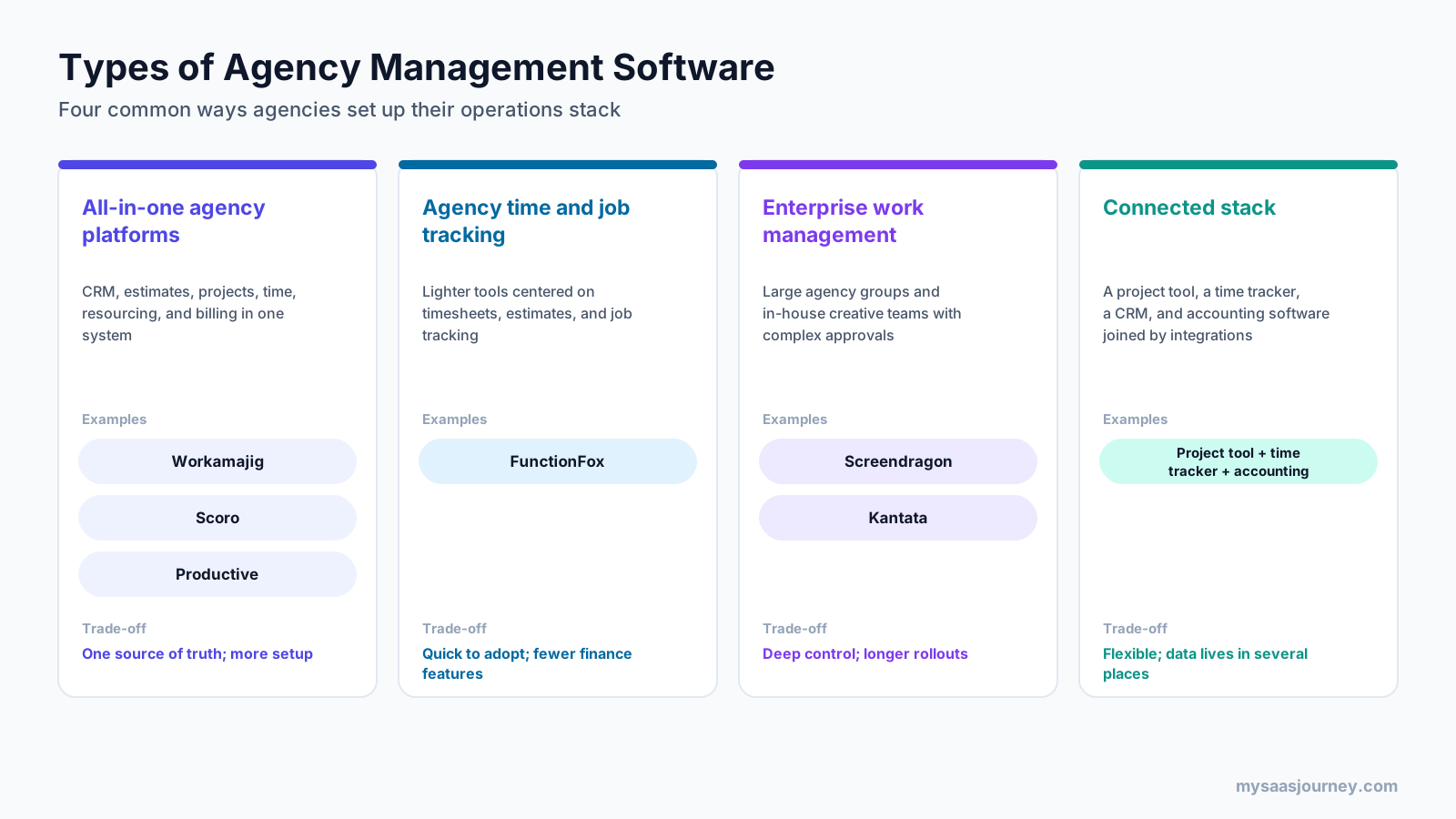
Agencies set up their operations stack in four common ways.
All-in-One Agency Platforms
All-in-one platforms combine CRM, estimates, projects, time tracking, resource planning, and billing in one system. Workamajig, Scoro, and Productive are examples. They give the clearest single view of the business but take more time to set up and need the whole agency to use them consistently.
Agency Time and Job Tracking Tools
Lighter tools focus on timesheets, estimates, job tracking, and reporting. FunctionFox is an example built for creative agencies. They are quick to adopt and inexpensive, but they cover less of the finance side, so agencies often pair them with separate accounting software.
Enterprise Work Management for Agency Networks
Large agency groups and in-house creative teams with complex approval chains often need enterprise platforms. Screendragon targets creative, media, PR, and production agencies, agency networks, and in-house teams, with estimating, resourcing, proofing, retainers, and a digital asset library. Kantata, formed in 2022 from the merger of Mavenlink and Kimble, is a professional services automation platform used by agencies and consultancies with roughly 50 to 5,000+ employees. These platforms offer deep control but longer rollouts.
A Connected Stack
Some agencies prefer to join best-of-breed tools: a project management tool, a time tracker, a CRM, and accounting software, connected through integrations or an automation platform. This is flexible and lets each team choose its favorite tool, but data lives in several places, and job profitability often ends up in spreadsheets. Our guide to workflow automation tools covers ways to connect them.
Common Agency Problems an AMS Solves
Agencies tend to run into the same operational problems as they grow. An agency management system is designed around them.
Scope Creep on Fixed Fees and Retainers
Clients ask for one more round of revisions, an extra banner size, or a quick social post. Each request seems small, but together they can wipe out the margin on a fixed-fee project or retainer. An AMS shows hours used against the agreed scope as work happens, so account managers can raise a change request with data rather than a feeling.
Overloaded Teams Next to Idle Ones
Without a shared capacity view, the same few designers or developers get booked on every urgent job while others wait for work. Resource planning in an AMS shows bookings by person and role, so managers can spread work fairly, bring in freelancers early, or move deadlines before people burn out.
Hours That Never Reach an Invoice
When timesheets are filled in late or logged to the wrong job, billable work goes unbilled. Linking timesheets to jobs, sending reminders, and building invoices from approved time closes most of those gaps. Unbilled work reports show what has been delivered but not yet invoiced.
Estimates Built on Memory
Many agencies estimate new work from memory or an old spreadsheet. An AMS keeps a record of estimated and actual hours for every job type, so the next estimate for a similar campaign or website starts from evidence. Over time, this makes pricing more consistent across account teams.
Reporting That Takes Days
Leadership often wants a monthly view of revenue, utilization, and client profitability. When the data sits in four tools, building that report can take days of spreadsheet work. With one system, the same report is a saved dashboard that updates as people work.
AI Features in Agency Management Systems
Agency management platforms are adding AI features, mostly to cut admin work and spot risks earlier. Current examples include AI assistants inside the platform, suggested time entries based on calendar and task activity, automated summaries of project health, and agents that run steps inside existing approval workflows. Productive lists an AI assistant on its plans, and Screendragon describes custom agents that work within existing permissions and approval workflows.
These features are most useful when the underlying data is clean. AI cannot fix timesheets that are never filled in or estimates that were never recorded, so the basics of the system still matter most. When you evaluate AI features, ask what data they use, whether outputs can be reviewed before they change records, and whether they are included in your plan or sold as an add-on.
Agency Management Systems for In-House Creative Teams
In-house creative, marketing, and content teams often work like agencies inside a larger company. They take requests from other departments, juggle priorities, route work through reviews, and report on output, even if they never send an external invoice.
For these teams, the most useful parts of an agency management system are usually:
- Request intake: standard brief forms so stakeholders submit complete requests instead of scattered emails and chat messages.
- Prioritization and capacity: a view of what the team can deliver this week, which helps when several departments want work at once.
- Review and approval workflows: clear routing to legal, brand, and business owners, with a record of who approved each version.
- Reporting on volume and turnaround: data on how much work the team delivers and how long it takes, which supports headcount and budget discussions.
- Internal chargebacks: in some organizations, billing internal departments for creative work. Workamajig, for example, offers a separate In-House plan with invoicing and chargebacks.
The same advice on rollout applies. Start with intake and approvals, which usually deliver the quickest improvement, then add time tracking and reporting once the team trusts the system.
Benefits of an Agency Management System
- Accurate pricing: estimates built from past data on actual hours and costs, rather than guesses.
- Healthier margins: budget alerts and profitability reports show problems while there is still time to act.
- Fewer missed billables: time and costs flow into invoices automatically.
- Better resourcing: managers see capacity and conflicts before they overbook people or turn away work.
- Clearer client conversations: data on hours and scope supports discussions about retainers and change requests.
- Less admin: one system replaces repeated data entry across spreadsheets and disconnected tools.
- Confident growth decisions: utilization and pipeline data show when to hire, use freelancers, or say no to new work.
Who Needs an Agency Management System?
Not every agency needs a full AMS on day one. A freelancer or a team of two or three can often manage with a project tool, a time tracker, and accounting software.
Signs that you are ready for an agency management system include:
- You cannot tell which clients or services are profitable without a spreadsheet exercise.
- Estimates regularly differ from actual hours, and you only find out at the end of the job.
- Resource planning lives in a spreadsheet that one person maintains.
- Timesheets are late or incomplete, and invoices miss billable work.
- You manage several billing models at once, such as retainers alongside fixed-fee projects.
- Leadership spends hours each month pulling reports from different tools.
In-house creative and marketing teams can benefit too. They may not invoice external clients, but they still need to manage intake, capacity, approvals, and, in some organizations, internal chargebacks.
How Much Does an Agency Management System Cost?
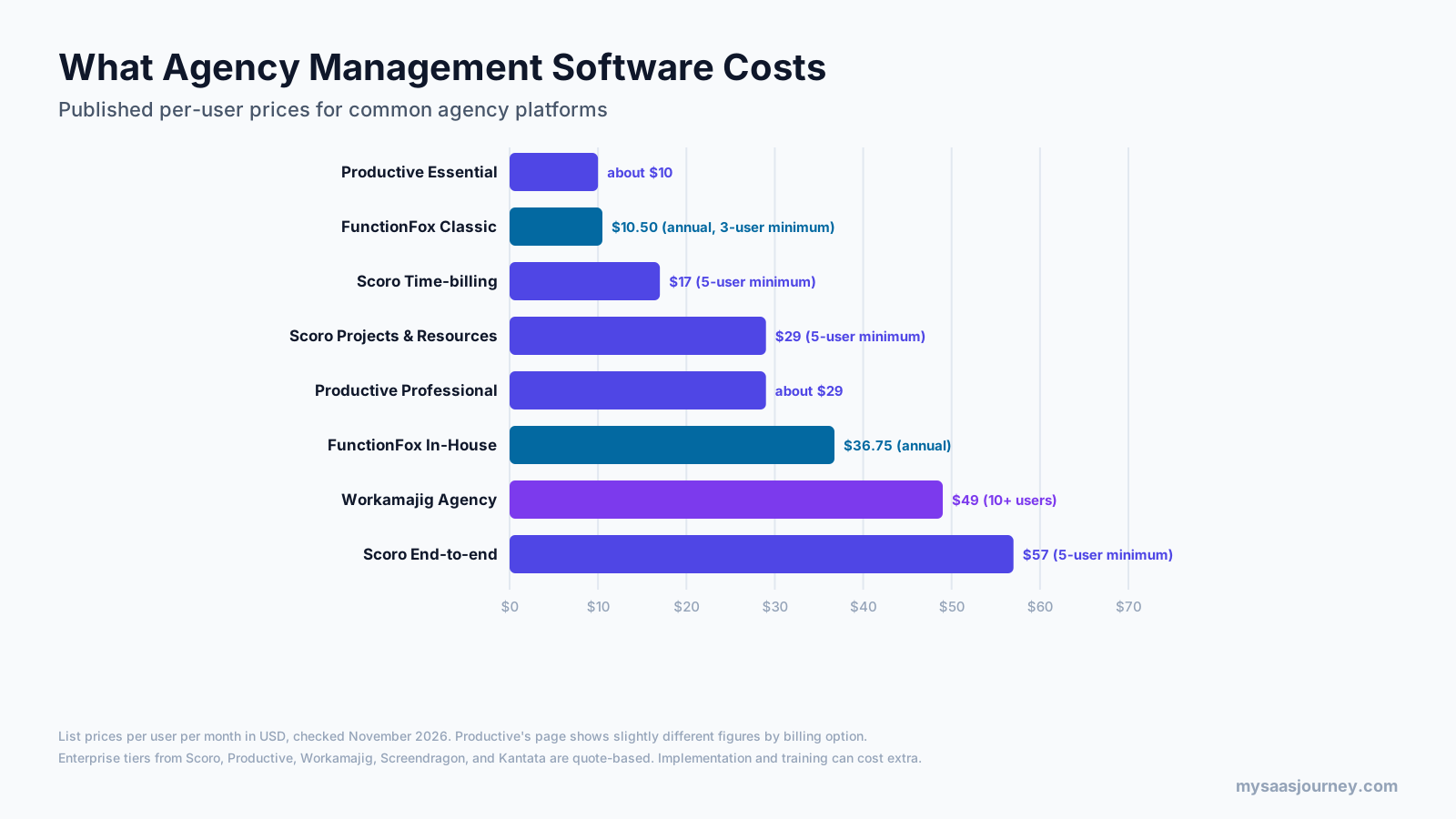
Agency management software is usually priced per user per month, with discounts for annual billing and minimum seat counts on some plans.
| Tool | Plan | Published price | Notes |
|---|---|---|---|
| FunctionFox | Classic | $10.50 per user per month (annual) | 3-user minimum; Premier $16, In-House $36.75 |
| Productive | Essential | About $10 per user per month | Professional about $29; Ultimate custom; 14-day free trial |
| Scoro | Time-billing | $17 per user per month | 5-user minimum; Projects & Resources and Quote to Cash $29, End-to-end $57; 14-day free trial |
| Workamajig | Agency | $49 per user per month (10+ users) | $47 for 25+ users, $45 for 50+ users; Enterprise custom |
| Screendragon | All plans | Quote | Priced by seats and modules |
| Kantata | All plans | Quote | Aimed at organizations with 50+ employees |
Prices were checked on vendor pages in November 2026 and change often. Productive’s page shows slightly different per-user figures depending on the billing option selected, so confirm current pricing with each vendor.
When you budget, look beyond the per-user price:
- Who needs a paid seat: some tools charge every user, while others offer cheaper or free seats for time-only users or clients.
- Minimum seats: some plans require at least three, five, or ten users.
- Modules and tiers: resource planning, advanced financials, and integrations are often on higher plans.
- Implementation: data migration, configuration, and training can add a one-time cost, especially for enterprise platforms.
- Integrations: check whether connections to your accounting software and CRM are included or extra.
Our glossary entry on pricing models explains per-seat and tiered pricing in more detail.
How to Choose an Agency Management System
- Map your current workflow from start to finish. Write down how work moves from brief or pitch to invoice, and where it breaks today.
- Decide what the system must own. Choose whether the AMS will replace your project tool, time tracker, CRM, or invoicing, or connect to them.
- Match the system to your billing models. Confirm the system handles your mix of retainers, fixed fees, hourly work, and media or third-party costs.
- Test resource planning with your own jobs and people. Load a month of actual jobs and people and see whether the capacity view matches reality.
- Check the integration with your accounting software. Make sure invoices, costs, and clients sync cleanly with your accounting software.
- Involve finance and delivery together. Both teams need to trust the numbers, so both should take part in the trial.
- Look at the experience for everyday users. If timesheets and task updates are slow, people will avoid them and the data will suffer.
- Compare the total cost over two or three years. Include seats, modules, implementation, and the time your team will spend on setup.
For a broader framework, see our guide on how to choose the right software for your business, and compare options in our ad agency management software category.
How to Implement an Agency Management System
A phased rollout keeps client work running while the agency moves to the new system.
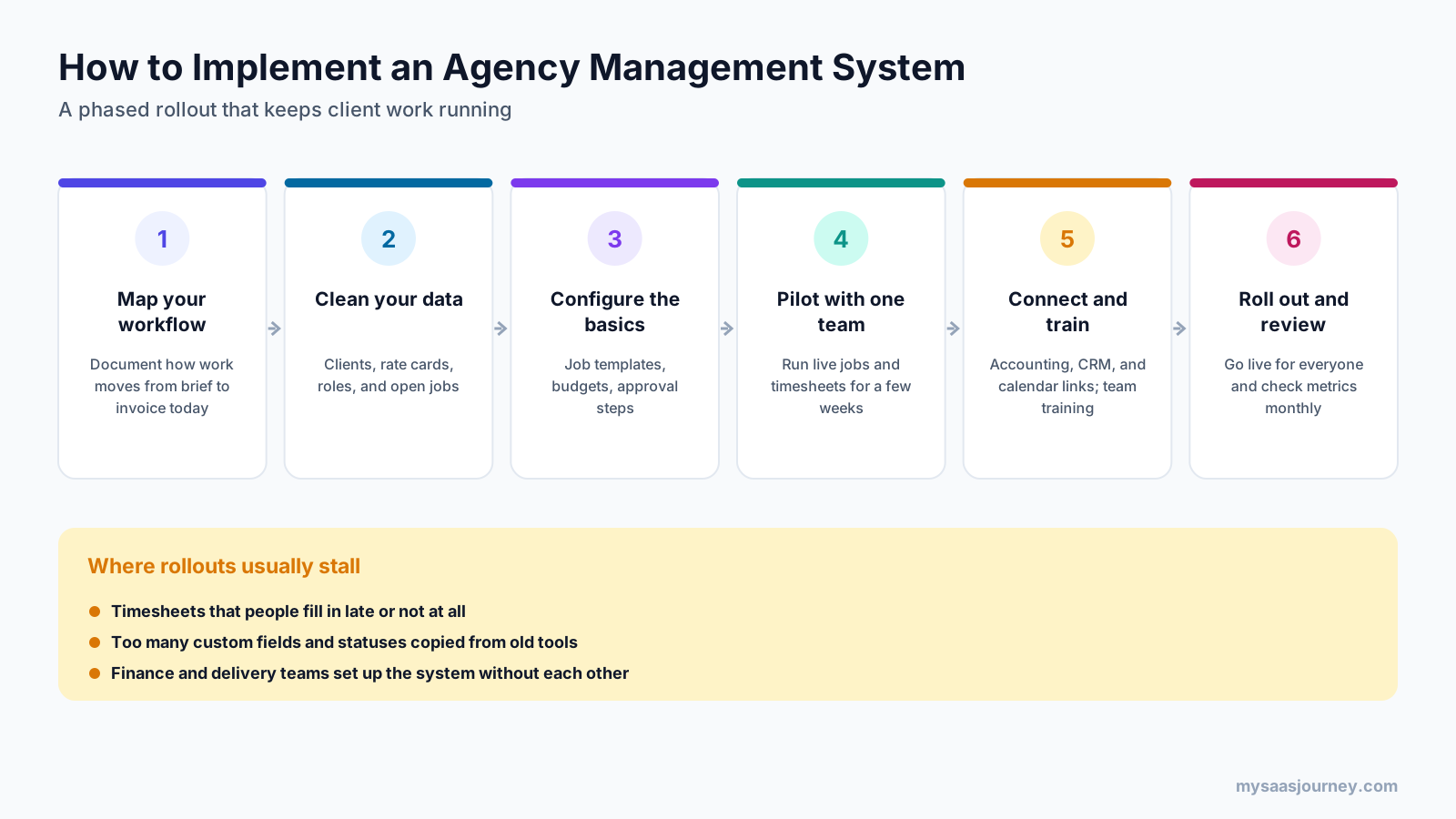
- Map your workflow and decide which steps the AMS will handle first.
- Clean your data, including clients, contacts, rate cards, roles, and open jobs.
- Configure the basics: job templates, budget structures, approval steps, and timesheet rules.
- Pilot with one team or client group for a few weeks, using live jobs and timesheets.
- Connect accounting, CRM, and calendars, and train each role on the tasks it will do daily.
- Roll out to the whole agency, then review metrics monthly and adjust the setup.
Rollouts usually stall for three reasons: timesheets that people fill in late or not at all, too many custom fields and statuses copied from old tools, and finance and delivery teams setting up the system without each other. Keeping the first version simple and agreeing on timesheet rules early avoids most of these problems. It also helps to name one owner for the system, usually in operations or finance, who handles setup changes and keeps reports consistent as the agency grows.
Agency Management System in Insurance
The phrase “agency management system” also describes a separate category of software used by insurance agencies and brokerages. If you searched the term with insurance in mind, this is the meaning you want.

An insurance agency management system stores client and policy records, tracks renewals and quotes, connects to insurance carriers, manages commissions, and keeps compliance documents. Examples include Applied Epic, EZLynx, HawkSoft, and AgencyBloc. These products solve different problems from ad agency platforms, and their features, integrations, and buyers do not overlap. When you compare vendors or read reviews, check which meaning they use before you compare features.
Final Thoughts
An agency management system is the software that turns an agency’s creative work into a well-run business. It connects new business, estimates, delivery, resourcing, timesheets, billing, and reporting, so you can price work accurately, keep people on the right jobs, bill for everything you deliver, and see margin while work is still running.
Start by mapping your workflow and the questions you cannot answer today, such as which clients are profitable or whether you have capacity for new work. Then choose the type of system that fits your size and billing models, pilot it with live jobs, and roll it out in stages. As your agency grows, the data it collects becomes one of the most useful assets you have for pricing, hiring, and planning.
Frequently Asked Questions
What is an agency management system in simple terms?
An agency management system is software that runs the business side of an ad, marketing, or creative agency. It connects sales pipeline, estimates, projects, resource planning, time tracking, billing, and reporting, so you can see which clients and jobs make money.
What does agency management mean?
Agency management is running an agency as a business: winning and pricing work, staffing it, delivering it on time and on budget, billing for it, and tracking profitability. Agency management software supports these tasks with shared data on clients, jobs, people, hours, and money.
What is the difference between a CRM and an AMS?
A CRM manages leads, contacts, and sales opportunities. An agency management system covers the full operation, including estimates, job budgets, resourcing, timesheets, billing, and profitability. Many agency management systems include a CRM, while others connect to a separate one.
What is the difference between agency management software and project management software?
Project management software organizes tasks, timelines, and collaboration. Agency management software adds the business layer, including estimates, rate cards, resource capacity, timesheets, invoicing, and job profitability. Many agencies start with a project tool and move to an AMS as they grow.
How much does an agency management system cost?
Published prices for common agency platforms range from about $10 to $57 per user per month. FunctionFox starts at $10.50, Productive at about $10, Scoro at $17, and Workamajig at $49 per user per month, while Screendragon and Kantata are quote-based. Implementation and training can add cost.
What are examples of agency management systems?
Examples for ad, marketing, and creative agencies include Workamajig, Scoro, Productive, FunctionFox, Screendragon, and Kantata. In insurance, agency management systems include Applied Epic, EZLynx, HawkSoft, and AgencyBloc, which are a separate software category.
Do small agencies need an agency management system?
Very small agencies can often manage with a project tool, a time tracker, and accounting software. An AMS becomes valuable when you need reliable job profitability, resource planning, several billing models, or less time spent building reports from separate tools.
What is an agency management system for insurance?
In insurance, an agency management system manages client and policy records, renewals, quotes, carrier connections, commissions, and compliance documents for insurance agencies and brokerages. It is a different category from agency management software for advertising and creative agencies.