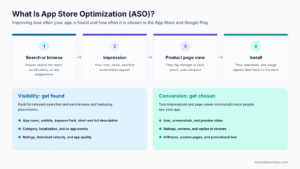
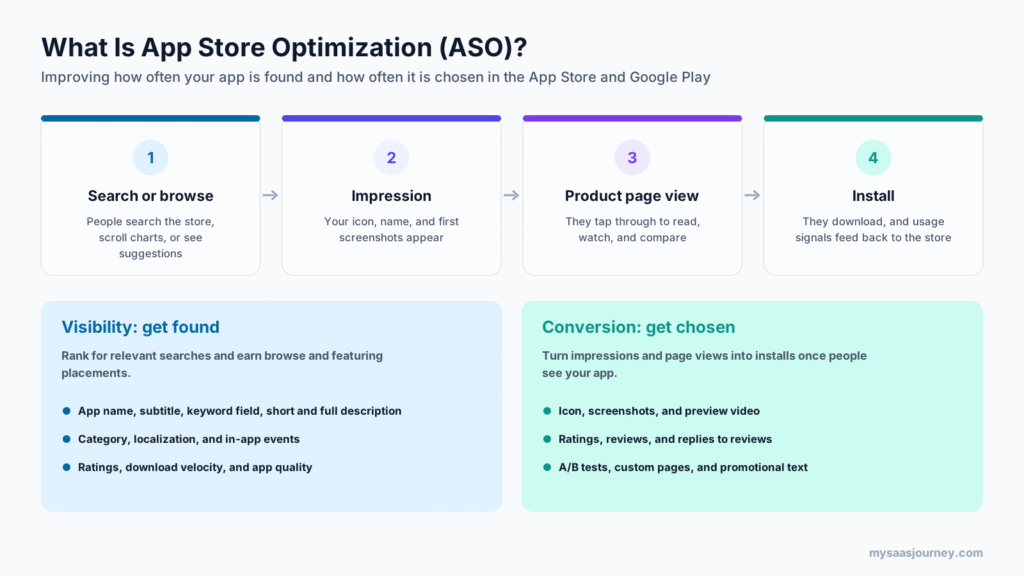
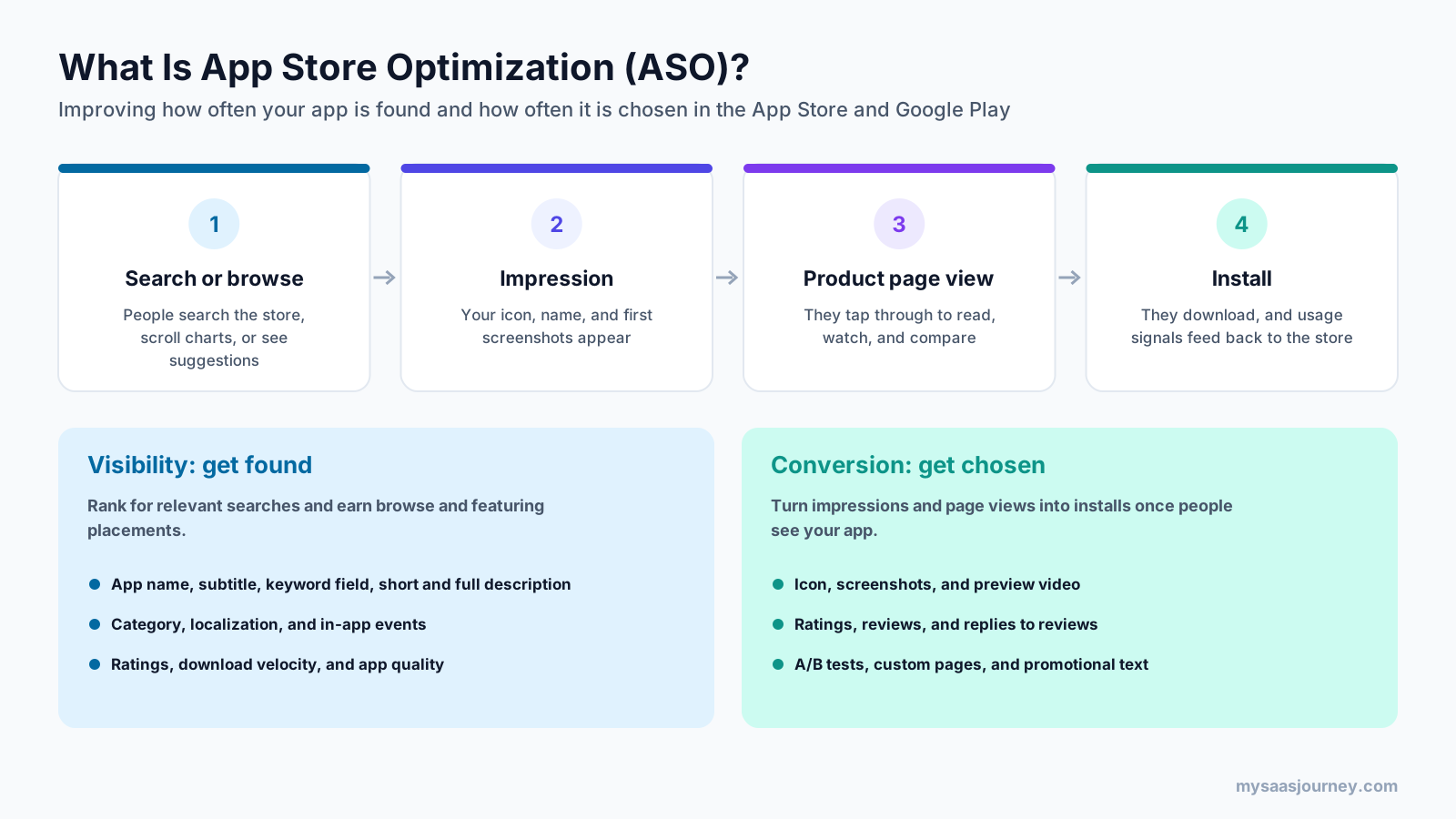
App store optimization (ASO) is the process of improving an app’s visibility and conversion rate in app stores such as Apple’s App Store and Google Play. It covers the text people search against, such as the app name, subtitle, and description, and the visuals that persuade them to install, such as the icon, screenshots, and preview videos. The goal is simple: more people find your app in the store, and more of the people who find it download it.
ASO is often described as SEO for apps, and the comparison is useful up to a point. Both aim to win visibility in search results. But app stores rank apps with different signals, give you different fields to work with, and let you test changes in ways a website cannot. This guide explains what ASO is, how it works in each store, the key features you can optimize, how stores rank apps, how to do ASO step by step, which metrics and tools to use, and how ASO differs from SEO.
Key takeaways:
- ASO has two jobs: visibility, which is getting found in search and browse, and conversion, which is turning store visitors into installs.
- On the App Store, the app name, subtitle, and hidden 100-character keyword field carry most of the text signal. On Google Play, the title, short description, and full description do.
- Ratings, reviews, download momentum, and app quality also shape rankings, so ASO is not only a metadata exercise.
- Both stores offer free built-in testing: Apple’s product page optimization and custom product pages, and Google Play’s store listing experiments and custom store listings.
- ASO is continuous. Keywords, competitors, and store algorithms change, so the best results come from regular cycles of research, updates, tests, and measurement.
What Does ASO Stand For?
ASO stands for app store optimization. In mobile marketing, it refers to everything you do to improve how an app ranks and converts inside app stores, mainly the Apple App Store and Google Play, and to a lesser extent stores such as the Microsoft Store, Amazon Appstore, and Huawei AppGallery.
The acronym has other meanings. In health insurance and HR, ASO means “administrative services only,” an arrangement where an employer funds its own health plan and pays a company to administer it. If you searched “what is ASO” with insurance in mind, that is a different topic. Everything in this guide refers to app store optimization.
Why App Store Optimization Matters
Search inside the store is one of the main ways people find new apps. When someone types “budget planner” or “sleep sounds,” they already know what they want, so ranking for that term puts your app in front of people who are ready to install. Those installs are organic, which means you do not pay for each one the way you do with ads.
ASO matters for several reasons:
- Organic installs lower your blended acquisition cost. Every install you earn from search is one you did not have to buy, which helps your customer acquisition cost.
- Paid campaigns convert better on a strong listing. Ads send people to the same product page, so a better icon, screenshots, and ratings improve the return on ad spend as well.
- Stores reward relevance and quality. A clear, accurate listing that attracts the right users tends to earn better retention and ratings, which feed back into rankings.
- Competition is high. Both stores list millions of apps, and most categories have established leaders, so a listing that is not optimized can be hard to find even when the app is good.
ASO also suits teams of every size. A solo developer can improve rankings with careful keyword choices and better screenshots, while large publishers run dozens of tests and localized listings across markets. For background on organic acquisition as a growth strategy, see our glossary entry on organic growth.
How App Store Optimization Works
App store optimization works on two levels at once: what the store’s algorithm sees and what people see.
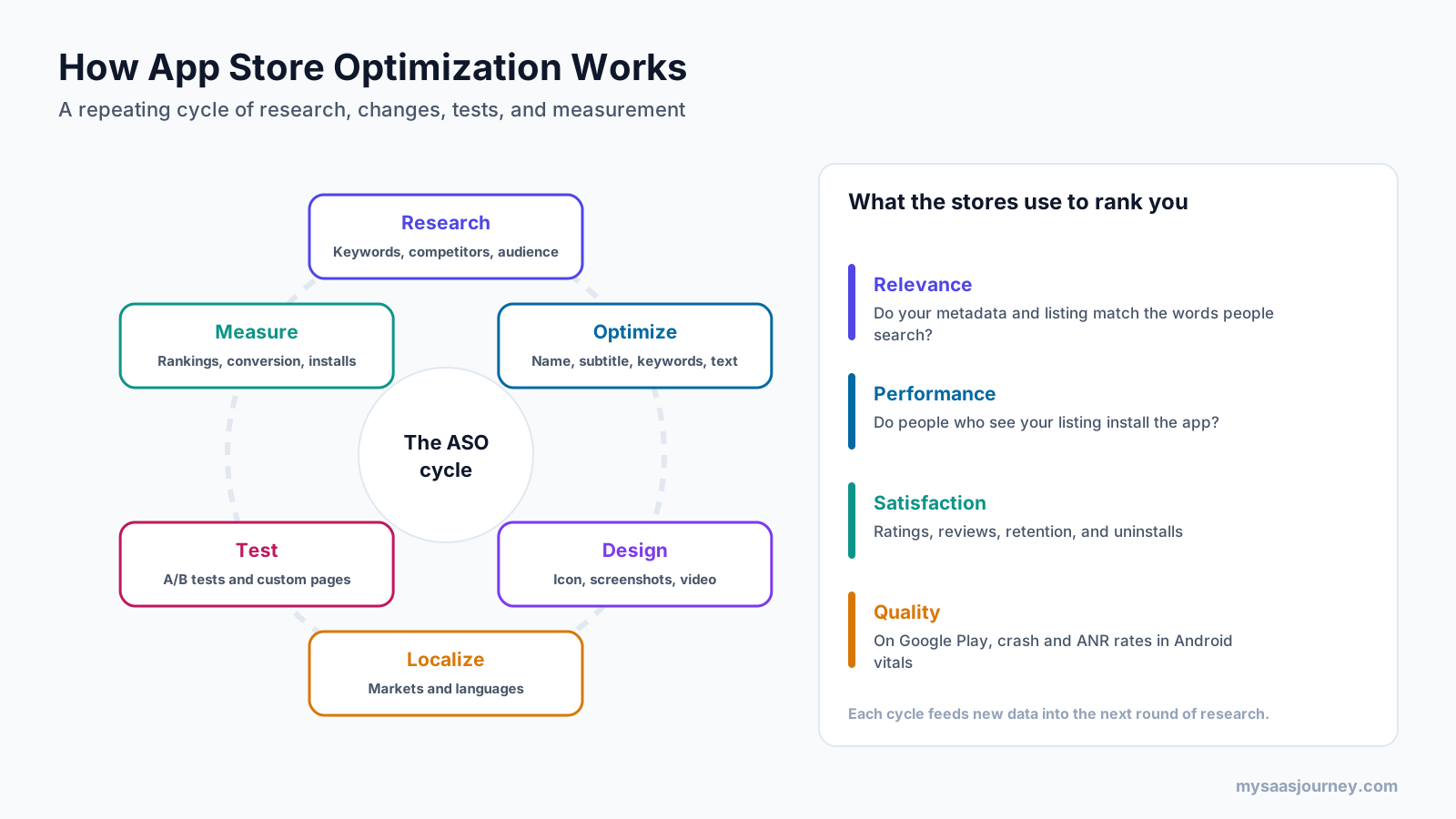
First, the store decides which apps to show for each search and in each browse placement. Neither Apple nor Google publishes its ranking formula, but their documentation and years of practitioner testing point to four broad groups of signals:
- Relevance: whether your app name, subtitle or short description, keywords, and description match the words people search for.
- Performance: whether people who see your app in results tap it and install it, and how many installs you earn over time.
- Satisfaction: ratings, reviews, retention, and uninstalls, which tell the store whether users like the app.
- Quality: on Google Play, technical measures in Android vitals such as crash and ANR (app not responding) rates.
Second, people decide whether to tap and install. Your icon, name, ratings, and first screenshots appear in search results. If someone opens your product page, they see more screenshots, a preview video, your description, reviews, and any events or offers. The share of visitors who install is your conversion rate, and it affects both your installs and, over time, your rankings.
That is why ASO is usually run as a repeating cycle. You research keywords and competitors, update metadata, design better visuals, localize for key markets, test changes, and measure the results. Each cycle produces data that shapes the next one.
In practice, a single change can move both levels. Adding a clear keyword to an app’s subtitle can raise its ranking for that term, and if the first screenshot then shows the matching feature, more of the people who see it will install. More installs for that keyword can then strengthen the ranking further.
Key Features of App Store Optimization
ASO covers a set of listing elements, each with its own rules in each store. The annotated listing below shows where they appear.

App Name or Title
The app name is the strongest text signal in both stores and the first words people read. Apple allows up to 30 characters for the app name, and Google Play’s title limit is also 30 characters. Most apps combine a short brand name with one or two descriptive keywords, so the name tells people what the app does.
In practice, a title such as “Brand: Expense Tracker” usually works better than the brand name alone, because it gives the store and the searcher a clear signal of what the app is for. Google Play’s policies prohibit emojis, repeated special characters, and claims such as “#1” or “best” in titles, and both stores reject names that mislead.
Subtitle or Short Description
On the App Store, the subtitle sits under the app name and allows 30 characters. On Google Play, the short description allows 80 characters and appears at the top of the listing. Both are prime places for secondary keywords and a plain statement of value, such as the main problem the app solves.
Keyword Field (App Store Only)
Apple gives you a hidden keyword field of up to 100 characters. Users never see it, but it helps decide which searches your app appears for. Apple’s guidance is to separate terms with commas and no spaces, and to avoid repeating words already in your name, using plurals of words you already include, and adding category names or the word “app.” Google Play has no keyword field, so every keyword you target there is visible text.
Description
Google Play allows a full description of up to 4,000 characters and uses it to understand what your app does, so it matters for search as well as for persuasion. Write it for people first, use your main terms naturally, and avoid keyword stuffing, which Google’s policies prohibit.
On the App Store, Apple’s guidance warns against adding keywords to the description to improve search results. Treat the iOS description as conversion copy: lead with what the app does, list the main features, and explain pricing or subscriptions clearly. Apple also offers a separate 170-character promotional text field above the description that you can update without a new app version, which suits sales, seasonal messages, and new features. Apple notes that promotional text does not affect search ranking.
Icon
The icon appears everywhere your app does, from search results to the home screen, so it has an outsized effect on taps. Strong icons are simple, recognizable at small sizes, and distinct from competitors in the same category. Google Play requires a 512 by 512 pixel icon, and both stores reject icons that mislead, such as fake notification badges.
Screenshots and Preview Videos
Screenshots are often the deciding factor between a page view and an install. Apple allows up to 10 screenshots and up to three app previews of up to 30 seconds each, and the first one to three screenshots can appear directly in search results. Google Play allows up to eight screenshots per device type and one preview video linked from YouTube, of which only the first 30 seconds autoplay.
The most effective screenshots show the app’s main benefit in the first frame, use short captions that explain the value in a few words, and follow the order of what users care about most. Some ASO practitioners report that text in App Store screenshot captions has influenced search rankings since mid-2025, but Apple has not confirmed this and other tests have been inconclusive. Write clear captions for people first, and treat any search benefit as a bonus.
Ratings and Reviews
Ratings and reviews influence both conversion and ranking. Apple states in its developer guidance that ratings and reviews influence how your app ranks in search. A high average rating builds trust, and recent reviews show that the app is maintained.
Both stores offer in-app review prompts. Apple’s prompt can be shown to a user up to three times in a 365-day period, and Google Play offers an in-app review API. Ask at a moment of success, such as after a user completes a task, rather than at launch. Replying to reviews, especially negative ones, shows that the developer is listening and can lead users to update their ratings.
Category
Your primary category decides where your app appears in browse placements and charts, and which apps you compete against. Choose the category that best matches what users come to do, and check how crowded it is. On the App Store, Apple notes that the primary category matters for discoverability and determines which tab the app appears in.
Localization
Localization means adapting your listing for each language and market, not only translating it. Keywords that people search in one country often differ from a literal translation, and screenshots may need different captions, examples, or currencies. Both stores let you localize metadata and visuals, and on the App Store, adding localizations can give you additional keyword fields for some markets.
In practice, a fitness app that ranks well for “workout planner” in the US may find that people in Germany search for a different phrase entirely. Researching each market’s keywords before translating avoids wasting the space on terms nobody uses.
In-App Events and Promotional Content
Apple’s in-app events let you promote time-limited activities such as challenges, live sessions, or new seasons. Event cards appear on your product page, in search results, and in editorial selections, and people can search for events directly. An app can have up to 10 events published at a time, each lasting up to 31 days. Google Play offers a similar feature called promotional content for events, offers, and major updates.
Custom Product Pages and Custom Store Listings
Both stores let you create alternative versions of your listing for different audiences. Apple allows up to 70 custom product pages, each with its own screenshots, previews, and promotional text, reachable through unique URLs. Apple also lets you assign keywords to a custom product page so it can appear in search results for those terms in place of your default page. Google Play’s custom store listings let you tailor the name, icon, descriptions, and graphics for specific countries, audiences, or campaign links.
App Store vs Google Play ASO: Key Differences
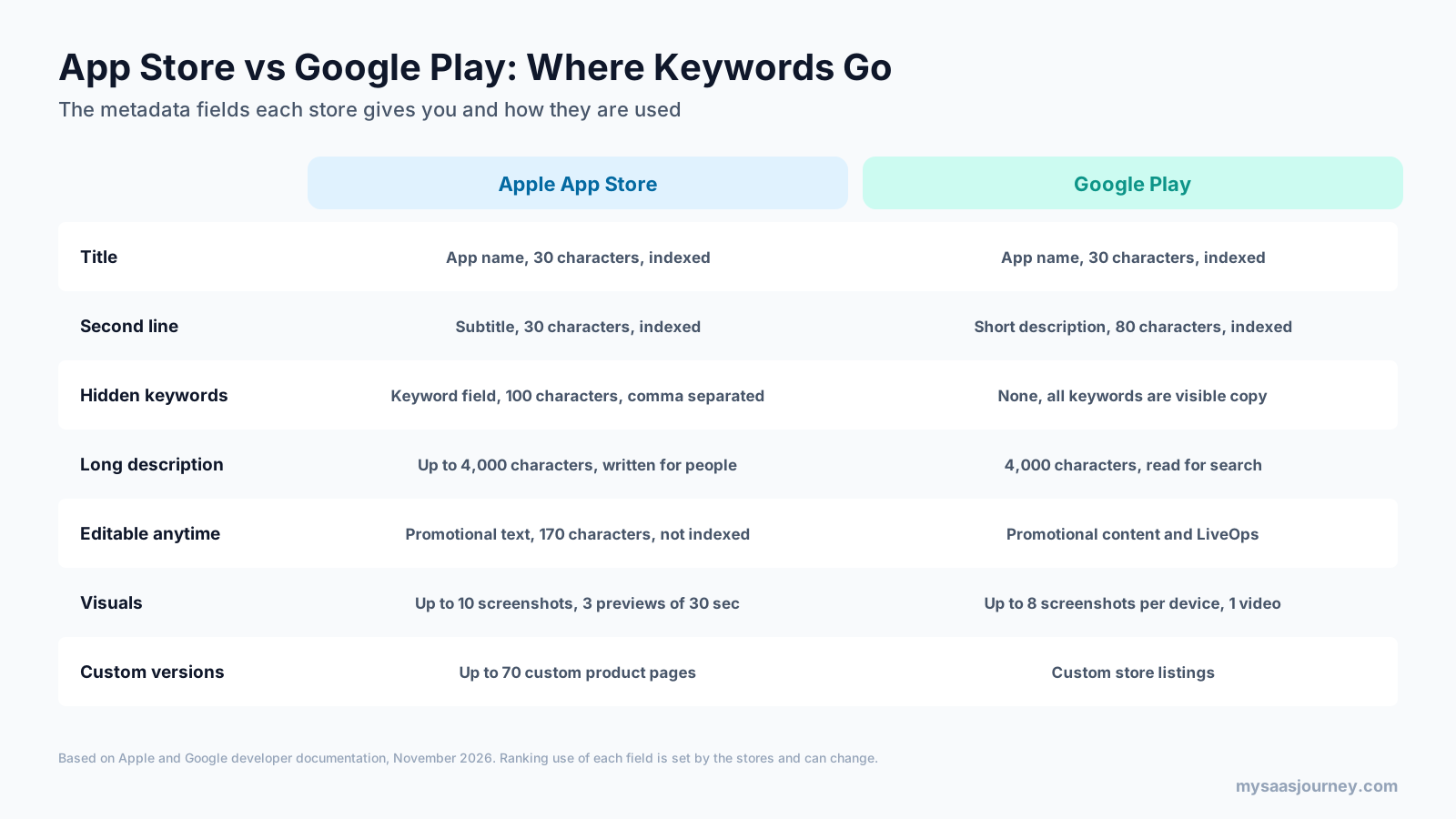
The principles of ASO are the same in both stores, but the fields, rules, and signals differ.
| Element | Apple App Store | Google Play |
|---|---|---|
| Title | App name, 30 characters | App name, 30 characters |
| Second text field | Subtitle, 30 characters | Short description, 80 characters |
| Hidden keywords | Keyword field, 100 characters | None |
| Long description | Written for people; Apple advises against adding keywords for search | Up to 4,000 characters and used for search |
| Editable promotional text | Promotional text, 170 characters, does not affect ranking | Promotional content for events and offers |
| Screenshots | Up to 10 | Up to 8 per device type |
| Video | Up to 3 app previews, 30 seconds each | 1 YouTube preview video |
| Testing | Product page optimization | Store listing experiments |
| Tailored listings | Up to 70 custom product pages | Custom store listings |
| Quality signals | Ratings, reviews, and engagement | Ratings, reviews, engagement, and Android vitals |
The difference that matters most day to day is where your keywords go. On iOS, you can target terms through the hidden keyword field without showing them to users, so your description can focus on persuasion. On Google Play, every keyword has to appear in visible copy, so the description needs to read well and cover your main terms naturally.
The way updates reach the store also differs. On the App Store, most metadata changes go live with a new app version and pass through App Review, while promotional text can change at any time. On Google Play, you can update store listing text and graphics without shipping a new build, although changes still go through review.
App Store Optimization Ranking Factors
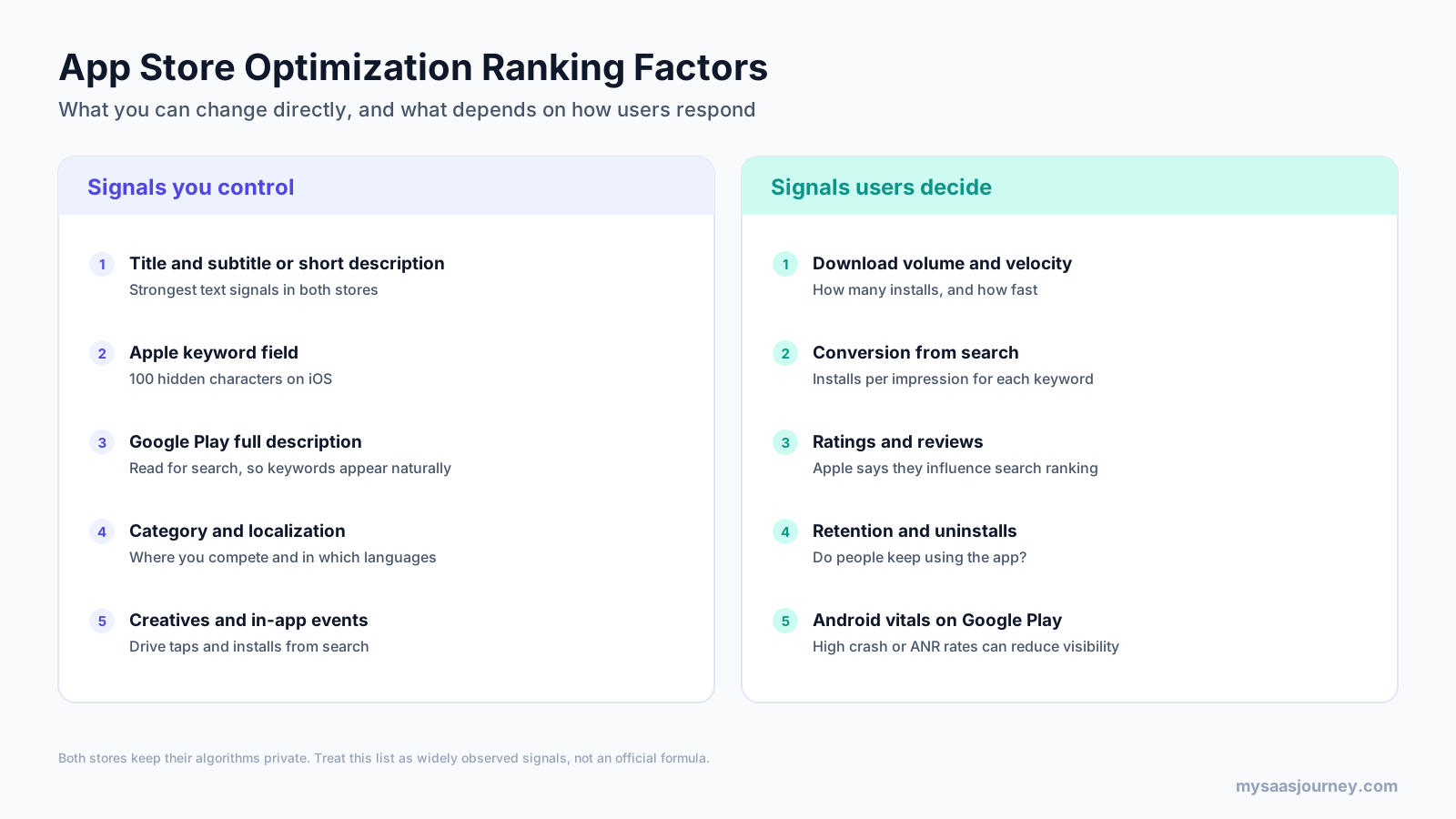
Neither store publishes its algorithm, so ranking factors come from official guidance and observed patterns. They fall into two groups: signals you control directly and signals that depend on how users respond.
Signals you control:
- App name or title, the strongest text signal in both stores
- Subtitle on iOS and short description on Google Play
- The keyword field on iOS
- The full description on Google Play
- Category, localization, and in-app events or promotional content
- Icon, screenshots, and videos, which drive taps and installs from search
Signals users decide:
- Download volume and momentum, meaning how many installs you earn and how quickly
- Conversion from search, meaning how many people install after seeing your app for a given term
- Ratings and reviews, which Apple says influence search ranking
- Retention and uninstalls, which show whether people keep using the app
- On Google Play, Android vitals, where Google states that core vitals such as user-perceived crash rate and ANR rate affect an app’s visibility
The second group explains why ASO and product quality are linked. A well-written listing can earn a ranking, but if the app crashes or disappoints, ratings fall, uninstalls rise, and visibility drops. Google sets bad behavior thresholds in Android vitals, including a 1.09% overall user-perceived crash rate and a 0.47% overall user-perceived ANR rate, and apps above them can lose visibility or show a warning on their listing.
How to Do App Store Optimization Step by Step
ASO follows a repeatable process. These steps apply whether you are launching a new app or improving an existing one.
Step 1: Define Your Audience and Competitors
Start with who the app is for and what they are trying to do. List the main use cases, the words your users use to describe their problem, and the apps they compare you with. Look at the top apps for your main terms and note their names, subtitles, screenshots, ratings, and how often they update. This gives you a baseline and shows where you can stand out.
Step 2: Research Keywords
Keyword research is the foundation of visibility.
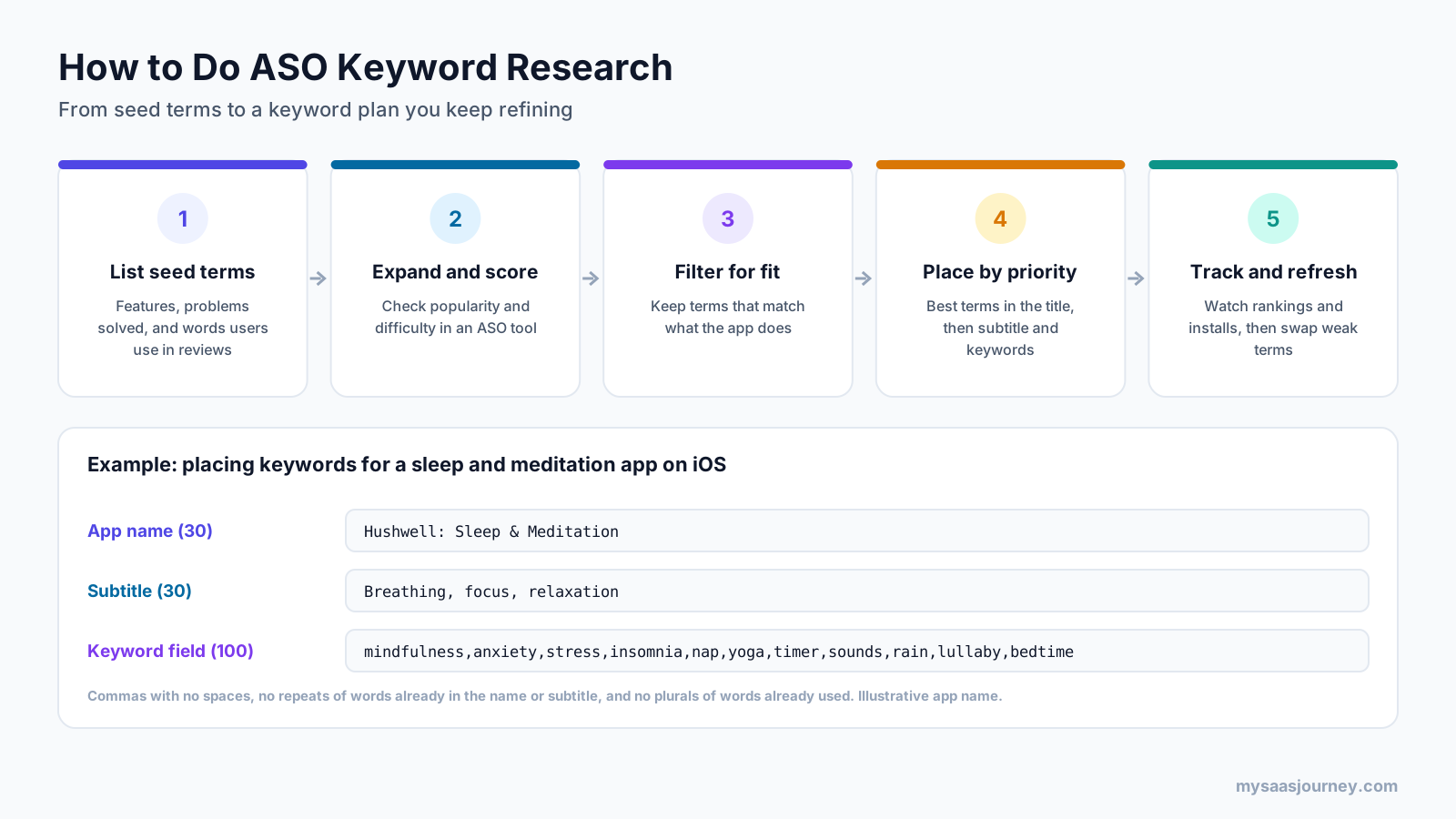
- List seed terms from your features, the problems the app solves, and the words users write in reviews of your app and competing apps.
- Expand the list and score each term in an ASO tool, which estimates search popularity and how hard it is to rank.
- Filter for fit, keeping only terms that describe what the app actually does, because irrelevant terms attract users who leave quickly.
- Place terms by priority, with the most important ones in the title, then the subtitle or short description, then the keyword field or description.
- Track rankings and installs, then replace terms that do not perform with new candidates.
The best keywords balance popularity, difficulty, and relevance. A new app rarely ranks for the most popular term in its category at first, so it often makes sense to target more specific phrases where you can win, then move toward broader terms as installs and ratings grow. Our roundup of free keyword research tools covers web SEO tools, but the same thinking about intent and difficulty applies in app stores.
Step 3: Write and Optimize Your Metadata
Write your app name, subtitle or short description, keyword field, and description using your keyword plan. Keep the name readable and on-brand, use the second field for your strongest secondary terms and a clear value statement, and fill the iOS keyword field without repeating words. On Google Play, write a full description that reads naturally and covers your main features and terms. Review each store’s policies so your listing is not rejected.
Step 4: Design Your Icon, Screenshots, and Video
Design visuals that show the app’s value quickly. Put the main benefit in the first screenshot, use short captions, and show the app’s actual screens. If you add a preview video, show the app in use within the first few seconds. Our guide to how to design an app covers platform conventions that also help screenshots feel familiar to iOS and Android users.
Step 5: Localize for Priority Markets
Choose the markets where you have users or see demand, research keywords in each language, and adapt metadata and screenshot captions. Start with your top two or three markets rather than translating into every language at once, and expand as results justify the work.
Step 6: Build a Ratings and Reviews Plan
Add an in-app review prompt at a positive moment, reply to reviews regularly, and use review themes to guide product fixes. When you release a version that fixes major issues, Apple lets you reset your summary rating, which can help if older ratings no longer reflect the app.
Step 7: Test Your Store Listing
Use the stores’ built-in testing tools to compare icons, screenshots, videos, and on Google Play, text. The next section explains how each one works.
Step 8: Measure, Report, and Repeat
Track your keyword rankings, impressions, page views, conversion rate, and installs, and compare them before and after each change. Review results on a regular schedule, such as monthly, and plan the next round of updates. ASO is never finished, because competitors, search behavior, and store algorithms keep changing.
How to Test Your Store Listing
Testing tells you which version of your listing converts better, so you are not relying on opinion. Both stores offer free tools, and each store has one tool for random A/B tests and one for tailored listings.
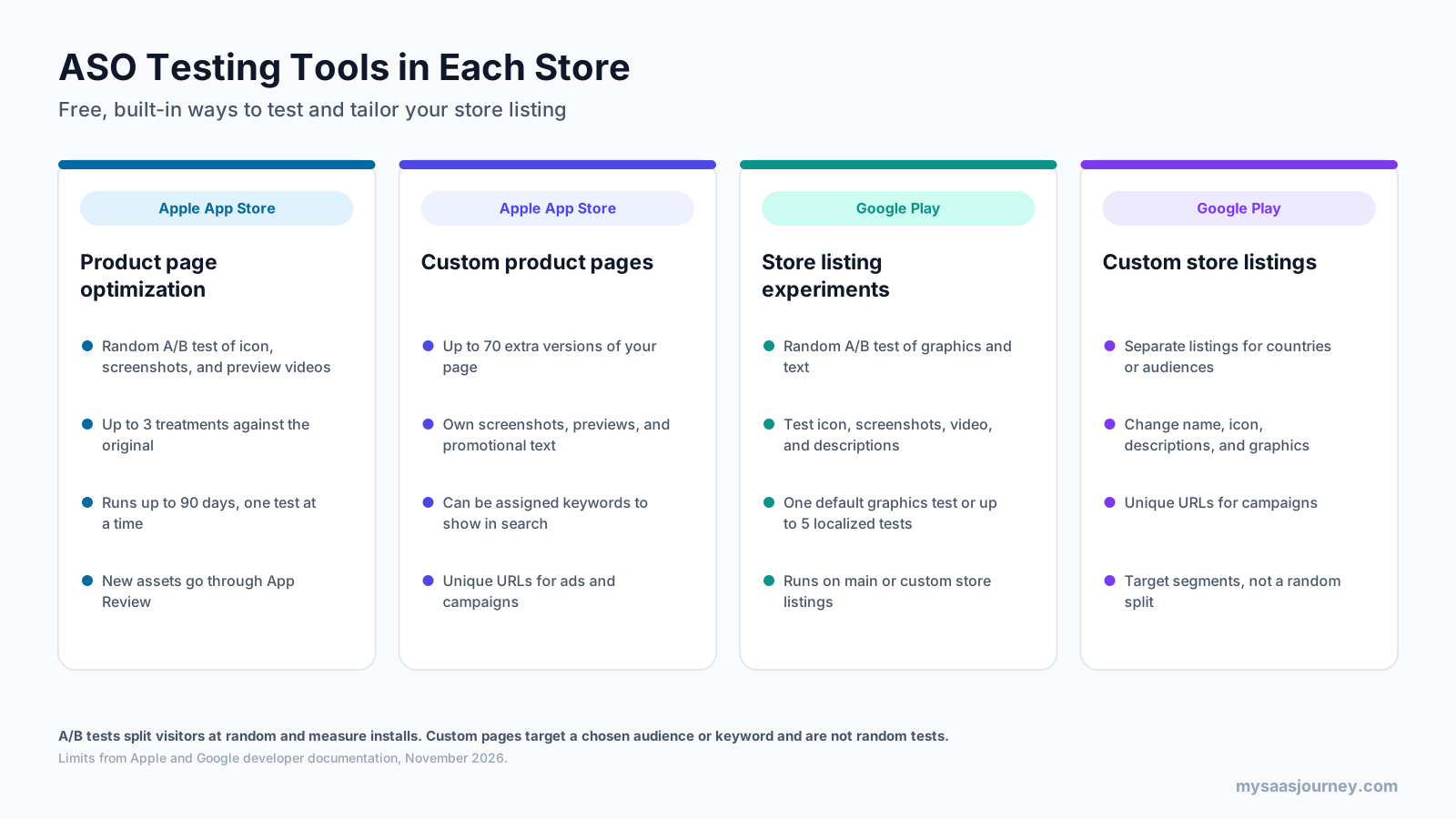
- Product page optimization (App Store): test up to three alternate versions of your icon, screenshots, and app previews against your original page. A test can run for up to 90 days, you can run one test at a time, and new assets need App Review approval. Apple recommends waiting until a treatment reaches 90% confidence before applying it.
- Custom product pages (App Store): create up to 70 extra versions of your page for specific audiences or campaigns, and assign keywords so a page can appear in search for matching terms. These are targeted pages, not random tests.
- Store listing experiments (Google Play): test graphics and text, including the icon, screenshots, video, and descriptions, against your current listing. You can run one default graphics experiment or up to five localized experiments at the same time, on your main or custom listings.
- Custom store listings (Google Play): create listings for specific countries, audiences, or campaign URLs, with their own name, icon, descriptions, and graphics.
To get useful results, change one element per test, run it long enough to reach a confident result, and record what you learn. A screenshot test that shows users respond to a certain benefit can inform your captions, ads, and even your onboarding. For more on testing methods, see our glossary entry on A/B testing and our A/B testing software category.
ASO Metrics to Track
To know whether ASO is working, track metrics at each stage, from visibility to installs and satisfaction.
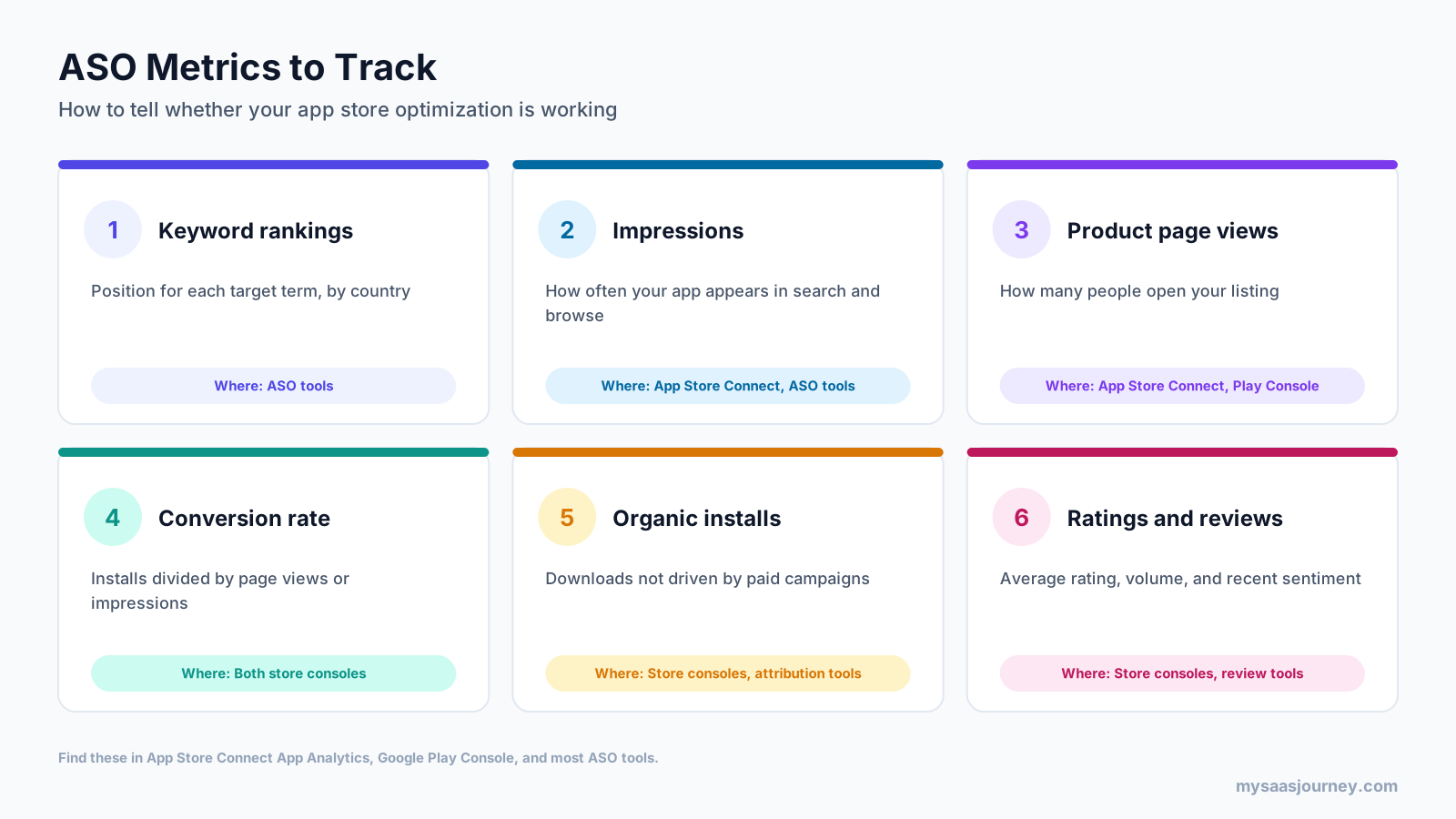
- Keyword rankings: your position for each target term in each country, tracked daily or weekly in an ASO tool.
- Impressions: how often your app appears in search, browse, and other placements.
- Product page views: how many people open your listing.
- Conversion rate: installs divided by impressions or page views, which shows how persuasive your listing is. Our glossary explains conversion rate in more depth.
- Organic installs: downloads not driven by paid campaigns, ideally broken down by search and browse.
- Ratings and reviews: average rating, rating volume, and the themes in recent reviews.
App Store Connect’s App Analytics and Google Play Console provide most of these figures for free, including impressions or store listing visitors, conversion, and installs by source. ASO tools add keyword rankings and competitor data.
What to Include in an ASO Report
An ASO report should show what changed, what happened, and what you plan next. A simple monthly report usually covers:
- Changes made during the period, such as new keywords, screenshots, or localizations
- Keyword ranking movement for your priority terms
- Impressions, page views, conversion rate, and organic installs compared with the previous period
- Results of any tests, including the winning variant and confidence level
- Rating and review trends, with notable themes
- Next steps and the hypothesis behind each planned change
Retention also belongs in the picture, because installs that churn quickly do little for rankings or revenue. Our glossary covers user retention and how to measure it.
What Are ASO Tools?
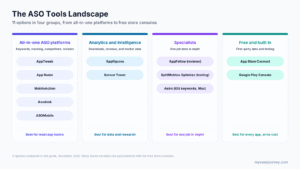
ASO tools are software platforms that help you research keywords, track rankings, monitor competitors, manage reviews, and test creatives across app stores. They fill the gaps left by the free analytics in App Store Connect and Google Play Console, which show your own data but little about keywords or competitors.
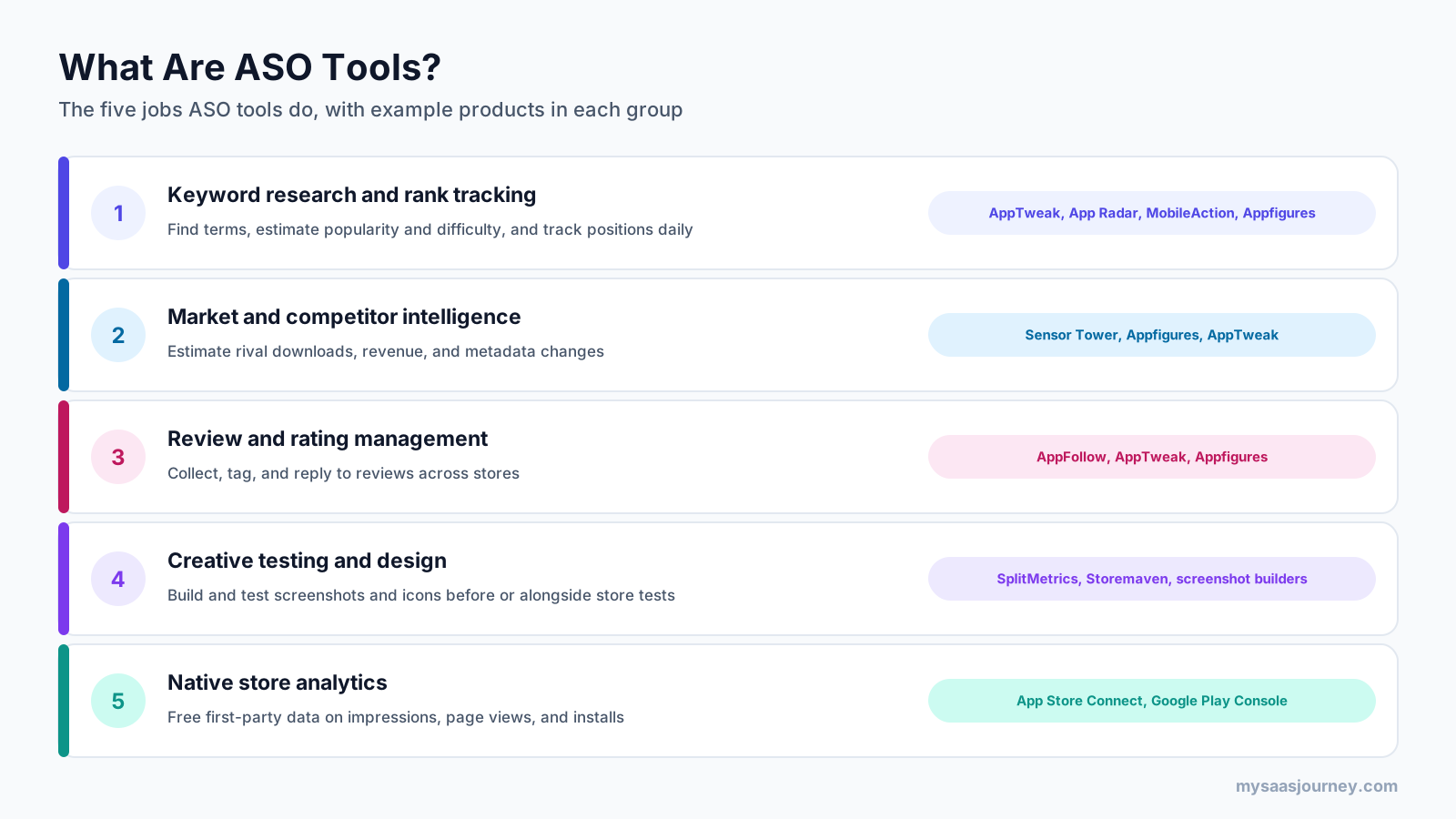
Most ASO tools fall into five groups, and many products cover several of them:
- Keyword research and rank tracking: find terms, estimate popularity and difficulty, and track your positions. Examples include AppTweak, App Radar, MobileAction, and Appfigures.
- Market and competitor intelligence: estimate competitors’ downloads and revenue and watch their metadata changes. Sensor Tower is a well-known example and acquired data.ai, formerly App Annie, in 2024.
- Review and rating management: collect, tag, and reply to reviews across stores. AppFollow is known for this, and several ASO suites include it.
- Creative testing and design: test screenshots and icons, often on simulated store pages with paid traffic, alongside the stores’ own tests. SplitMetrics and Storemaven focus on this.
- Native store analytics: App Store Connect and Google Play Console provide free first-party data on impressions, page views, and installs.
A small team can start with the free store consoles and one keyword tool, then add review management and creative testing as the app grows. When choosing, check which stores and countries the tool covers, how fresh its keyword data is, and whether it supports your team’s workflow. Our category page on ASO tools for app visibility lists options to compare.
ASO vs SEO
ASO and SEO share the same idea: earn visibility in search for the terms your audience uses. But they work in different places, with different levers and signals.
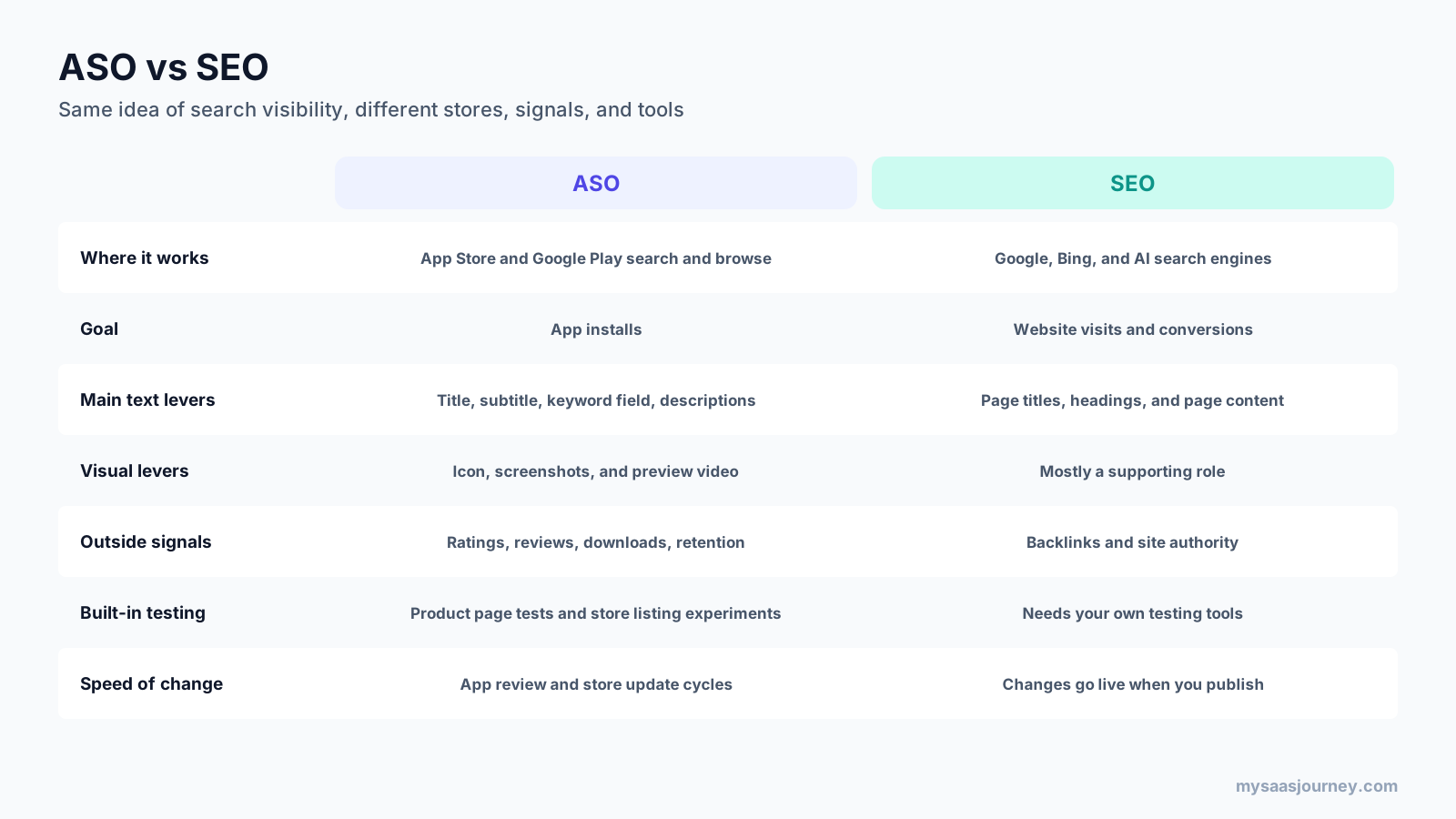
| Factor | ASO | SEO |
|---|---|---|
| Where it works | App Store and Google Play search and browse | Google, Bing, and AI search engines |
| Goal | App installs | Website visits and conversions |
| Main text levers | Title, subtitle, keyword field, descriptions | Page titles, headings, and page content |
| Visual levers | Icon, screenshots, and preview video | Mostly a supporting role |
| Outside signals | Ratings, reviews, downloads, retention | Backlinks and site authority |
| Built-in testing | Product page tests and store listing experiments | Needs your own testing tools |
| Speed of change | App review and store update cycles | Changes go live when you publish |
The two also work together. Many people discover apps through web search before visiting a store, so a strong website and good rankings in Google support your app’s growth. App listings can also appear in web search results. If you manage both, our guide to the best SEO tools covers the web side.
ASO and Paid User Acquisition
ASO and paid acquisition are separate but connected. Paid campaigns, such as Apple Ads on the App Store, which Apple renamed from Apple Search Ads in April 2025, and Google’s app campaigns, send people to your listing. A listing with strong visuals and ratings converts more of that traffic, which lowers your cost per install.
Paid campaigns also generate data you can use for ASO. Search term reports from Apple Ads show which keywords lead to installs, which can guide your metadata. Custom product pages and custom store listings let you match a listing to an ad’s message, so the page a user lands on reflects what made them tap. And installs from paid campaigns can add to your download momentum, which may support organic rankings.
The reverse also holds: ASO work makes paid budgets go further. Most teams that run both treat the store listing as a shared asset and test it with both organic and paid traffic in mind.
Common ASO Mistakes
- Choosing keywords only by popularity, which leads to terms where a new app cannot rank or terms that do not match what the app does
- Repeating the same words across the name, subtitle, and keyword field on iOS, which wastes limited space
- Stuffing the Google Play description with keywords, which hurts readability and can break store policy
- Using screenshots that show interface details without explaining the benefit
- Translating metadata word for word instead of researching keywords in each language
- Ignoring reviews, or asking for ratings at a frustrating moment
- Changing many elements at once, which makes it impossible to tell what caused a result
- Treating ASO as a one-time launch task rather than an ongoing process
- Overlooking app quality, especially crash and ANR rates on Google Play
Final Thoughts
App store optimization is how you help the right people find your app and choose to install it. It combines keyword research and metadata, visual design, ratings and reviews, localization, and testing, and it depends on product quality as much as on listing copy. The App Store and Google Play share the same principles but differ in their fields and signals, so each needs its own plan.
Start with clear research on your users and competitors, write metadata that is relevant and readable, design visuals that show your main benefit, and use the stores’ free testing tools to learn what works. Track rankings, conversion, and installs over time, and keep improving. As your app grows, ASO tools can save time on keyword tracking, competitor research, and review management.
Frequently Asked Questions
What is app store optimization in simple terms?
App store optimization (ASO) is improving your app’s listing in the App Store and Google Play so more people find it in search and more of them install it. It covers the app name, subtitle or short description, keywords, description, icon, screenshots, videos, ratings, reviews, and localization.
What is ASO in marketing?
In marketing, ASO is the practice of growing an app’s organic installs by improving its visibility and conversion rate in app stores. It sits alongside paid user acquisition, SEO, and content marketing, and it improves the return on paid campaigns because ads send traffic to the same store listing.
What does ASO stand for?
ASO stands for app store optimization in mobile marketing. In health insurance and HR, ASO means administrative services only, an arrangement where an employer funds its own health plan and pays a company to administer it.
How does app store optimization work?
App stores rank apps based on relevance, performance, satisfaction, and quality signals. ASO improves relevance through keywords in your metadata, raises conversion through better visuals and ratings, and supports satisfaction and quality through app improvements. You then measure rankings, conversion, and installs and repeat the cycle.
What are ASO tools?
ASO tools are software platforms that help you research and track keywords, monitor competitors, manage reviews, and test store creatives. Examples include AppTweak, Sensor Tower, Appfigures, AppFollow, MobileAction, App Radar, and SplitMetrics, alongside the free analytics in App Store Connect and Google Play Console.
What is the difference between ASO and SEO?
SEO improves a website’s visibility in search engines such as Google, while ASO improves an app’s visibility and conversion in app stores. SEO relies heavily on content and backlinks, while ASO relies on app metadata, visuals, ratings, downloads, and retention, and it offers built-in A/B testing in each store.
How long does ASO take to show results?
Metadata changes usually take effect within days to a few weeks after a store update is approved and indexed, but rankings often take longer to settle as the store measures how users respond. Visual changes can affect conversion quickly. Most teams judge ASO results over several weeks to a few months.
Is the App Store description used for search?
Apple’s guidance warns against adding keywords to the App Store description to improve search results, and Apple relies on the app name, subtitle, and keyword field for search text. On Google Play, the full description is used to understand your app, so it matters for search as well as for persuading users.
How do you measure ASO?
Measure ASO with keyword rankings, impressions, product page views, conversion rate, organic installs, and ratings and reviews. App Store Connect and Google Play Console provide most of these for free, while ASO tools add keyword ranking and competitor data. Compare results before and after each change.