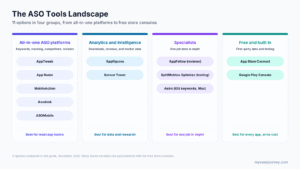

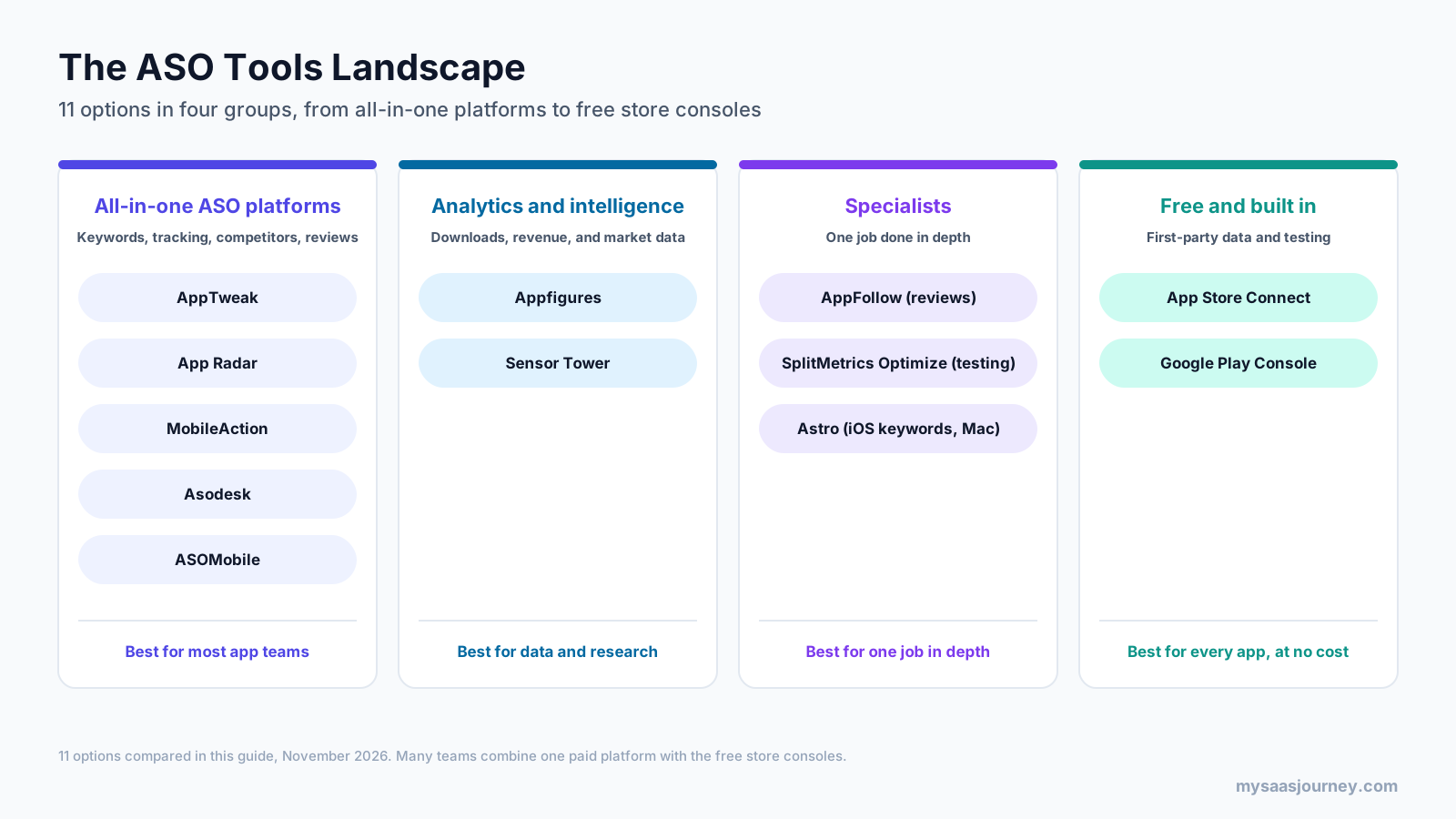
The best tools for ASO in 2027 are AppTweak for an all-round keyword and competitor platform, Sensor Tower for enterprise market intelligence, and Appfigures for analytics, ASO, and reviews in one affordable tool. MobileAction and App Radar are strong mid-priced alternatives, AppFollow and Asodesk lead on review management, and Astro is the cheapest keyword tracker for iOS developers on a Mac. Every app should also use the free data and testing in App Store Connect and Google Play Console.
App store optimization tools help you find the keywords people search, track where your app ranks, watch competitors, manage reviews, and test your store listing. They range from $9 a month for a single-developer Mac app to enterprise contracts priced on request, so the right choice depends on how many apps and markets you manage and which job matters most.
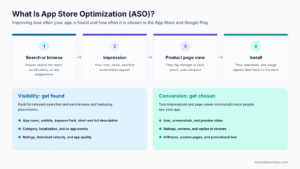
This guide compares 11 ASO tools with prices checked against vendor pages in November 2026, explains which tools are best for keyword research, lists free options, and shows example tool stacks for teams of different sizes. If you are new to the topic, start with our guide to what app store optimization is.
Key takeaways:
- AppTweak offers one of the largest keyword databases, with 30 million+ keywords and 12+ research tools, from $79 a month.
- Appfigures combines sales analytics, ASO, download estimates, and reviews, with a free plan and ASO plans from $44.99 a month.
- MobileAction is the lowest-cost full ASO platform at $15 a month, and its Apple Ads campaign tool is free up to $10,000 in monthly ad spend.
- AppFollow, Asodesk, and ASOMobile all have free plans, which makes them easy to test before you pay.
- App Store Connect and Google Play Console are free and provide the first-party data and built-in A/B testing that no third-party tool can replace.
Quick Comparison of the Best ASO Tools
| Tool | Best for | Stores | Free option | Starting price |
|---|---|---|---|---|
| AppTweak | All-round keyword research and competitor analysis | App Store, Google Play | 7-day trial | $79 a month |
| Sensor Tower | Enterprise market intelligence and benchmarks | App Store, Google Play | No | Quote |
| Appfigures | Analytics, ASO, and reviews in one tool | App Store, Google Play, others | Free plan | $44.99 a month for ASO |
| MobileAction | Low-cost ASO with Apple Ads tools | App Store, Google Play | 7-day trial, free Apple Ads tool | $15 a month |
| App Radar | Editing and publishing listings to both stores | App Store, Google Play | 7-day trial | €69 a month |
| AppFollow | Review management with ASO | App Store, Google Play, more | Free plan | From $19 a month billed yearly |
| Asodesk | Budget ASO and review replies | App Store, Google Play, alternative stores | Free plan | $59 a month |
| ASOMobile | Low-cost ASO for indie teams | App Store, Google Play | Free plan | $59 a month |
| Astro | iOS keyword tracking on a Mac | App Store only | No | $9 a month |
| SplitMetrics Optimize | Creative and pre-launch testing | App Store, Google Play | Trial on request | Quote (listed from $4,999 a year) |
| App Store Connect and Google Play Console | First-party data and built-in testing | Each store | Free | Free with a developer account |
What Do ASO Tools Do?
ASO tools fill the gaps that the store consoles leave. App Store Connect and Google Play Console show how your own app performs, but they do not tell you which keywords people search, how hard those terms are to rank for, or what competitors are doing. Third-party ASO tools cover five main jobs:
- Keyword research: finding terms, estimating their popularity and difficulty, and suggesting new ideas
- Rank tracking: recording where your app ranks for each keyword in each country over time
- Competitor and market intelligence: estimating competitors’ downloads and revenue and watching their metadata and creative changes
- Review management: collecting, tagging, translating, and replying to reviews
- Creative testing and listing management: testing screenshots and icons, and editing or publishing metadata
Most platforms combine several of these jobs, but each tends to be strongest in one. That is why the tools below are grouped by what they do best rather than ranked on a single score.
How We Chose These Tools
We looked at the ASO tools that appear most often in practitioner discussions, review sites, and current comparison lists, then checked each vendor’s own pricing and product pages. We assessed each tool on:
- Keyword research depth: database size, popularity and difficulty metrics, and suggestions
- Rank tracking: update frequency, history, and the number of keywords per plan
- Store coverage: App Store, Google Play, and other stores
- Competitor and market data: download and revenue estimates and competitor keywords
- Reviews: monitoring, replies, and automation
- Testing and creative tools: support for store tests and creative analysis
- Pricing transparency: published prices, free plans, and trials
Prices are the lowest published monthly price unless noted, and third-party sources are marked. ASO tool pricing changes often, so confirm the current figures before you buy.
The 11 Best Tools for ASO
1. AppTweak
AppTweak is a full ASO and app marketing intelligence platform used by app publishers and agencies. It covers keyword research, rank tracking, competitor analysis, ratings and reviews analysis, and Apple Ads intelligence across 100+ countries and languages.
Best for: app teams that want deep keyword data and competitor insight in one platform.
Key features:
- A keyword database of 30 million+ terms with 12+ research tools
- Keyword metrics including Chance, Difficulty, KEI, and Relevancy
- Competitor metadata, ranking, and ratings and reviews analysis
- Apple Ads intelligence, including paid keyword insights and custom product page keyword tracking
- AppTweak MCP, which connects data to AI assistants such as Claude and ChatGPT, and an AI Visibility add-on that tracks ChatGPT and Gemini
Pricing: Essential costs $79 a month for 5 followed apps, or $949 a year. Grow starts at $299 a month and Expand at $549 a month, with Enterprise on custom pricing. Essential includes 500 keywords and 6 months of history. Each self-serve plan includes one seat and a 7-day free trial.
Trade-offs: Self-serve plans include a single seat, so teams usually need Enterprise for shared access. Review replies sit in a separate App Reviews Manager product.
2. Sensor Tower
Sensor Tower is a market intelligence platform for mobile apps, games, and digital advertising. It estimates downloads, revenue, active users, and retention, tracks ad creatives and spend, and offers an ASO toolkit called ASO Keywords for keyword discovery, rank tracking, and competitive analysis. Sensor Tower acquired data.ai, formerly App Annie, in 2024.
Best for: large publishers, brands, and investors that need market data and benchmarks alongside ASO.
Key features:
- Download, revenue, active user, and retention estimates for apps and competitors
- ASO Keywords for keyword discovery, performance tracking, and competitor keywords
- Ad intelligence covering ads served, spend estimates, and share of voice
- Category benchmarks and market trend reports
- An MCP server for connecting data to AI tools
Pricing: Sensor Tower customizes pricing for each customer, so you need to contact sales for a quote.
Trade-offs: Pricing is aimed at enterprise budgets, and the platform offers far more market data than a small team running ASO for one app needs.
3. Appfigures
Appfigures combines app analytics, ASO, competitor intelligence, and review management. It connects to your store accounts to track downloads, revenue, and subscriptions, and adds keyword tracking, AI keyword suggestions, and download and revenue estimates for other apps.
Best for: indie developers and small to mid-sized teams that want analytics, ASO, and reviews in one affordable tool.
Key features:
- Download, revenue, subscription, and ad performance analytics from your connected accounts
- Keyword rank tracking, keyword inspector, AI keyword suggestions, and competitor keywords
- Download and revenue estimates, organic and paid keywords, and SDK data for competitors
- Unified reviews with alerts, translation, and reply templates
- Hourly category ranks and featured alerts
Pricing: A free plan covers 5 connected apps. Monitor costs $44.99 a month with 100 tracked keywords updated daily, Optimize costs $149.99 a month with 500 keywords updated hourly, and Boost and Amplify cost $599.99 and $1,399.99 a month. Annual billing saves about 20%. The free trial needs no credit card and gives you Optimize features until it ends.
Trade-offs: Lower plans include few keywords, and premium competitor data starts on the Boost plan. Market intelligence plans for larger teams start at $599.99 a month.
4. MobileAction
MobileAction offers ASO Intelligence alongside tools for Apple Ads campaign management, ad intelligence, and custom product page research. Its ASO plans start at a lower price than most full platforms.
Best for: budget-conscious teams and teams that run Apple Ads alongside ASO.
Key features:
- Keyword research with AI suggestions, volume and difficulty scores, and metadata analysis
- Competitor keyword insights, keyword grouping, and custom product page keyword research
- Review analysis, sentiment analysis, and AI review replies
- Pro features for in-app events, promotional content, localization reports, and a keyword translator
- A free Apple Ads campaign management tool for up to $10,000 in monthly ad spend
Pricing: Lite costs $15 a month for 100 keywords and 5 apps, Basic costs $69 a month for 500 keywords and 8 apps, and Pro costs $239 a month for 1,500 keywords, 10 apps, and 3 seats. Yearly billing lowers these to $12.50, $59, and $199 a month. Each ASO plan advertises a 7-day free trial, and Enterprise is on custom pricing.
Trade-offs: Lite and Basic include one seat and limited history, and the full ranked keywords report and paid keyword insights are on Enterprise.
5. App Radar
App Radar, now part of SplitMetrics, is an ASO platform with keyword research and tracking, competitor analysis, review replies, and a store listing editor that pushes metadata updates to the App Store and Google Play without opening each console.
Best for: teams that manage listings for several apps or markets and want to edit and publish from one place.
Key features:
- Keyword research and tracking, top charts, and category rankings
- Store Listing Preview and Editor, and a Bulk Editor for publishing updates to both stores
- Review replies, with AI-assisted replies and AI review summaries on higher plans
- Conversion insights and creative trend monitoring on Growth
- An API add-on for rankings and performance data
Pricing: Essentials costs €69 a month (€690 a year) for 2 apps, 500 keywords, and 1 seat. Growth costs €169 a month for 10 apps and 1,500 keywords, and Scale costs €299 a month for 15 apps and 3,000 keywords. The 7-day free trial requires a credit card.
Trade-offs: Prices are in euros, and the pricing page notes that prices were last updated in February 2024, so confirm before buying. Apple Ads management is tied to SplitMetrics’ Enterprise and agency services.
6. AppFollow
AppFollow is a review management and app monitoring platform with ASO tools. It collects reviews from the App Store, Google Play, and sources such as Steam, Discord, Reddit, and Trustpilot, and automates replies, tagging, and translation.
Best for: apps with high review volume and support teams that answer reviews.
Key features:
- Review monitoring and replies across app stores and other sources
- AI replies, auto-replies, automated translation, and sentiment tags on Essential
- Keyword tracking and AI keyword recommendations on the ASO plan
- Integrations with Slack, Zendesk, Salesforce, Tableau, and 20+ other tools
- Unlimited users on every plan
Pricing: AppFollow’s plan guide lists a Free plan for up to 2 apps, an ASO plan from $19 a month billed yearly with 500 keywords, Essential at $179 a month ($129 a month billed yearly), and Team at $599 a month ($425 a month billed yearly). Enterprise pricing is set by quote, and a 10-day free trial is available.
Trade-offs: The pricing page itself does not list plan prices, so the figures above come from AppFollow’s own plan guide. Deep keyword research is lighter than in dedicated ASO platforms.
7. Asodesk
Asodesk is an ASO and review management platform with a forever-free plan. It covers keyword research and monitoring, top charts, competitor tracking, and review replies, and can add alternative stores such as Huawei AppGallery, Samsung Galaxy Store, and RuStore.
Best for: small teams that want ASO and review replies at a low cost, including on alternative app stores.
Key features:
- Keyword research, ASO monitoring, and top charts
- Competitor app tracking per country
- Review analytics, reply tools, and auto-replies and auto-tags as add-ons
- Release manager tools and email or Slack reports
- Helpdesk integrations with Zendesk and other tools
Pricing: The Free plan includes 1 app, 200 keywords, and 100 review replies a month. Pro costs $59 a month for 700 keywords and 2 apps, with Guru, Power, and Custom plans above it (Custom starts at $147 a month). Separate review reply plans start at $49 a month. Most paid plans include a 7-day free trial.
Trade-offs: Prices for the higher ASO tiers differ between Asodesk’s pricing page and third-party trackers, so check the live page for current figures.
8. ASOMobile
ASOMobile is an ASO platform aimed at indie developers and small teams, with keyword research, competitor tracking, and AI text tools at prices that scale gradually.
Best for: indie developers and small teams that want an affordable ASO tool with a free plan.
Key features:
- Keyword research, tracking, and competitor monitoring
- An AI text editor for app descriptions on Pro and above
- App text and visuals monitoring worldwide on Pro and above
- Keyword data comparison by country on Max
- API credits on paid plans
Pricing: The Free plan covers 2 apps, 20 keywords, and 10 competitors. ASO Indie costs $59 a month for 5 apps and 500 keywords, ASO Pro costs $119 a month for 10 apps, 1,500 keywords, and 3 users, and ASO Max costs $229 a month. Annual billing saves 20%, which brings Indie to $47 a month. Paid plans include a 3-day free trial.
Trade-offs: The trial is short, and the pricing page does not say clearly which plans include Google Play data.
9. Astro
Astro is a Mac app for App Store keyword research and rank tracking, built for independent iOS developers. It pulls keyword popularity and difficulty from Apple’s ad platform data and tracks rankings daily.
Best for: solo iOS developers who want low-cost keyword tracking.
Key features:
- Keyword popularity and difficulty based on Apple Ads data
- Keyword suggestions, including competitors’ keywords
- Unlimited keyword tracking with daily ranking updates and history
- Keyword translations through DeepL
- Coverage of 60+ App Store countries
Pricing: A single Mac license costs $9 a month or $108 a year. Astro offers a 14-day refund window rather than a free trial.
Trade-offs: Astro covers the App Store only, runs only on macOS 14 or later, and is built for one user, so it does not suit Android apps or teams.
10. SplitMetrics Optimize
SplitMetrics Optimize is a creative testing platform for app store listings. It runs A/B tests on simulated App Store and Google Play pages with paid traffic, so you can test icons, screenshots, videos, and concepts before changing your live listing or even before launch.
Best for: publishers testing creatives at scale or validating ideas before launch.
Key features:
- A/B tests on emulated store pages for the App Store and Google Play
- Pre-launch tests for concepts, positioning, and creative direction
- Engagement data showing how visitors interact with the page
- Sample size guidance and statistical reporting
- Support for testing against competitors’ pages
Pricing: SplitMetrics provides pricing on request. Capterra and Software Advice list a starting price of $4,999 a year.
Trade-offs: Tests need paid traffic, which adds cost, and the free built-in store tests cover many simple cases. Storemaven is a comparable alternative for simulated store testing.
11. App Store Connect and Google Play Console
App Store Connect and Google Play Console are the free developer consoles for each store. They hold your first-party data on impressions, page views, conversion, installs, and reviews, and they include each store’s built-in testing tools.
Best for: every app, as the foundation of any ASO tool stack.
Key features:
- App Store Connect App Analytics for impressions, product page views, conversion, and traffic sources
- Apple’s product page optimization tests and up to 70 custom product pages
- Google Play store listing experiments and custom store listings
- Google Play Console acquisition reports, including the search terms that bring visitors to your listing
- Review replies in both consoles
Pricing: Both consoles are free for registered developers. The Apple Developer Program costs $99 a year, and Google Play charges a one-time $25 registration fee.
Trade-offs: The consoles show only your own apps and offer little keyword research or competitor data, which is why most teams add a third-party tool.
Features Compared
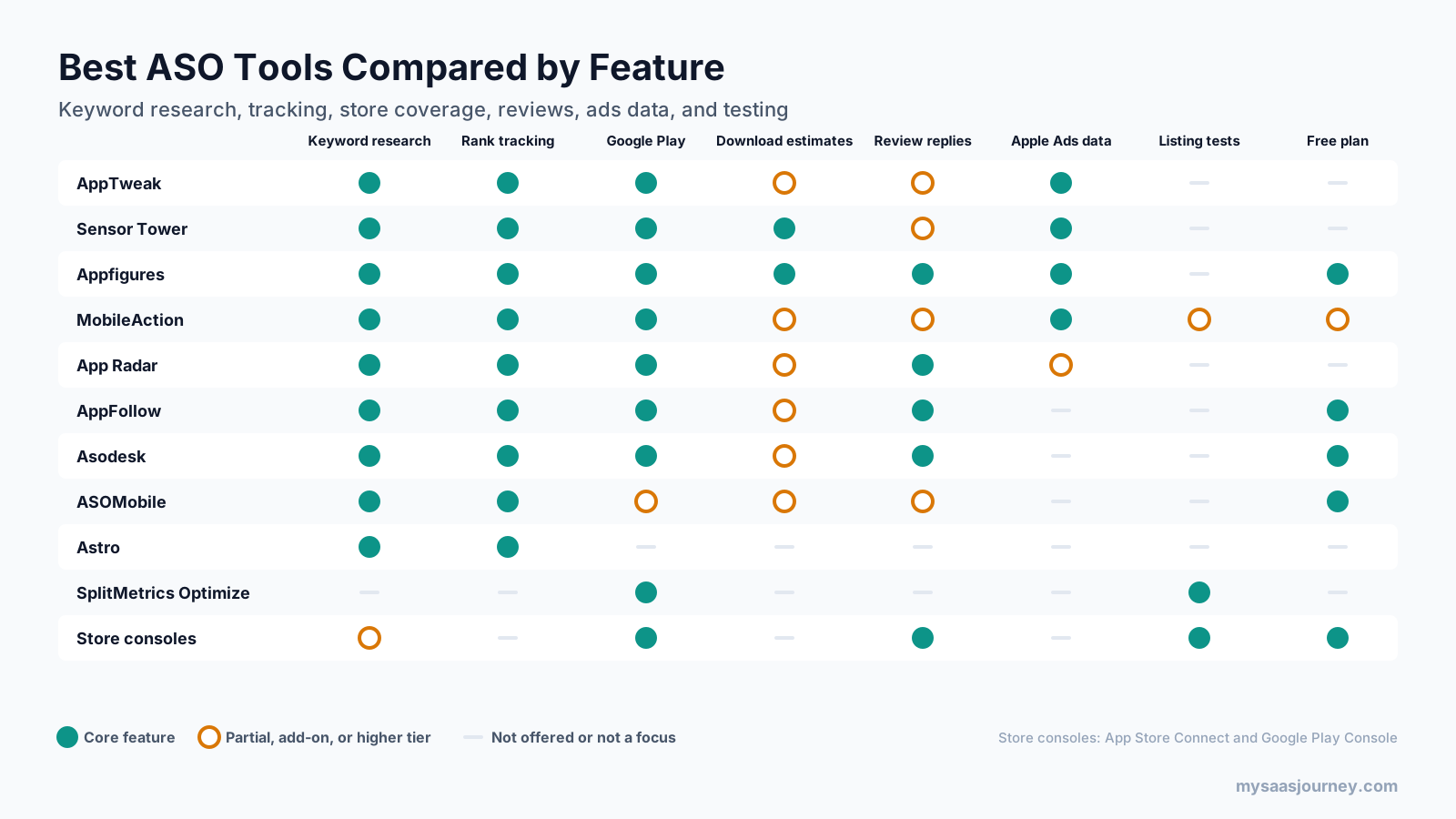
Most paid ASO platforms cover keyword research and rank tracking for both stores. The differences show up elsewhere. Sensor Tower and Appfigures offer download and revenue estimates as core features. AppFollow, Asodesk, App Radar, and Appfigures are strongest on review replies. AppTweak, Sensor Tower, Appfigures, and MobileAction offer the deepest Apple Ads data. Listing tests come from the stores themselves or from specialists such as SplitMetrics Optimize.
Store coverage beyond Apple and Google also varies. AppFollow’s Team plan adds the Microsoft Store, Xbox, and Amazon Appstore, Asodesk offers add-ons for Huawei AppGallery, Samsung Galaxy Store, and RuStore, and Appfigures tracks several stores beyond the main two. If you publish on alternative stores, for example to reach Android users in markets where Google Play is less common, check coverage before you choose. Astro is the clearest exception at the other end, since it covers the App Store only.
Pricing Compared
| Tool | Free option | Entry paid plan | Keywords on entry plan |
|---|---|---|---|
| Astro | No (14-day refund window) | $9 a month | Unlimited (iOS only) |
| MobileAction | Free Apple Ads tool | Lite, $15 a month | 100 |
| AppFollow | Free plan | ASO, from $19 a month billed yearly | 500 |
| Appfigures | Free plan | Monitor, $44.99 a month | 100 |
| Asodesk | Free plan | Pro, $59 a month | 700 |
| ASOMobile | Free plan | Indie, $59 a month | 500 |
| App Radar | 7-day trial | Essentials, €69 a month | 500 |
| AppTweak | 7-day trial | Essential, $79 a month | 500 |
| Sensor Tower | No | Quote | Custom |
| SplitMetrics Optimize | Trial on request | Quote, listed from $4,999 a year | Not applicable |
| App Store Connect and Play Console | Free | Free | Not applicable |
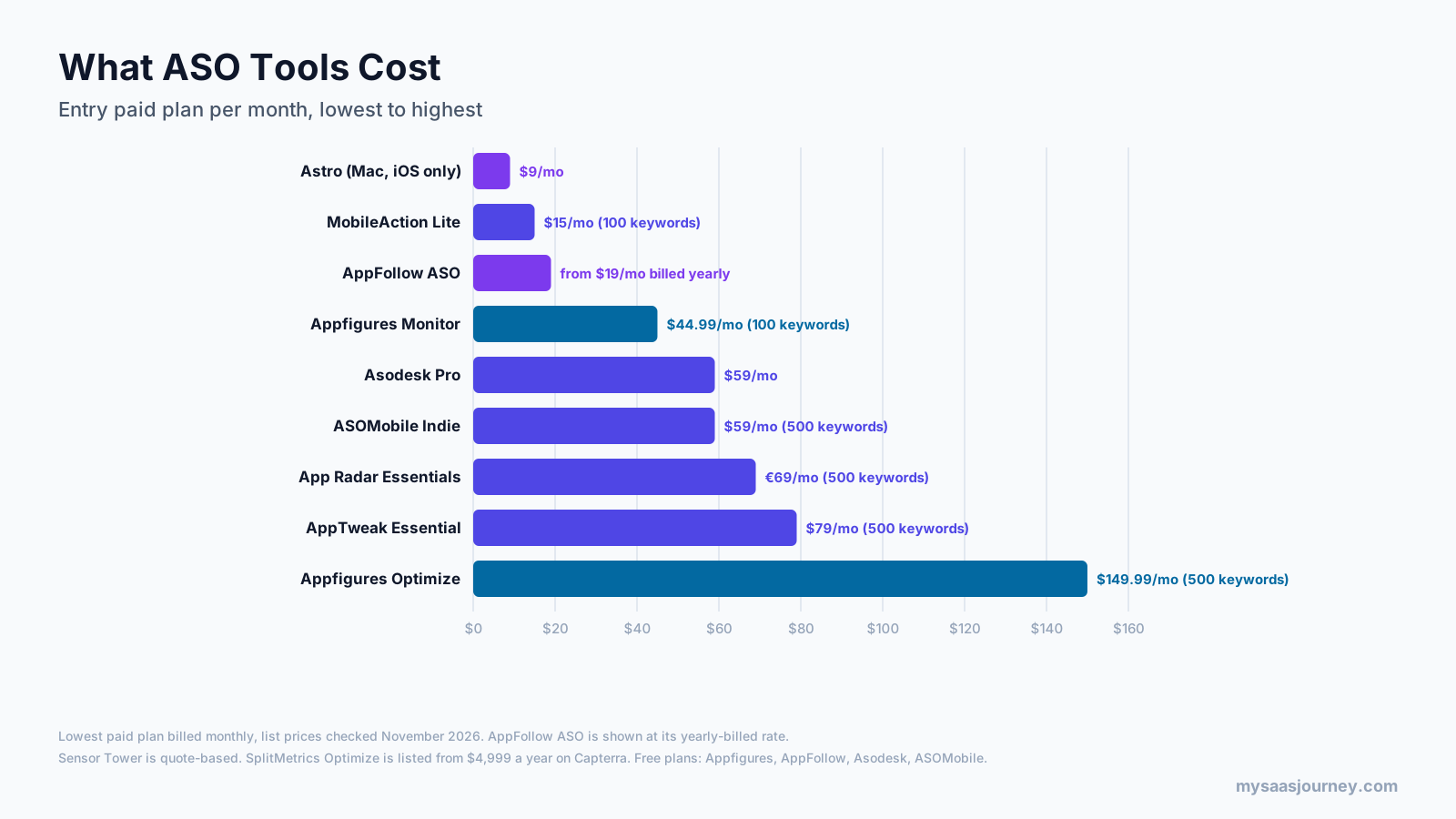
When comparing prices, check how many keywords, apps, and seats each plan includes, how often rankings update, and how much history you keep. A $15 plan with 100 keywords can suit one app in one market, while a team tracking several apps in many countries will reach the limits of entry plans quickly. Our glossary entry on pricing models explains per-seat and usage-based pricing.
Best Keyword Research Tools for ASO
Keyword research is the job most people buy an ASO tool for. The strongest options for keyword research are AppTweak for database depth and metrics, MobileAction and App Radar for keyword research at mid-range prices, Appfigures for AI keyword suggestions alongside analytics, and Astro for low-cost iOS research on a Mac.

When you compare keyword research tools for ASO, check:
- 1
- 2
- 3
- 4
- 5
- 6
Treat keyword popularity figures as directional rather than exact, and compare trends rather than single numbers. For web keyword research, our guide to free keyword research tools covers SEO-focused options.
Free ASO Tools
You can do a lot of ASO without paying for a tool, especially for one app in one market.
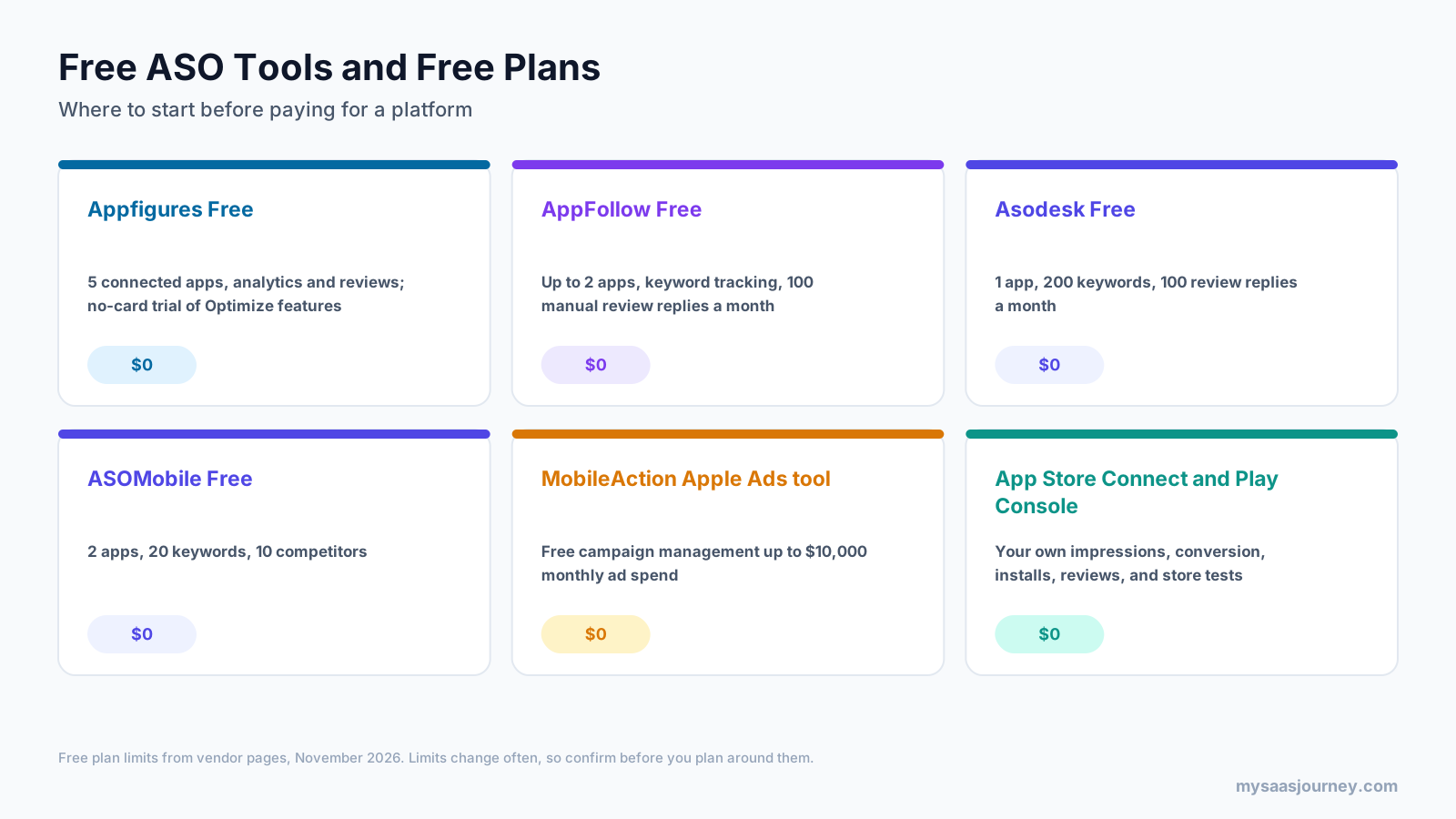
- Appfigures Free: 5 connected apps with analytics and reviews, plus a no-card trial of Optimize features.
- AppFollow Free: up to 2 apps with keyword tracking and 100 manual review replies a month.
- Asodesk Free: 1 app, 200 keywords, and 100 review replies a month.
- ASOMobile Free: 2 apps, 20 keywords, and 10 competitors.
- MobileAction’s Apple Ads tool: free campaign management for up to $10,000 in monthly ad spend.
- App Store Connect and Google Play Console: your own performance data, review replies, and built-in A/B tests.
A free setup usually means combining one free keyword plan with the store consoles. You will hit keyword and app limits quickly, but it is enough to learn which terms matter before you pay for more data.
ASO Tool Stacks by Team Size
Most teams use more than one tool. A common pattern is one paid ASO platform for keywords and competitors, plus the store consoles for first-party data and testing.
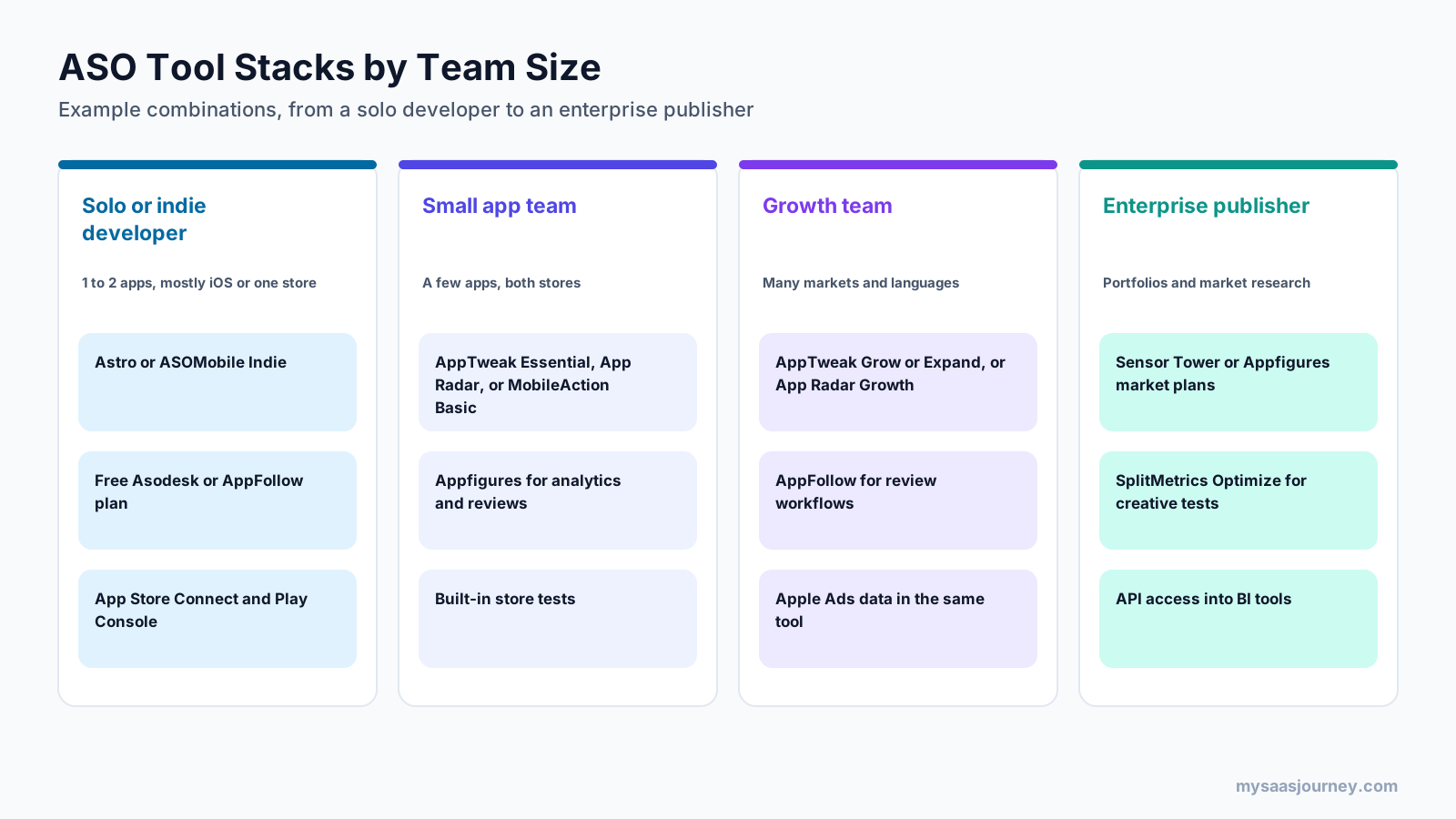
- Solo or indie developer: Astro or ASOMobile Indie for keywords, a free Asodesk or AppFollow plan for reviews, and the store consoles.
- Small app team: AppTweak Essential, App Radar, or MobileAction Basic for ASO, Appfigures for analytics and reviews, and the stores’ built-in tests.
- Growth team: AppTweak Grow or Expand, or App Radar Growth, with AppFollow for review workflows and Apple Ads data in the same platform.
- Enterprise publisher: Sensor Tower or Appfigures market plans for intelligence, SplitMetrics Optimize for creative testing, and API access into business intelligence tools.
These are example combinations, not fixed rules. Start with the job that limits your growth most, and add tools only when a gap becomes clear.
How to Choose the Right ASO Tool
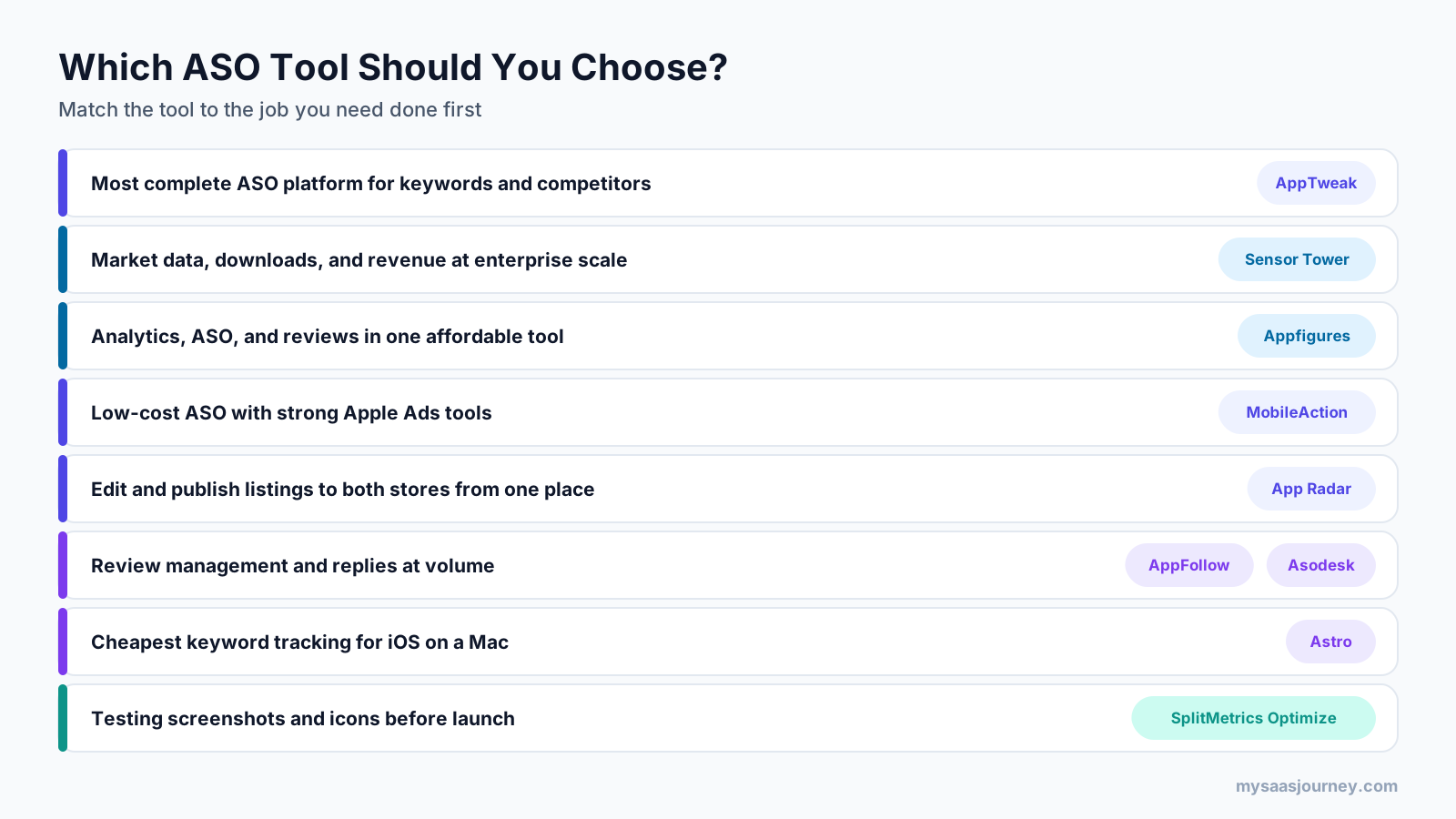
- 1
- 2
- 3
- 4
- 5
- 6
For a broader framework, see our guide on how to choose the right software for your business, and compare more options in our category page for ASO tools for app visibility. If you also manage a website, our guide to the best SEO tools covers the web side of search.
Tips for Getting More From an ASO Tool
Buying a tool is the easy part. These habits make the data useful:
- Set up keyword groups by theme, such as features, problems, and competitor brands, so you can see which group drives installs.
- Record every metadata and screenshot change with a date, so you can match ranking and conversion movements to the change that caused them.
- Compare tool estimates with your console data regularly, since third-party popularity and download figures are modeled.
- Track a small set of priority keywords closely rather than hundreds of terms you never review.
- Review competitors monthly, noting new keywords, screenshots, and in-app events that you may want to test.
- Share a short monthly ASO report with your team so changes, results, and next steps stay visible.
Final Thoughts
There is no single best tool for ASO for every team. AppTweak is the most complete all-round platform for keyword research and competitor analysis. Sensor Tower suits enterprise teams that need market data. Appfigures offers the best mix of analytics, ASO, and reviews for the price. MobileAction and App Radar are strong mid-priced choices, AppFollow and Asodesk lead on reviews, ASOMobile and Astro keep costs low, and SplitMetrics Optimize serves teams that test creatives at scale.
Whichever tool you choose, pair it with App Store Connect and Google Play Console, start with the job that matters most, and use free plans and trials to compare data before you commit. For testing approaches beyond the app stores, our A/B testing software category lists more options.
Frequently Asked Questions
What is the best tool for ASO?
AppTweak is the best all-round tool for ASO for most teams, thanks to its large keyword database, competitor analysis, and Apple Ads data. Sensor Tower is better for enterprise market intelligence, Appfigures for combining analytics, ASO, and reviews, and Astro for low-cost iOS keyword tracking.
What are the best keyword research tools for ASO?
The best keyword research tools for ASO are AppTweak, MobileAction, App Radar, Appfigures, and Astro. AppTweak offers the deepest database and metrics, MobileAction and App Radar balance depth and price, Appfigures adds AI keyword suggestions to analytics, and Astro is the cheapest option for iOS developers on a Mac.
Are there free ASO tools?
Yes. Appfigures, AppFollow, Asodesk, and ASOMobile have free plans with limited apps and keywords, MobileAction’s Apple Ads tool is free up to $10,000 in monthly ad spend, and App Store Connect and Google Play Console are free for registered developers.
How much do ASO tools cost?
ASO tools range from $9 a month for Astro to $15 to $80 a month for entry plans from MobileAction, Appfigures, Asodesk, ASOMobile, App Radar, and AppTweak. Mid-tier plans cost roughly $150 to $600 a month, and Sensor Tower and SplitMetrics Optimize are priced on request for larger teams.
Do I need an ASO tool if I have App Store Connect and Google Play Console?
The store consoles show your own impressions, conversion, installs, and reviews, and they include built-in A/B testing. They offer little keyword research or competitor data, so most teams add an ASO tool to find keywords, track rankings, and watch competitors.
Which ASO tools support both the App Store and Google Play?
AppTweak, Sensor Tower, Appfigures, MobileAction, App Radar, AppFollow, Asodesk, and SplitMetrics Optimize support both stores. ASOMobile covers both but does not state Google Play support per plan, and Astro covers the App Store only.
What is the difference between AppTweak and Sensor Tower?
AppTweak is focused on ASO and app marketing, with published self-serve plans from $79 a month. Sensor Tower is a broader market intelligence platform with download, revenue, and advertising data, plus ASO tools, and it is priced by custom quote for larger organizations.
Is Sensor Tower worth it for a small team?
For most small teams, Sensor Tower offers more market data than they need at an enterprise price. Tools such as Appfigures, AppTweak, MobileAction, and App Radar cover keyword research, rank tracking, and competitor basics at published monthly prices.
Sources
| Source | Used for |
|---|---|
| https://www.apptweak.com/en/pricing | AppTweak plans, prices, keyword database, metrics, seats, trial, MCP, and AI Visibility |
| https://sensortower.com/pricing | Sensor Tower custom pricing and product list |
| https://sensortower.com/blog/app-store-optimization-tool | Sensor Tower ASO Keywords (January 2026) |
| https://www.mrweb.com/drno/news36449.htm | Sensor Tower acquisition of data.ai, formerly App Annie (March 2024) |
| https://appfigures.com/pricing | Appfigures plans, prices, keyword limits, free plan, and trial |
| https://www.mobileaction.co/pricing/ | MobileAction ASO plans, prices, features, trial, and free Apple Ads tool |
| https://appradar.com/pricing | App Radar plans, prices, features, trial, and price update note |
| https://appfollow.io/blog/new-plans-at-appfollow-and-how-to-choose-the-right-one | AppFollow plans, prices, and limits |
| https://appfollow.io/pricing | AppFollow trial, sources, and integrations |
| https://asodesk.com/pricing | Asodesk free plan, plan limits, add-ons, and trial |
| https://pricingsaas.com/companies/asodesk | Asodesk Pro price (third-party tracker) |
| https://asomobile.net/en/pricing/ | ASOMobile plans, prices, limits, and trial |
| https://tryastro.app/ | Astro platform, price, features, and refund window |
| https://www.capterra.com/p/245860/SplitMetrics/ | SplitMetrics Optimize features (third-party listing) |
| https://www.softwareadvice.com/mobile-marketing/splitmetrics-profile/ | SplitMetrics Optimize starting price (third-party listing) |
| https://developer.apple.com/app-store/custom-product-pages/ | Up to 70 custom product pages |
| Ahrefs Keywords Explorer and SERP Overview (US, November 2026) | Keyword volumes, difficulty, and SERP analysis |