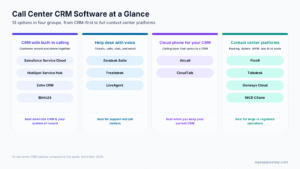
The best call center CRM software in 2027 depends on where your customer data lives and how big your call floor is. Salesforce Service Cloud and HubSpot Service Hub are the strongest CRM-first choices, Zoho CRM and Bitrix24 are the lowest-cost options for small teams, and Zendesk Suite, Freshdesk, and LiveAgent suit support-led call centers that run on tickets. Aircall and CloudTalk add a capable phone layer to the CRM you already use, while Five9, Talkdesk, Genesys Cloud, and NICE CXone are full contact center platforms for large, outbound-heavy, or regulated operations.
A call center CRM puts the customer record and the phone call on the same screen. When a call comes in, the agent sees who is calling, their history, and their open issues before saying hello, and every call is logged without manual typing. This guide compares 13 options with prices checked against vendor pages in November 2026, explains the three ways to build a call center CRM stack, and shows what a 20-agent team should expect to pay. To browse more tools, see our call center software category.
Key takeaways:
- CRM-first tools with built-in calling start at about $14 to $25 per user per month, and HubSpot offers a free plan for up to two users.
- Help desks with voice, such as Zendesk Suite at $55 per agent per month, bundle tickets, calls, chat, and email in one agent workspace.
- Cloud phone apps such as Aircall start at $30 per license per month and sync calls into Salesforce, HubSpot, Zoho, Pipedrive, and other CRMs.
- Contact center platforms publish prices from $75 (Genesys Cloud CX 1) to $249 (NICE CXone Ultimate) per agent per month, and the CRM is usually a separate license.
- Numbers, call minutes, AI add-ons, and onboarding fees can add a large share to the license cost, so compare total cost, not the headline price.
Quick Comparison
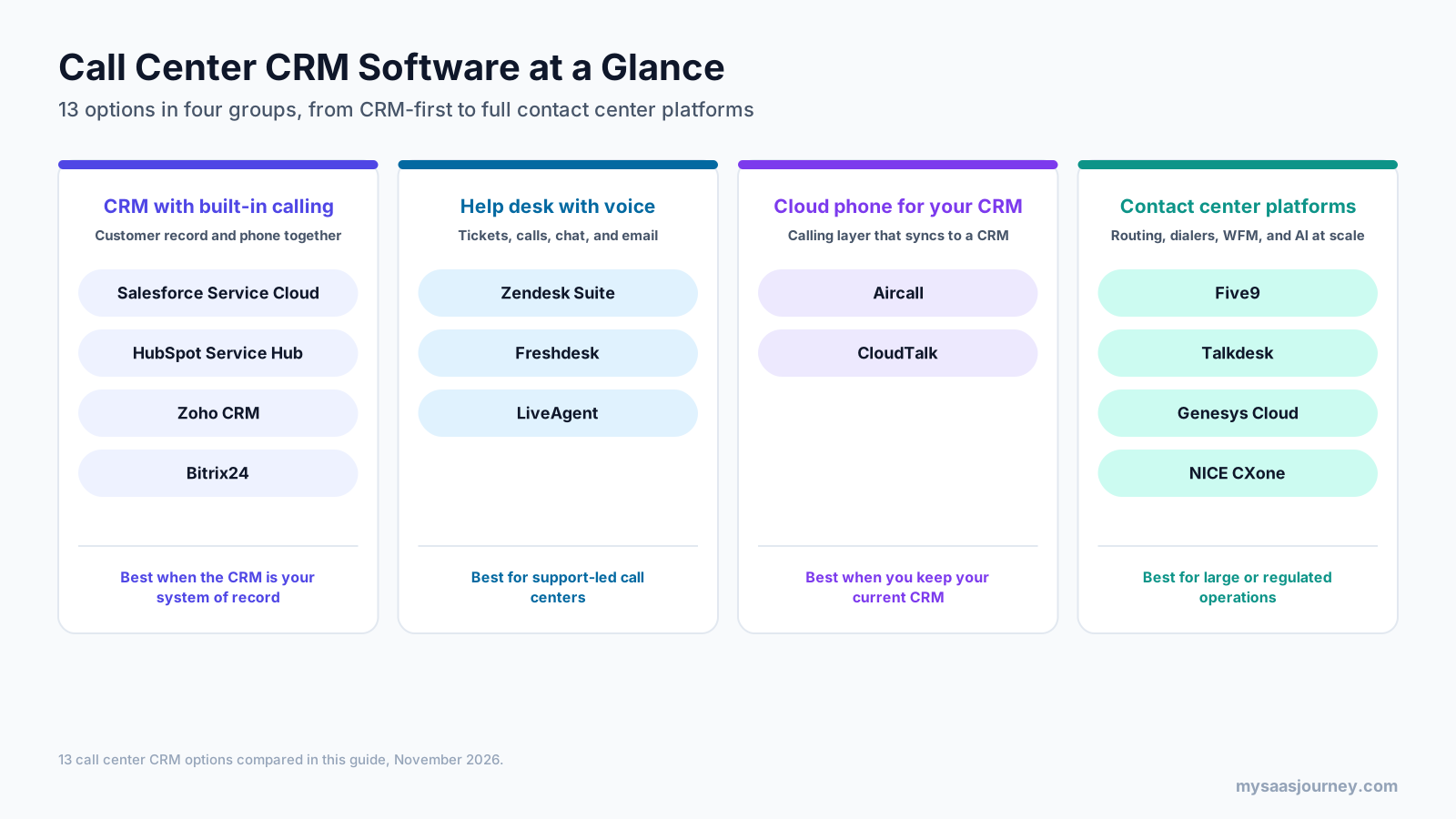
| Tool | Best for | Starting price | Free plan or trial |
|---|---|---|---|
| Salesforce Service Cloud | Enterprise service teams on Salesforce | $25 per user a month (Starter Suite) | 30-day trial |
| HubSpot Service Hub | CRM, help desk, and calling in one place | Free; paid from $15 per seat a month | Free plan (2 users) |
| Zoho CRM | Lowest-cost CRM with built-in calling | $14 per user a month (annual, third-party) | Free plan (3 users) |
| Bitrix24 | Flat-price CRM for small teams | $49 a month for 5 users (annual) | Free plan (no telephony) |
| Zendesk Suite | Support-led call centers on tickets | $55 per agent a month (annual) | 14-day trial |
| Freshdesk | Help desk plus a separate contact center app | $19 + $15 per agent a month (annual) | Free voice plan; 14-day trials |
| LiveAgent | Budget help desk with your own carrier | $29 per agent a month (annual list) | 30-day trial, no card |
| Aircall | Cloud phone for an existing CRM | $30 per license a month (annual, 3 min) | Free test access |
| CloudTalk | Cloud phone with IVR and dialers | €25 per user a month (annual) | 14-day trial, no card |
| Five9 | Outbound and blended call centers | $159 per concurrent seat a month (50 min) | Demo |
| Talkdesk | AI-led contact center with CRM connectors | $105 per user a month (Voice Essentials) | Express offer for small firms |
| Genesys Cloud | Large omnichannel operations | $75 per user a month (CX 1, annual) | Demo |
| NICE CXone | Enterprise contact centers needing WEM | $110 per agent a month (Omnichannel) | Demo |
What Is Call Center CRM Software?
Call center CRM software is a customer relationship management system that connects to your phone system, so agents can handle calls from inside the customer record. It combines the contact database, interaction history, and case or deal tracking of a CRM with call center functions such as caller ID lookup, call routing, click-to-call, recording, and reporting. If you are new to the category, our guide to customer relationship management in SaaS explains the basics.
The link between the two systems is called computer telephony integration (CTI). CTI is what makes the screen pop, logs each call against the right contact, and lets agents dial with one click. Some products build the phone system into the CRM, others sell it as an add-on, and many call centers connect a separate calling platform to the CRM they already use.
The term overlaps with “contact center CRM,” which usually means the same setup with more channels, such as chat, email, SMS, and social messages, routed into one queue. In both cases the goal is the same: give every agent full context on every customer, and give managers accurate data on what happens on the call floor.
How a Call Center CRM Works
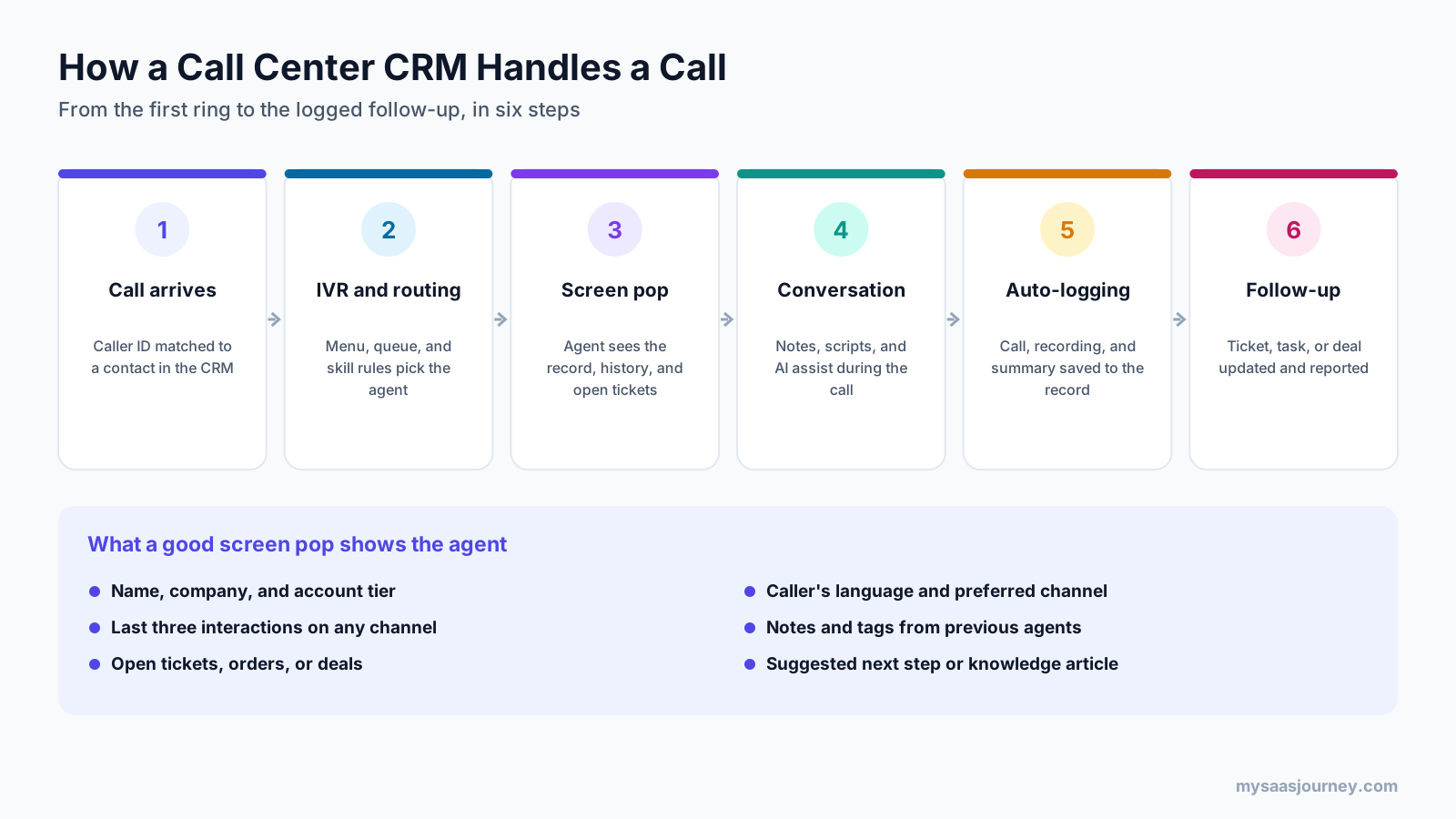
A call center CRM follows the same sequence on almost every call. The caller’s number is matched to a contact, the interactive voice response (IVR) menu and routing rules choose the right queue and agent, and the agent’s screen opens the matching record. During the call, the agent adds notes, follows a script, or reads AI suggestions. When the call ends, the system saves the call, recording, transcript, and summary to the record, then creates or updates a ticket, task, or deal.
In practice, picture a returning customer calling about a late delivery. Without a CRM link, the agent asks for an order number, searches two systems, and types notes after the call. With a call center CRM, the agent sees the open order and the customer’s last email as the call connects, routes it to the shipping team if needed, and the call log appears on the ticket without any extra work. Across thousands of calls a month, those saved seconds add up to shorter handle times and cleaner data.
The quality of this flow depends on three things: how accurate your contact data is, how deep the routing rules go, and how well the CRM and phone system share data in both directions.
Key Features to Look For
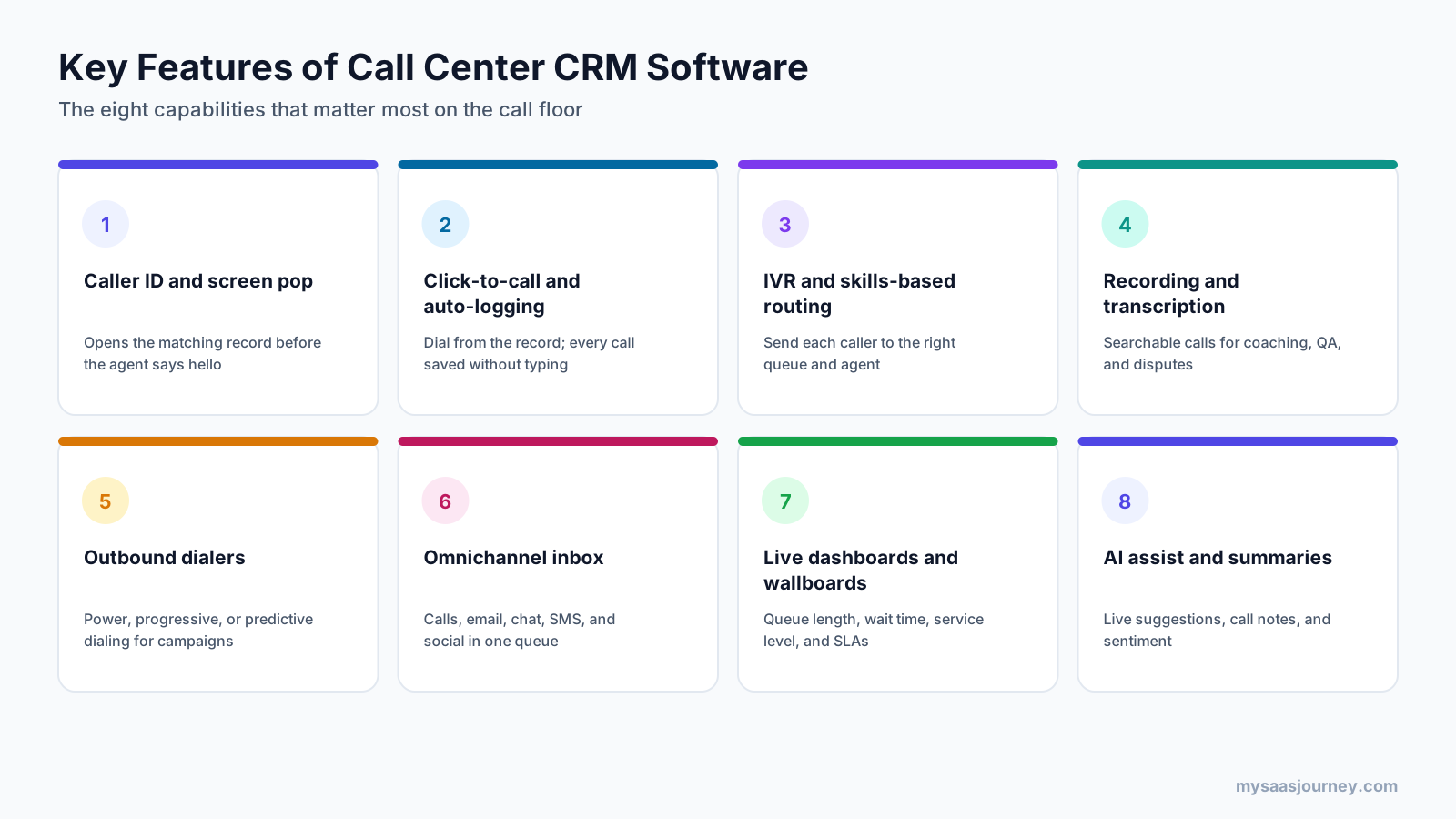
Not every call center needs every feature, but these eight capabilities separate a phone system that happens to log calls from a working call center CRM.
Caller ID and Screen Pop
The CRM should match the incoming number to a contact and open the record automatically. Check how it handles unknown numbers, shared numbers, and customers with several phone numbers, because that is where screen pop often fails.
Click-to-Call and Automatic Call Logging
Agents should dial from any record and have the call, duration, outcome, and notes logged without manual entry. Automatic logging is the feature that keeps CRM data complete, which matters for every report you build later.
IVR and Skills-Based Routing
An IVR menu greets callers and collects intent, and routing rules send them to the right queue. Skills-based routing matches callers to agents by language, product, or customer tier. Many CRM-first tools offer basic queues on entry plans and keep IVR for higher tiers.
Call Recording and Transcription
Recordings support coaching, quality reviews, and dispute handling. Transcription makes calls searchable and feeds AI summaries. If you operate in regulated industries, check retention controls, pause-and-resume for card payments, and consent settings. Our call recording software category covers dedicated tools.
Outbound Dialers
Sales and collections teams need power, progressive, or predictive dialers that call through lists and skip unanswered numbers. These are standard on contact center platforms and rare on CRM-first tools. See our auto dialer software category for standalone options.
Omnichannel Inbox
Most customers now switch between phone, email, chat, and messaging apps. An omnichannel inbox puts every channel in one queue and one record, so the agent can see that the caller already sent two emails about the same issue.
Live Dashboards and Wallboards
Supervisors need live views of queue length, wait time, abandoned calls, and service levels. Historical reports should break results down by agent, queue, and call reason.
AI Assist and Summaries
AI features now include live suggestions, knowledge article lookups, automatic call summaries, sentiment detection, and AI voice agents that handle simple calls. Pricing for these varies widely, from included minutes to per-seat add-ons and per-resolution fees, so read the AI line items closely. For a broader view, see our guide to the best AI agents.
Three Ways to Build a Call Center CRM Stack
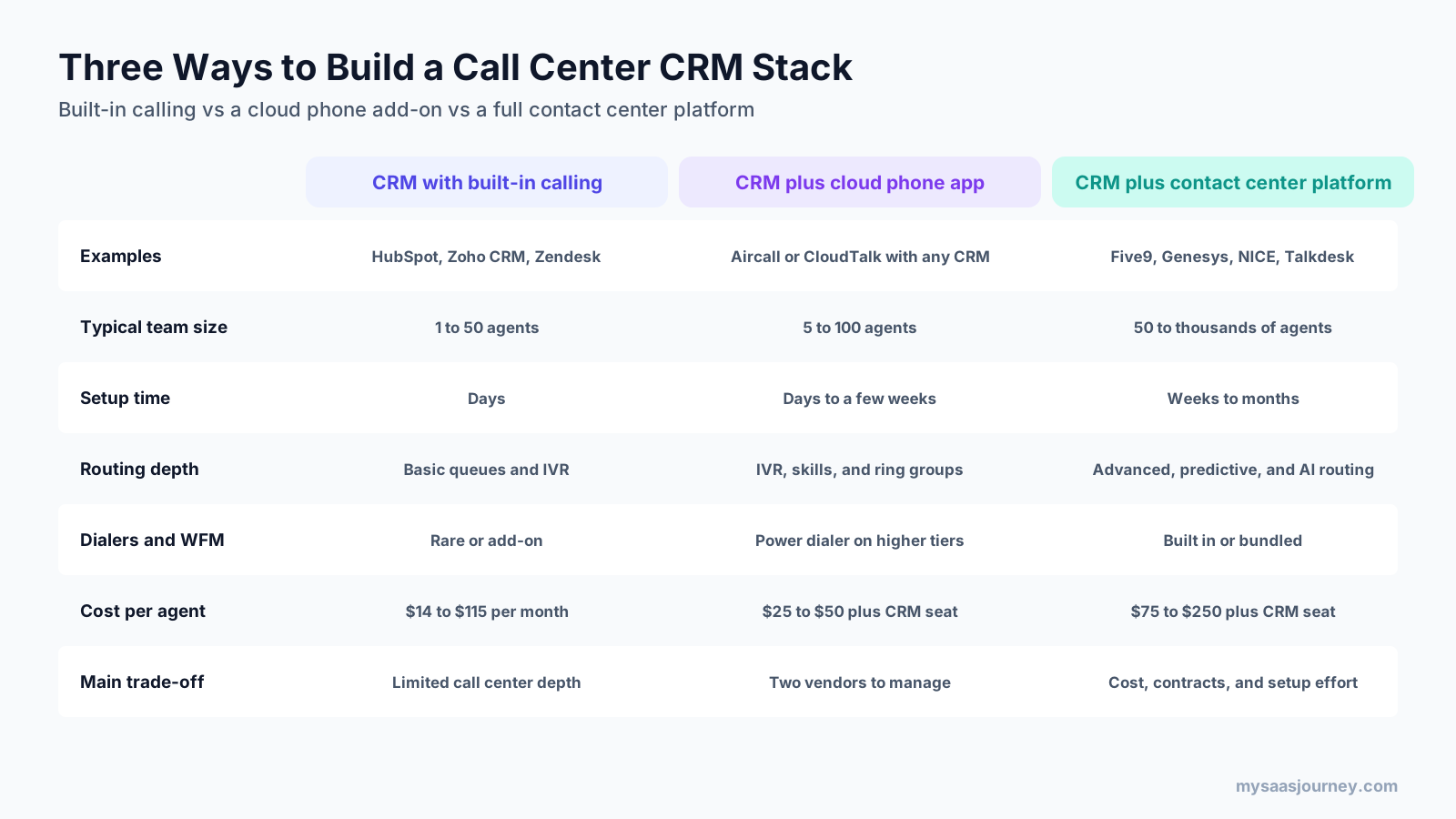
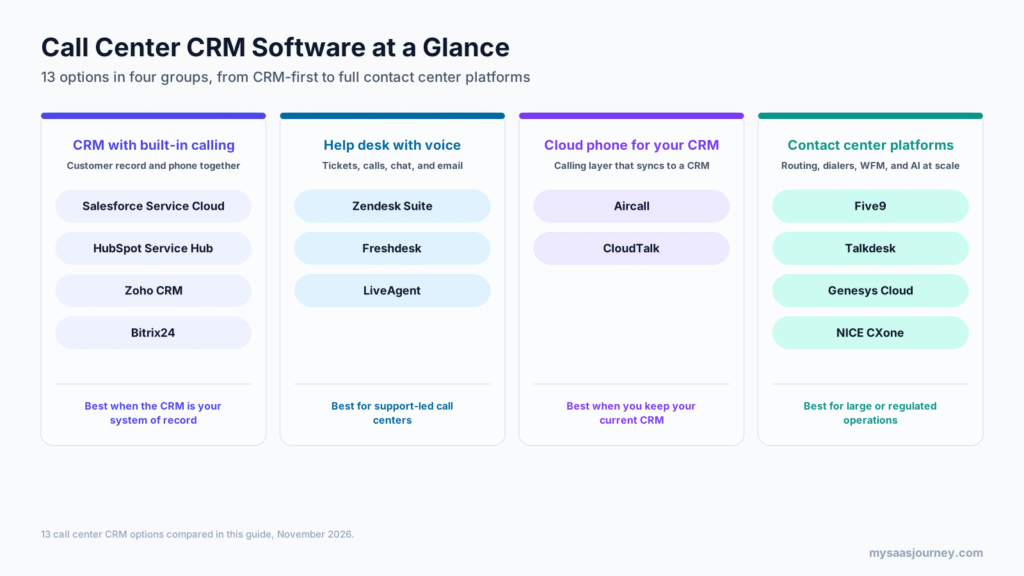
Before comparing vendors, decide which kind of stack you need. The 13 tools in this guide fall into three models.
CRM with built-in calling is the simplest setup. Tools such as HubSpot Service Hub, Zoho CRM, and Zendesk Suite include a phone system, so there is one vendor, one bill, and one login. This model fits teams of up to about 50 agents with mostly inbound calls and basic routing needs. The trade-off is depth: dialers, workforce management, and advanced routing are limited or missing.
CRM plus a cloud phone app keeps your current CRM and adds a dedicated calling layer such as Aircall or CloudTalk. You get stronger IVR, routing, and call analytics than most built-in options, and the phone app syncs calls, recordings, and notes into the CRM. The cost is a second vendor and a second license per agent.
CRM plus a contact center platform (often called CCaaS, for contact center as a service) pairs a CRM with Five9, Talkdesk, Genesys Cloud, or NICE CXone. These platforms add predictive dialers, workforce management, quality management, and AI routing, and they run inside the CRM through prebuilt connectors. This model suits operations with 50 or more agents, heavy outbound volume, or strict compliance needs, but setup takes weeks to months and contracts are larger.
CRM-First Platforms With Built-In Calling
These four tools start from the customer record. Calling is built in or added through a native module, so the CRM stays the system of record. For a wider list of CRMs, see our CRM software category.
1. Salesforce Service Cloud
Salesforce Service Cloud is the service edition of the Salesforce platform, with case management, omnichannel routing, knowledge, and AI agents through Agentforce. Telephony runs through Service Cloud Voice, which connects contact center telephony to the Salesforce agent console. Learn more on our Salesforce page.
Best for: mid-sized and enterprise service teams that already run sales or service on Salesforce.
Key features:
- Case management, omnichannel routing, and a unified agent console
- Service Cloud Voice for calls inside Salesforce, through Amazon Connect or partner telephony
- Knowledge base, macros, and service analytics
- Agentforce for Service AI agents on the top edition
- A large partner ecosystem, including most contact center platforms in this guide
Pricing: Starter Suite costs $25 per user per month and Pro Suite costs $100 per user per month, both billed annually. Higher service editions are listed at $195, $395, and $550 per user per month, and the top tier includes Agentforce for Service. Voice and contact center pricing is not shown on the main pricing page. A 30-day free trial is available without a credit card.
Trade-offs: Salesforce is powerful but complex. Most teams need an admin or partner for setup, and voice is a separate cost, so the total bill is often well above the edition price.
2. HubSpot Service Hub
HubSpot Service Hub combines a help desk, ticketing, a knowledge base, a customer portal, and built-in calling on the HubSpot CRM. Because it shares a database with HubSpot’s marketing and sales tools, agents see the full customer journey on every call.
Best for: small and mid-sized teams that want CRM, help desk, and calling in one product with a free starting point.
Key features:
- Built-in calling with click-to-call, recording, and automatic logging
- Help desk workspace with tickets, SLAs, and routing
- Call transcription on Professional and Enterprise
- Knowledge base, customer portal, and feedback surveys
- Breeze AI features for summaries and support
Pricing: a free plan covers up to two users. Starter costs $15 per seat per month billed annually and includes 500 calling minutes and one phone number. Professional costs $90 per seat per month with 3,000 minutes, up to three numbers, and 750 hours of call transcription, plus a $1,500 one-time onboarding fee. Enterprise costs $150 per seat per month with 12,000 minutes, up to five numbers, 1,500 transcription hours, and $3,500 onboarding. HubSpot’s page also shows slightly higher monthly-billing prices.
Trade-offs: HubSpot’s calling suits service and sales teams more than high-volume call floors. There is no predictive dialer or workforce management, and onboarding fees raise the first-year cost. If you only need a free CRM, compare it with our list of the best free CRM tools.
3. Zoho CRM
Zoho CRM is a full-featured CRM with a low entry price. Its pricing page states that you can make, receive, and log calls inside Zoho CRM, and teams can connect Zoho Voice (Zoho’s own cloud telephony) or partner phone systems through PhoneBridge.
Best for: small and growing teams that want the lowest per-user cost for a CRM with calling.
Key features:
- Built-in calling with call logging on the Standard plan
- PhoneBridge connections to partner telephony providers
- Workflow automation, Blueprint process rules, and sales signals
- Zia AI assistant on Enterprise and above
- Links to Zoho Desk for ticket-based support
Pricing: a free edition covers up to three users. Third-party trackers that checked Zoho’s US page in 2026 list Standard at $14, Professional at $23, Enterprise at $40, and Ultimate at $52 per user per month on annual billing, or $20, $35, $50, and $65 monthly. Zoho’s page renders prices by location, so confirm in your region. A free trial is available on paid editions.
Trade-offs: telephony features depend on the provider you connect, so IVR, recording, and routing vary. Ticket-based support lives in Zoho Desk, a separate product.
4. Bitrix24
Bitrix24 is an all-in-one workspace with CRM, tasks, chat, and an omnichannel contact center that brings messengers and live chat into the CRM. Unlike most tools here, it charges a flat price per organization rather than per user.
Best for: small businesses that want a CRM, communication, and project tools for a fixed monthly price.
Key features:
- CRM with leads, deals, and automation
- Telephony integration on paid plans, with call tracking on Professional
- Omnichannel contact center for live chat and messaging apps
- Tasks, projects, and internal chat in the same workspace
Pricing: the free plan does not include telephony. Basic costs $49 a month for 5 users, Standard costs $99 a month for 50 users, and Professional costs $199 a month for 100 users, all billed annually. Monthly billing is $69, $144, and $289. Enterprise plans start at $399 a month for 250 users on annual billing.
Trade-offs: the pricing page does not detail call recording, SIP, or number rental, so confirm the telephony setup with Bitrix24 before you commit. The broad feature set also means a steeper learning curve for agents who only need a call screen.
Help Desks With Built-In Voice
These three tools start from the ticket. They suit call centers where most calls are support requests that need tracking, SLAs, and follow-up. Our customer service software category lists more help desks.
5. Zendesk Suite
Zendesk Suite bundles ticketing, messaging, live chat, voice, a help center, and AI agents in one agent workspace. Calls create tickets automatically, so voice and digital conversations share one history. For a head-to-head view, read our Zendesk vs Intercom comparison.
Best for: support-led call centers that want voice inside a mature help desk.
Key features:
- Built-in telephony with group routing on Suite Team
- Overflow, after-hours routing, and IVR on Suite Professional
- Unified agent workspace for calls, email, chat, and messaging
- AI agents billed by automated resolution
- Large marketplace of CRM and phone integrations
Pricing: Suite Team costs $55 per agent per month billed annually ($69 monthly), and Suite Professional costs $115 ($149 monthly). Enterprise pricing is available by quote only. Phone numbers and call minutes are add-ons. AI agents include 5 automated resolutions per agent on Team and 10 on Professional, with extra resolutions at $1.50 committed or $2 pay-as-you-go. A 14-day trial covers Professional.
Trade-offs: IVR needs Professional, and telephony usage is billed on top of seats. Outbound dialers and workforce management require add-ons or partners.
6. Freshdesk
Freshdesk is Freshworks’ help desk, and Freshdesk Contact Center (formerly Freshcaller) is its cloud phone system. Teams buy them separately or as part of a Freshworks bundle, and calls create tickets in Freshdesk.
Best for: growing support teams that want a low-cost help desk and a phone system from one vendor.
Key features:
- Ticketing, automations, SLAs, and a knowledge base in Freshdesk
- Call recording, wait queues, voicemail, and transfers from Contact Center Growth
- Routing automation and call conferencing on Contact Center Pro
- Speech-enabled IVR and service-level monitoring on Contact Center Enterprise
- Freddy AI Copilot for agents as a paid add-on
Pricing: Freshdesk costs $19 (Growth), $55 (Pro), or $89 (Enterprise) per agent per month billed annually. Freshdesk Contact Center has a free plan with pay-per-minute calling, then Growth at $15, Pro at $39, and Enterprise at $69 per agent per month billed annually, with 2,000, 3,000, and 5,000 included incoming minutes. Freddy AI Copilot costs $29 per agent per month. Both products offer 14-day trials.
Trade-offs: you manage two subscriptions, and IVR is limited to the top Contact Center plan. Check whether your plan includes the CRM fields you need, since Freshdesk is support-focused.
7. LiveAgent
LiveAgent is a help desk with tickets, live chat, social messages, and a built-in call center. It connects to your own phone provider, so LiveAgent charges for agents while your carrier bills numbers and minutes directly.
Best for: budget-conscious support teams that want a help desk and call center in one product.
Key features:
- Universal inbox for email, chat, calls, and social channels
- Built-in call center on the Team plan and above
- Bring-your-own carrier model with no LiveAgent call charges
- Ticket automation, SLAs, and a knowledge base
Pricing: list prices on annual billing are $15 (Starter), $29 (Team, up to 15 agents), and $49 (Business) per agent per month. A promotional offer lowers these to $11, $22, and $38 for customers who start before November 22, 2026. Starter does not include the call center. Enterprise costs $3,199 a month on annual billing with 80 agents included. Every plan has a 30-day trial with no credit card.
Trade-offs: the pricing page does not list IVR or recording details by plan, so confirm them in the trial. You also need a separate telephony provider, which adds a second bill.
Cloud Phone Systems That Plug Into Your CRM
These tools do not replace your CRM. They add a stronger calling layer and sync every call to the CRM you already use. Our business phone systems category covers more options.
8. Aircall
Aircall is a cloud phone system built for sales and support teams. It is popular because of its long list of CRM and help desk integrations and quick setup.
Best for: teams that like their current CRM and want a better phone layer without a full contact center platform.
Key features:
- Integrations with Salesforce, HubSpot, Zoho, Pipedrive, monday.com, and Microsoft Dynamics
- Help desk integrations with Zendesk, Intercom, Help Scout, and Gorgias
- AI Voice Agents included on paid plans
- Analytics+, AI Assist Pro, and WhatsApp as add-ons
- Over 250 integrations in total
Pricing: Essentials costs $30 and Professional costs $50 per license per month billed annually, with a three-license minimum. Enterprise is custom with a 25-license minimum. Annual billing saves 25% over monthly. Add-ons include AI Assist Pro at $49 per seat, Analytics+ at $15 per seat, WhatsApp at $10 per seat, and Aircall for Salesforce Voice at $30 per seat. New accounts get free test access.
Trade-offs: you still pay for a CRM seat per agent. Advanced features such as live analytics and AI coaching cost extra, so the per-agent total can climb quickly.
9. CloudTalk
CloudTalk is a cloud call center app with IVR, routing, dialers, and more than 95 CRM and help desk integrations. It is often chosen by sales teams that need outbound dialing alongside support calls.
Best for: small and mid-sized teams that want IVR and dialers on top of an existing CRM.
Key features:
- Visual call flow builder, ring groups, queues, and call recording on Starter
- IVR, skills-based routing, and 95+ integrations from Essential
- Smart dialer, AI Sales Dialer, live monitoring, and wallboards on Expert
- Certified HubSpot integration, plus Pipedrive, Zoho CRM, Zendesk, and Intercom
- Salesforce integration on the Expert plan
Pricing: in euros, Starter costs €25, Essential costs €29, and Expert costs €49 per user per month billed annually, or €34, €39, and €69 monthly. The Expert plan requires at least three licenses. A 14-day trial with no credit card includes full Expert access and calling credit. USD prices are available on the pricing page toggle.
Trade-offs: Salesforce users need the top plan, and integrations below Essential are limited. Calls and numbers are billed on top of licenses.
Contact Center Platforms With CRM Integrations
These platforms run large call floors. They include dialers, advanced routing, workforce engagement, and AI, and they plug into the CRM rather than replacing it. Our call center workforce management software category covers scheduling tools that pair with them.
10. Five9
Five9 is a cloud contact center platform known for outbound and blended operations. It covers voice and digital channels with built-in dialers and AI.
Best for: outbound-heavy or blended call centers with at least 50 seats.
Key features:
- Blended inbound and outbound with built-in dialers
- Voice, chat, email, SMS, and social messaging
- AI summaries, live transcription, agent assist, and AI knowledge
- Quality management, workforce management, and analytics on higher plans
- CRM integrations with Salesforce, ServiceNow, Microsoft Dynamics, Zendesk, and Oracle
Pricing: Digital costs $119 and Core costs $159 per concurrent seat per month. Plus, Pro, and Enterprise are quote-based. The minimum is 50 seats, and usage charges may apply. AI includes 3,000 minutes per bundled seat.
Trade-offs: the 50-seat minimum rules out small teams. Pricing per concurrent seat helps shift-based operations but makes per-agent comparisons harder.
11. Talkdesk
Talkdesk is an AI-focused contact center platform with industry editions and prebuilt CRM connectors.
Best for: mid-sized and enterprise teams that want a contact center with strong CRM connectors and industry packages.
Key features:
- Voice Essentials with speech recognition, routing, and business intelligence
- Digital Essentials for email, chat, SMS, and social
- Elite tier with workforce management, screen recording, and custom reporting
- Industry Experience Clouds for financial services, healthcare, retail, and more
- Integrations with Salesforce, Zendesk, ServiceNow, HubSpot, and Microsoft Dynamics 365
Pricing: Digital Essentials costs $85, Voice Essentials costs $105, Elite costs $165, and Industry Experience Clouds cost $225 per user per month. Talkdesk Express for US and Canadian businesses under 50 employees includes 25 licenses and $100 in credit with no contract.
Trade-offs: you need a separate CRM license. Voice and digital are split at the Essentials level, so omnichannel needs Elite.
12. Genesys Cloud
Genesys Cloud CX is an enterprise contact center platform with four published plans that add digital channels, workforce engagement, and AI as you move up.
Best for: large omnichannel operations that need routing, WEM, and AI on one platform.
Key features:
- Voice, routing, speech-enabled IVR, outbound campaigns, and recording on CX 1
- Digital channels, quality, and compliance tools on CX 2
- Workforce management, forecasting, and scheduling on CX 3
- Journey management and AI Experience Units on CX 4
- Agent Copilot, Supervisor Copilot, and predictive routing
Pricing: CX 1 costs $75, CX 2 costs $115, CX 3 costs $155, and CX 4 costs $240 per user per month with an annual commitment. Usage-based charges may apply, and some features are add-ons on lower tiers.
Trade-offs: the CRM is a separate system, and enterprise rollouts usually need a partner. Usage charges make the final cost hard to predict.
13. NICE CXone
NICE CXone is an enterprise contact center platform with deep workforce engagement and analytics, sold in five suites.
Best for: enterprise and regulated contact centers that need quality management and workforce tools.
Key features:
- Voice and digital channels in every suite
- Workforce engagement items that grow by suite
- AI routing on Ultimate, with outbound as an add-on
- Industry packages for banking, insurance, healthcare, and retail
- Integrations with major CRMs
Pricing: Omnichannel costs $110, Essential costs $135, Core costs $169, Complete costs $209, and Ultimate costs $249 per agent per month, or $0.25 per session on Ultimate. Billing is monthly in arrears.
Trade-offs: many AI and outbound features are add-ons below Ultimate. The platform is built for large teams, so smaller call centers pay for depth they may not use.
Features Compared
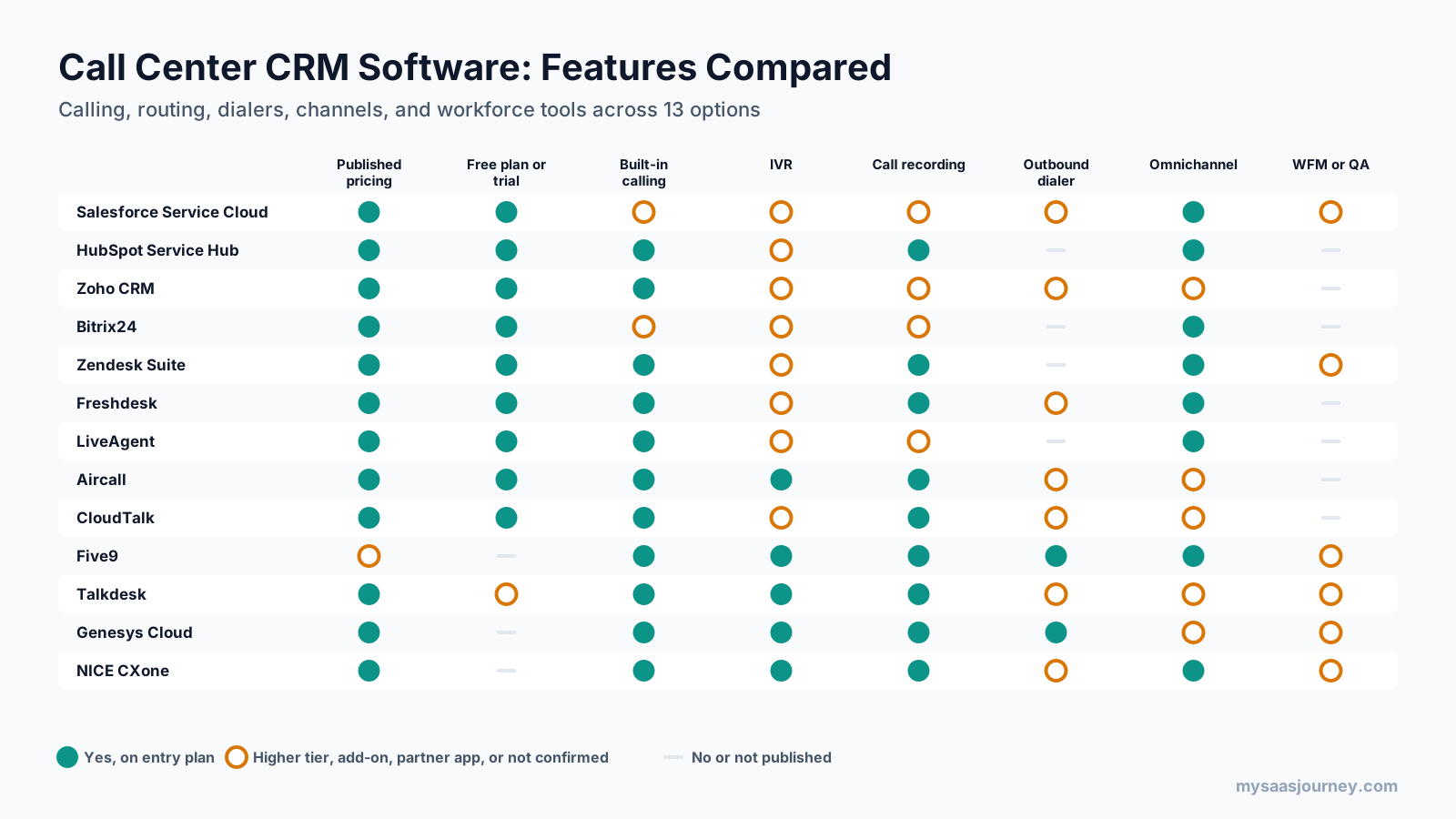
The matrix shows the pattern clearly. CRM-first tools and help desks win on price transparency, free plans, and omnichannel records, but they rarely include outbound dialers or workforce management. Cloud phone apps fill the routing and dialing gap at a modest price. Contact center platforms cover every call center function, but they lack free plans and need a CRM alongside them.
Pricing Compared
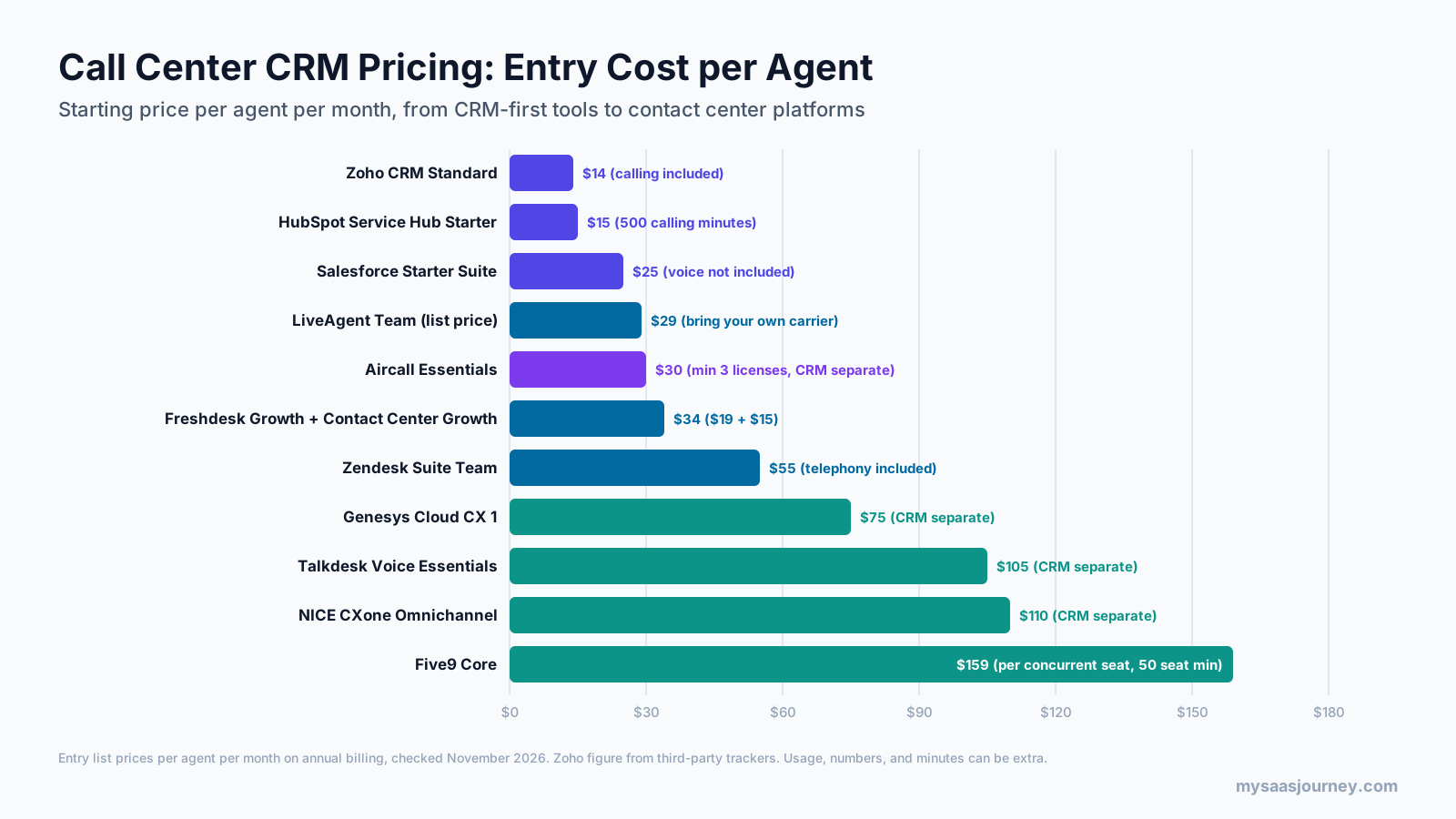
Entry prices range from $14 to $159 per agent per month, but headline prices are not directly comparable. CRM-first prices include the customer record, while cloud phone and contact center prices usually do not. Some vendors include calling minutes, and others bill every minute and number separately.
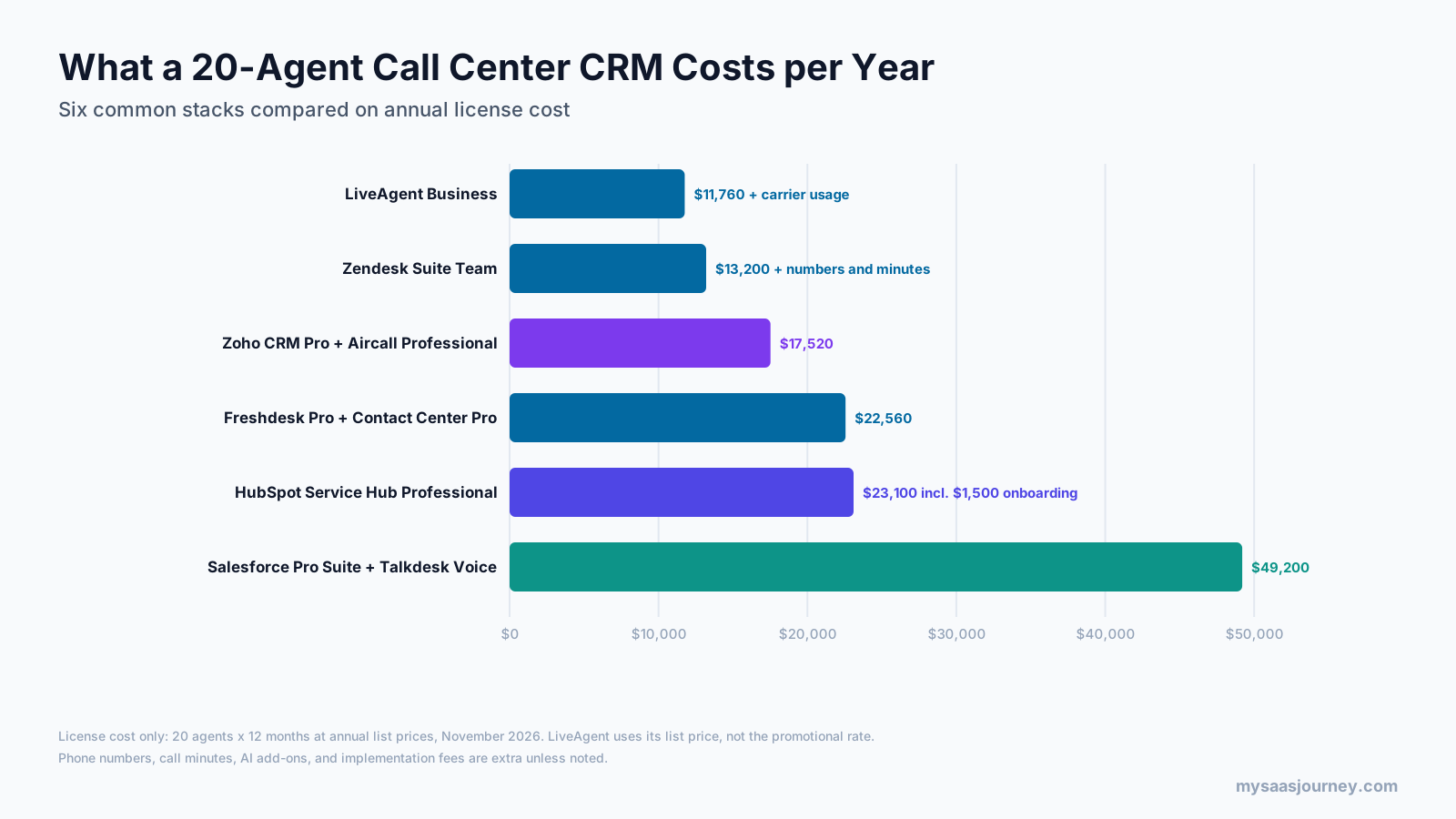
For a 20-agent team on annual billing, license costs work out as follows:
| Stack | Per agent per month | Annual license cost (20 agents) | Not included |
|---|---|---|---|
| LiveAgent Business | $49 (list) | $11,760 | Carrier numbers and minutes |
| Zendesk Suite Team | $55 | $13,200 | Numbers and minutes |
| Zoho CRM Professional + Aircall Professional | $23 + $50 | $17,520 | Call usage, AI add-ons |
| Freshdesk Pro + Contact Center Pro | $55 + $39 | $22,560 | Minutes above allowance |
| HubSpot Service Hub Professional | $90 | $23,100 with $1,500 onboarding | Minutes above 3,000 |
| Salesforce Pro Suite + Talkdesk Voice Essentials | $100 + $105 | $49,200 | Usage, implementation |
In practice, the cheapest stack on paper is not always the cheapest to run. A team making many outbound calls may spend more on carrier minutes with LiveAgent than with a plan that bundles minutes, and an enterprise team may save on handle time with a contact center platform’s routing and dialers. Use your current call volume, average handle time, and minutes per agent to model at least two options. For broader context on CRM adoption and spend, see our CRM statistics for 2027.
How to Choose Call Center CRM Software
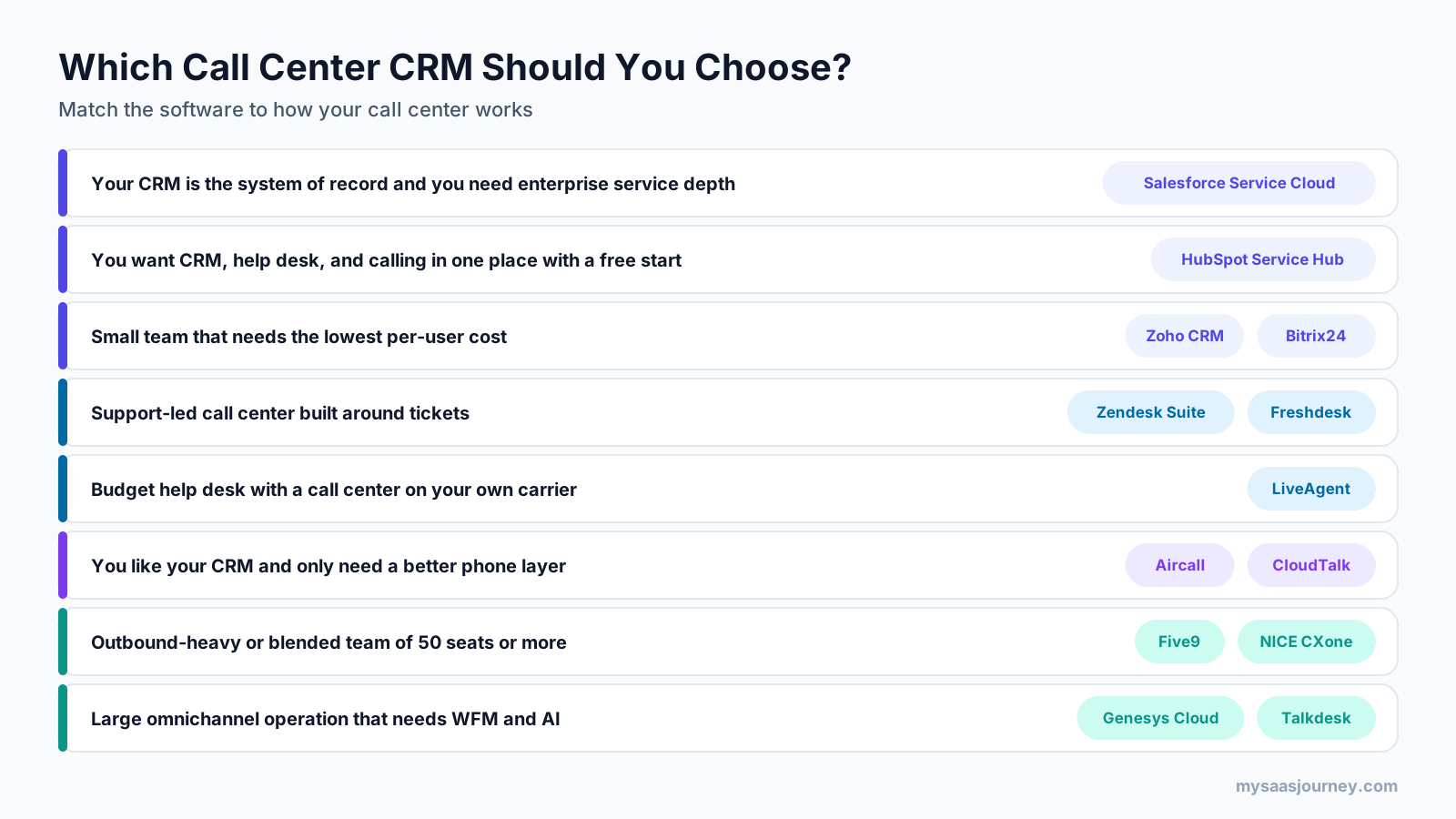
Start with how your call center works today, not with the vendor list. These steps help you narrow the field quickly.
- Decide where customer data should live. If sales, marketing, and service already run on one CRM, keep it as the system of record and add calling to it.
- Map your call mix before you compare vendors. Count inbound and outbound calls per day, average handle time, and the share of calls that need a ticket or follow-up.
- Pick the stack model that fits your size. Teams under about 50 agents with mostly inbound calls usually fit a CRM or help desk with built-in calling, while outbound-heavy or larger teams need a cloud phone app or a contact center platform.
- List the call features you cannot work without. Write down whether you need IVR, skills-based routing, recording retention, dialers, wallboards, or WFM, and check which plan includes each one.
- Test the CRM integration in a trial. Place test calls and confirm screen pop, call logging, recordings, and notes land on the right record every time.
- Model total cost for 12 months. Add licenses, numbers, minutes, AI add-ons, onboarding fees, and any partner implementation costs.
- Check compliance and data residency. Confirm recording consent, payment card handling, retention, and where call data is stored.
Our guide on how to choose software for your business needs has a scoring template you can reuse for vendor demos.
How to Roll Out a Call Center CRM
A careful rollout protects service levels while agents learn the new screens. Follow these steps in order.
- Clean and deduplicate contacts first, because screen pop only works when each phone number maps to one record.
- Port or provision your phone numbers early, since number porting can take days or weeks depending on the carrier.
- Build IVR menus, queues, and routing rules from your current call flows, then simplify anything callers rarely use.
- Configure call dispositions and required fields, so every call ends with a reason code that feeds your reports.
- Train agents on live test calls, including transfers, callbacks, and escalations, before switching customer traffic.
- Run a pilot with one team or queue for one to two weeks and compare handle time and logging rates with your baseline.
- Move the remaining queues in stages and keep the old system available until reporting matches.
Common Mistakes to Avoid
Buying a contact center platform for a small team is the most common mistake. If you have ten agents taking inbound support calls, a help desk with voice will cover your needs at a fraction of the cost and setup time.
The opposite mistake is also common. Teams start with a CRM’s built-in calling, then grow to 60 agents with outbound campaigns and no dialer or workforce tools. If growth is likely, check the upgrade path before you sign.
Ignoring usage costs is another trap. Numbers, minutes, SMS, AI resolutions, and transcription hours are often billed separately, and they can add a large share to the license bill in a busy month.
Finally, do not skip the integration test. A CRM and phone system that “integrate” on paper may only log basic call data, without recordings, transcripts, or two-way sync. Confirm exactly which fields sync and in which direction.
Final Thoughts
The best call center CRM software is the one that matches your stack model. HubSpot Service Hub, Zoho CRM, and Salesforce Service Cloud suit teams that want the CRM at the center, Zendesk Suite, Freshdesk, and LiveAgent suit ticket-driven support, Aircall and CloudTalk add a capable phone layer to any CRM, and Five9, Talkdesk, Genesys Cloud, and NICE CXone run large, complex call floors. Shortlist two or three options from the right group, test the CRM link with live calls, and compare 12-month total cost before you decide. For more tools in this space, browse our call center software category or our list of top SaaS tools for sales teams.
Frequently Asked Questions
What CRM do call centers use?
Call centers commonly use Salesforce Service Cloud, HubSpot Service Hub, Zoho CRM, Zendesk, and Freshdesk as the customer record, often paired with a calling platform such as Aircall, CloudTalk, Five9, Talkdesk, Genesys Cloud, or NICE CXone. Smaller teams usually choose a CRM or help desk with built-in calling, while larger operations connect a contact center platform to their CRM.
What is the best CRM software for a call center?
There is no single best option for every call center. Salesforce Service Cloud suits enterprise service teams, HubSpot Service Hub suits teams that want CRM, help desk, and calling in one place, and Zendesk Suite suits support-led call centers. For large or outbound-heavy operations, Five9, Genesys Cloud, NICE CXone, or Talkdesk connected to your CRM is the stronger choice.
What are the top 3 CRM tools?
Salesforce, HubSpot, and Zoho CRM are three of the most widely used CRM platforms. All three offer calling for call center use: Salesforce through Service Cloud Voice, HubSpot through built-in calling in Service Hub and Sales Hub, and Zoho through built-in calling, Zoho Voice, and PhoneBridge partners.
What is CRM in a call center?
CRM in a call center is the system that stores customer records and interaction history and connects them to the phone system. When a customer calls, the CRM identifies them, shows the agent their details, and logs the call, recording, and notes automatically, so every agent has the same context and managers can report on every interaction.
How much does call center CRM software cost?
Prices start at about $14 to $25 per user per month for CRM-first tools with calling, around $55 per agent per month for help desks with voice such as Zendesk Suite, and $30 to $50 per license for cloud phone apps such as Aircall. Contact center platforms publish prices from $75 to $249 per agent per month, usually on top of a CRM license.
Is there a free call center CRM?
Yes, though free plans come with tight limits. HubSpot offers a free plan for up to two users, Zoho CRM has a free edition for up to three users, and Freshdesk Contact Center has a free plan with pay-per-minute calling. Bitrix24 has a free plan, but telephony requires a paid plan. Free plans suit very small teams, not full call centers.
What is the difference between call center CRM and call center software?
Call center software handles the calls themselves, including routing, IVR, dialers, recording, and agent status. A call center CRM stores the customer record and history. Many products combine both, and most call centers connect the two through computer telephony integration so agents see customer data during every call.
What is CTI in a CRM?
CTI, or computer telephony integration, connects a phone system to a CRM. It enables caller ID lookup, screen pop, click-to-call, and automatic call logging, so agents can handle calls from inside the CRM instead of switching between a phone and a separate database.