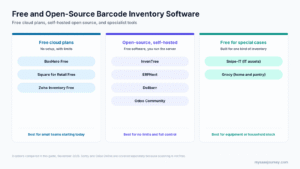
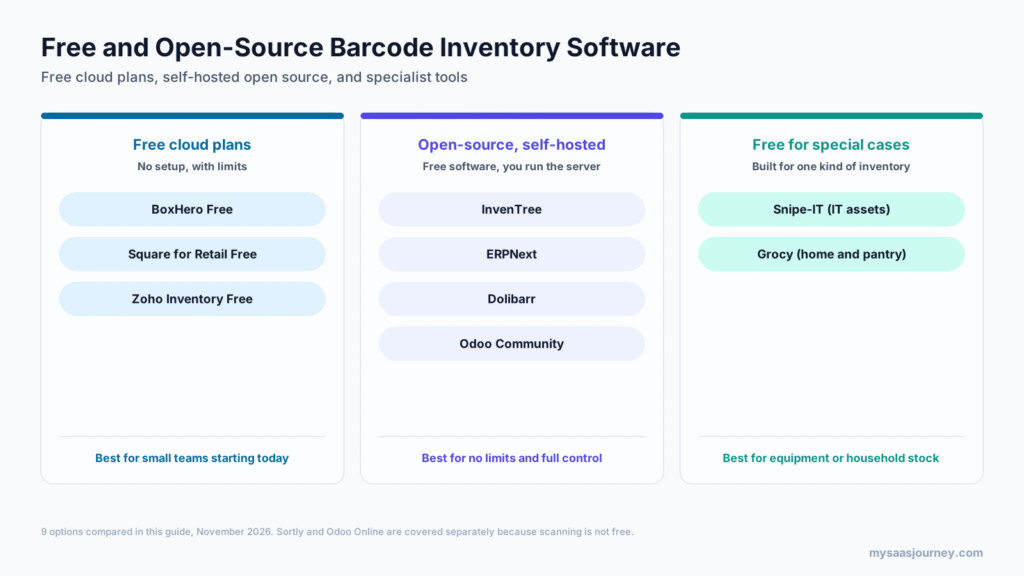
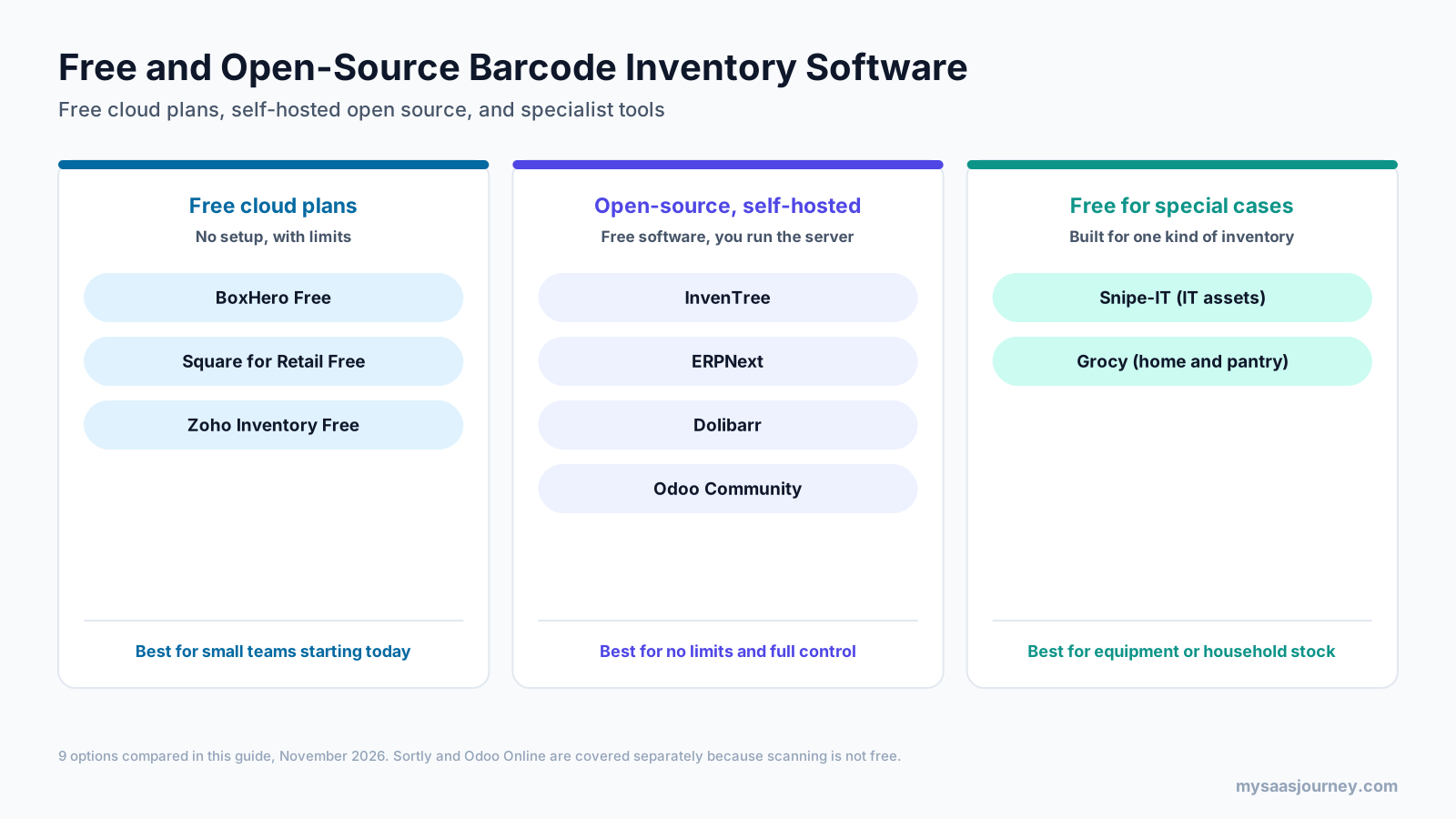
The best free inventory software with a barcode scanner in 2027 is BoxHero Free for small stockrooms, Square for Retail Free for shops that sell in person, and InvenTree for teams that want open-source software with no item limits. ERPNext and Dolibarr are strong open-source choices if you also need orders, invoicing, and accounting, Snipe-IT is the best free option for IT equipment, and Grocy is the best free barcode system for home use.
“Free” covers two very different things. Free cloud plans let you start scanning in minutes but cap items, users, orders, or locations, and some keep barcode features for paid plans. Open-source tools have no caps and cost nothing to download, but you need to host, secure, and update them yourself. This guide compares 9 options across both groups, shows exactly what each free version includes, and explains the hardware you need to start scanning. For barcode tools beyond inventory, see our barcoding software category.
Key takeaways:
- BoxHero Free includes barcode scanning with a phone or scanner for up to 100 items, 1 member, and 1 location.
- Square for Retail Free has a built-in barcode scanner and unlimited items, but label printing and barcode counts need the Plus plan.
- Sortly’s free plan does not include in-app barcode scanning, which starts on its $49 a month Advanced plan.
- Odoo Community is free and open source, but Odoo’s official Barcode app is part of Odoo Enterprise only.
- InvenTree, ERPNext, Dolibarr, Snipe-IT, and Grocy are open source with no item caps and support USB scanners, with camera scanning built in or available through apps.
Quick Comparison
| Tool | Type | Best for | Free limits | Barcode scanning on free |
|---|---|---|---|---|
| BoxHero | Free cloud plan | Small stockrooms under 100 items | 100 items, 1 member, 1 location, 30 days of history | Yes, phone or scanner |
| Square for Retail | Free cloud plan | Shops selling in person | Unlimited items; card processing fees apply | Yes, built-in scanner; counts and labels on Plus |
| Zoho Inventory | Free cloud plan | Small sellers with orders | 50 orders a month, 1 user, 1 warehouse | Mobile app scanning; plan availability not stated |
| InvenTree | Open source (MIT) | Parts, components, and builds | No caps; self-hosted | Yes, web and mobile app |
| ERPNext | Open source (GPL) | Full ERP with stock and POS | No caps; self-hosted | Yes, camera and scanners |
| Dolibarr | Open source (GPL) | Small business ERP with stock | No caps; self-hosted | Scanners and companion apps; label printing |
| Odoo Community | Open source (LGPL) | Teams already using Odoo | No caps; self-hosted | No official Barcode app; third-party modules |
| Snipe-IT | Open source (AGPL) | IT assets and equipment | No caps; self-hosted | Barcode and QR labels, USB scanners |
| Grocy | Open source (MIT) | Home pantry and household stock | No caps; self-hosted | Yes, camera and USB scanners |
How Barcode Inventory Software Works
Barcode inventory software links a code on each item, shelf, or bin to a record in the system, so a single scan can find an item and update its stock.
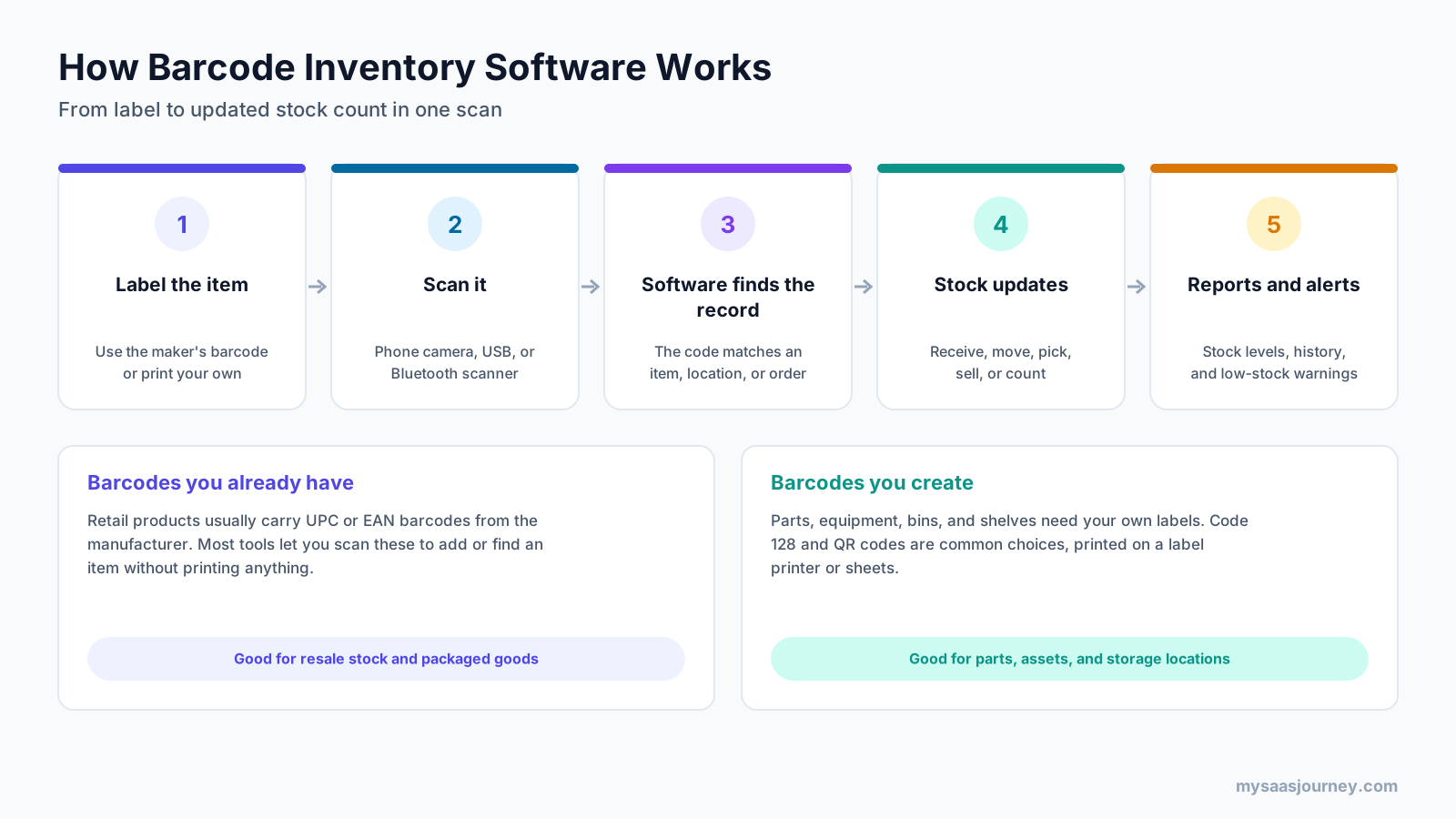
- Label each item, using the manufacturer’s barcode or a label you print yourself.
- Scan the code with a phone camera, a USB scanner, or a Bluetooth scanner.
- The software matches the code to an item, location, or order.
- Stock levels update when you receive, move, pick, sell, or count items.
- Reports and alerts show stock levels, history, and low-stock warnings.
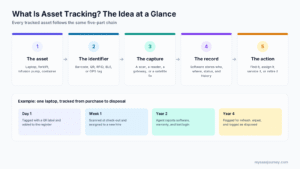
Retail products usually carry UPC or EAN barcodes already, so you can scan them to add or find items without printing anything. Parts, equipment, bins, and shelves need your own labels, often in Code 128 or as QR codes. If you track equipment rather than stock, our guide to what asset tracking is explains how barcode labels fit into asset management.
What Free Really Includes
Before choosing a tool, check what its free version actually allows. Many “free” plans exclude the barcode features you came for.
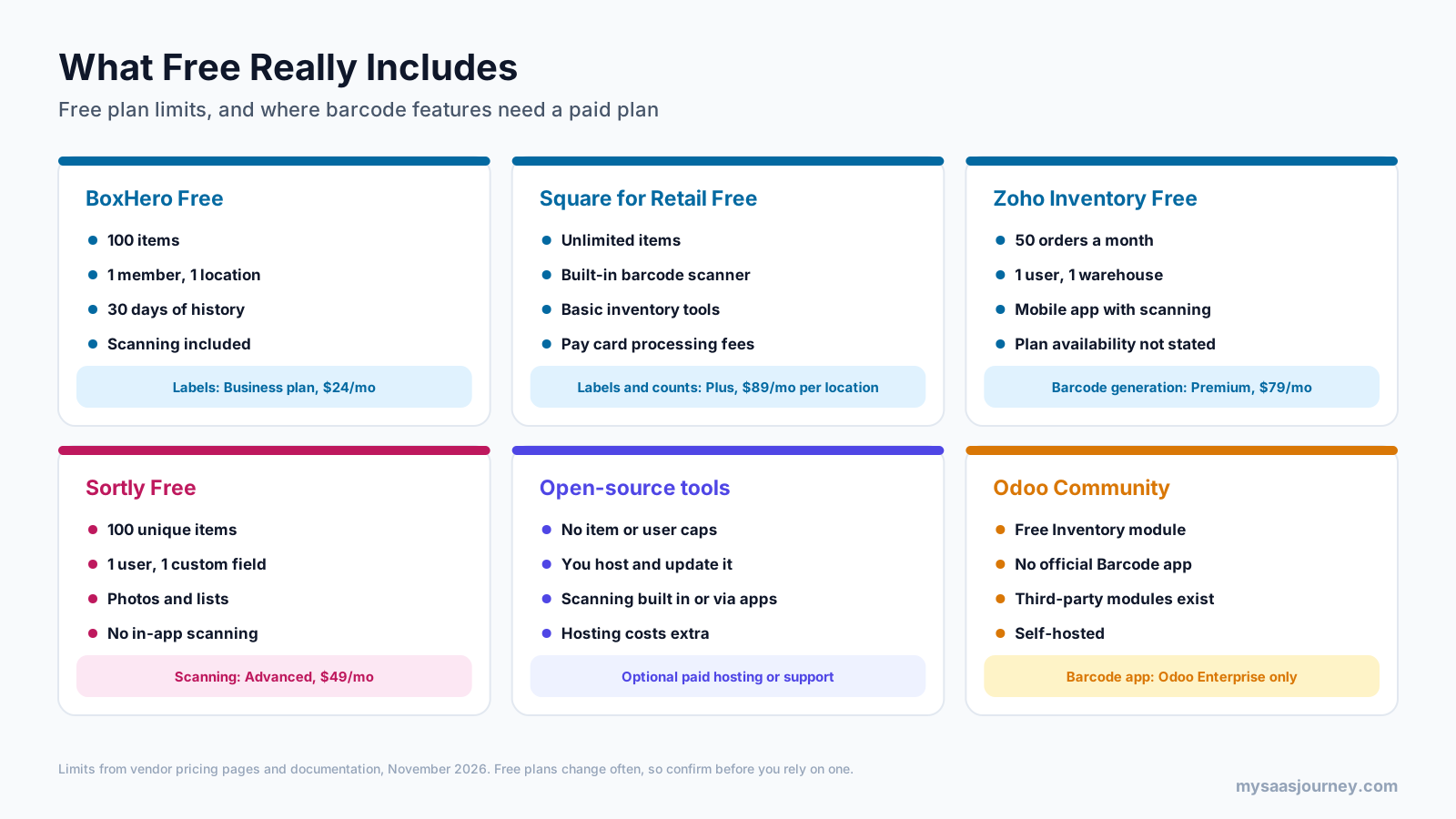
- BoxHero Free includes scanning but limits you to 100 items, 1 member, 1 location, and 30 days of history. Custom barcode label printing is on the Business plan.
- Square for Retail Free includes a built-in barcode scanner and unlimited items, but inventory counting and barcode label printing need Plus.
- Zoho Inventory Free allows 50 orders a month, 1 user, and 1 warehouse. The mobile app includes barcode scanning, but Zoho’s pricing page does not say which plans include it, and barcode generation is listed on Premium.
- Sortly Free allows 100 unique items and 1 user, but in-app barcode and QR scanning starts on the Advanced plan, so it is not a free barcode option.
- Open-source tools have no item or user caps, but you pay in time or hosting costs.
- Odoo Community includes a free Inventory module, but Odoo’s official Barcode app is an Enterprise feature, so scanning needs third-party modules.
Free Cloud Plans With Barcode Scanning
These three tools run in the cloud, so you can start scanning in minutes. Each free plan has limits, so check them against your item count and team size.
1. BoxHero
BoxHero is a cloud inventory app with mobile and web apps, built around fast barcode scanning for stock in and stock out.
Best for: small businesses and stockrooms with up to 100 items that want scanning without setup.
Key features:
- Barcode scanning with a phone or a barcode scanner on the free plan
- Stock in, stock out, and adjustment transactions
- Item attributes and search
- Mobile and web access
- Custom barcode printing and low-stock alerts on the Business plan
Free plan: The Personal plan is free for 1 member, 100 items, 1 location, and 30 days of transaction history, with barcode scanning included.
Paid plans: Business costs $24 per team per month ($288 a year) for 3 members, 1,000 items, and 3 locations, with add-ons for more members, items, and locations.
Trade-offs: The 100-item cap and 30-day history are tight, and label printing is not free.
In practice, BoxHero suits a single stockroom of supplies or spare parts, where one person scans items in and out and checks stock from a phone.
2. Square for Retail
Square for Retail is a point of sale and inventory system for shops. Its free plan includes the Retail POS app, an online store, basic inventory tools, and a built-in barcode scanner.
Best for: retail stores that sell in person and want inventory tied to sales.
Key features:
- Built-in barcode scanner in the Retail POS app
- Unlimited items in the catalog
- Basic inventory tools and a free online store
- Item lookup by scanning at checkout
- Barcode label printing, inventory counts, and advanced inventory tools on Plus
Free plan: There is no monthly fee. Square charges card processing fees of 2.6% plus 10 cents for in-person payments and 2.9% plus 30 cents online in the US.
Paid plans: Plus costs $89 a month per location in the US, with a 30-day free trial, and adds barcode label printing, advanced inventory tools, and inventory counting.
Trade-offs: The free plan makes sense only if you process payments through Square, and counting by scan and label printing need Plus.
3. Zoho Inventory
Zoho Inventory is a cloud inventory and order management system with sales orders, purchase orders, and integrations with Zoho’s other apps and online marketplaces. Its mobile apps include barcode scanning.
Best for: small online or wholesale sellers that need orders and stock in one place.
Key features:
- Sales orders, purchase orders, and invoices
- Item management with composite items and kits
- Mobile apps for iOS and Android with built-in barcode scanning
- Integrations with Zoho Books and ecommerce channels
- Barcode generation on the Premium plan
Free plan: The free plan allows 50 orders a month, 1 user, and 1 warehouse.
Paid plans: Standard costs $29 a month, Premium $79, Plus $129, and Enterprise $249 per organization, billed annually.
Trade-offs: The order cap is low, and Zoho does not state on its pricing page which plans include mobile scanning, so test it during sign-up.
Open-Source, Self-Hosted Software
4. InvenTree
InvenTree is an open-source inventory management system for parts management and stock control, popular with makers, electronics teams, labs, and small manufacturers. It is built on Python and Django with a REST API.
Best for: teams tracking parts, components, and builds who want no item limits and strong barcode support.
Key features:
- Native barcode support in the web interface, with USB keyboard-style scanners and webcam scanning
- Companion mobile app for Android and iOS, with barcode scanning as a core feature
- Parts organized by category, with stock tracked by location
- Bills of materials, suppliers, and supplier parts
- Plugins, including community label printer plugins, and a REST API
Cost and license: Free and open source under the MIT license. You can deploy it with Docker, a one-line install script, or a bare-metal install.
Trade-offs: You need to host and maintain it, and it is designed around parts and builds rather than retail sales.
In practice, an electronics workshop can label each storage bin, scan the bin with the mobile app, and see every part and quantity stored there before starting a build.
5. ERPNext
ERPNext is an open-source ERP from Frappe that covers stock, buying, selling, accounting, manufacturing, and point of sale. Frappe says you can scan product barcodes with your device camera, without separate scanners.
Best for: small and mid-sized businesses that want inventory, orders, POS, and accounting in one open-source system.
Key features:
- Item barcodes and serial number scanning in stock and sales documents
- Camera-based scanning, plus support for hardware scanners
- Multiple warehouses, batches, serial numbers, and reorder levels
- Point of sale integrated with inventory
- Purchasing, sales, accounting, and manufacturing modules
Cost and license: Free and open source under the GPL. Frappe also offers paid cloud hosting if you do not want to run your own server.
Trade-offs: As a full ERP, it takes more setup than a simple inventory app, and specialist warehouse scanning flows may need customization.
In practice, a small shop can scan products at the ERPNext point of sale and see stock fall in the same system that holds purchase orders and accounts, with no separate inventory app.
6. Dolibarr
Dolibarr is an open-source ERP and CRM for small businesses, with modules for products, stock, warehouses, orders, invoices, and barcodes.
Best for: small businesses that want a modular open-source system with barcode labels and stock control.
Key features:
- Barcode module that adds barcode fields to products and suggests and validates barcode numbers
- Barcode generation in common formats, with automatic EAN13 check digits
- Barcode sticker printing from the Tools menu
- Support for hardware scanners in keyboard emulation mode, and smartphone apps such as MobilId for Android and DoliApp for iOS
- Stock, warehouses, orders, invoices, and CRM modules
Cost and license: Free and open source under the GPL, with paid hosting available from partners.
Trade-offs: Phone scanning relies on separate apps, and the interface feels more traditional than newer tools.
7. Odoo Community
Odoo Community is the free, open-source edition of the Odoo business suite, including a full Inventory module. Odoo’s official Barcode app, however, is part of Odoo Enterprise.
Best for: teams already committed to Odoo that can add community or third-party barcode modules.
Key features:
- Inventory module with warehouses, locations, routes, and stock moves
- Sales, purchase, and point of sale modules
- Barcode fields on products
- Community and third-party barcode modules on the Odoo Apps store, some free and some paid
- Large partner and developer ecosystem
Cost and license: Odoo Community is free and open source under the LGPL. Odoo Enterprise, which includes the Barcode app, is a paid subscription.
Trade-offs: You do not get Odoo’s own scanning app for free, so plan for a third-party module and check that it supports your Odoo version.
Free Tools for Special Cases
8. Snipe-IT
Snipe-IT is a free, open-source IT asset and license management system. It tracks which person has which device, along with licenses, accessories, and consumables, and prints asset labels with barcodes and QR codes.
Best for: IT teams and offices tracking laptops, phones, monitors, and other equipment.
Key features:
- Asset labels with a 1D barcode for USB scanners and a QR code that opens the asset record
- Works with standard USB or Bluetooth barcode scanners in the top search bar
- Check-out and check-in of assets to users, locations, and other assets
- Audit, maintenance, and full asset history
- REST API and integrations
Cost and license: Free and open source under the AGPL for self-hosting. Hosted plans start at $39.99 a month, according to third-party listings.
Trade-offs: It is built for equipment, not stock you sell, so there are no sales or purchase orders.
In practice, an IT team can print a label for each laptop, then scan it at handover to check it out to a new employee and keep a full history of who used it.
9. Grocy
Grocy is a self-hosted web app for managing groceries and household supplies. It describes itself as “ERP beyond your fridge.”
Best for: households, home labs, and small shared spaces that want barcode-based pantry and supply tracking.
Key features:
- Camera scanning in the browser, processed on the device, which needs a secure HTTPS connection
- USB barcode reader support in fields with a barcode icon
- Barcode lookup for unknown products, with an Open Food Facts plugin by default
- Stock by location, best-before dates, and shopping lists
- Docker image and a Windows desktop version
Cost and license: Free and open source under the MIT license.
Trade-offs: Grocy is built for households, not businesses, so it lacks orders, invoicing, and multi-user business workflows.
In practice, you can scan groceries as you unpack them, let Grocy fill in product names from Open Food Facts, and get a shopping list when staples run low.
Features Compared
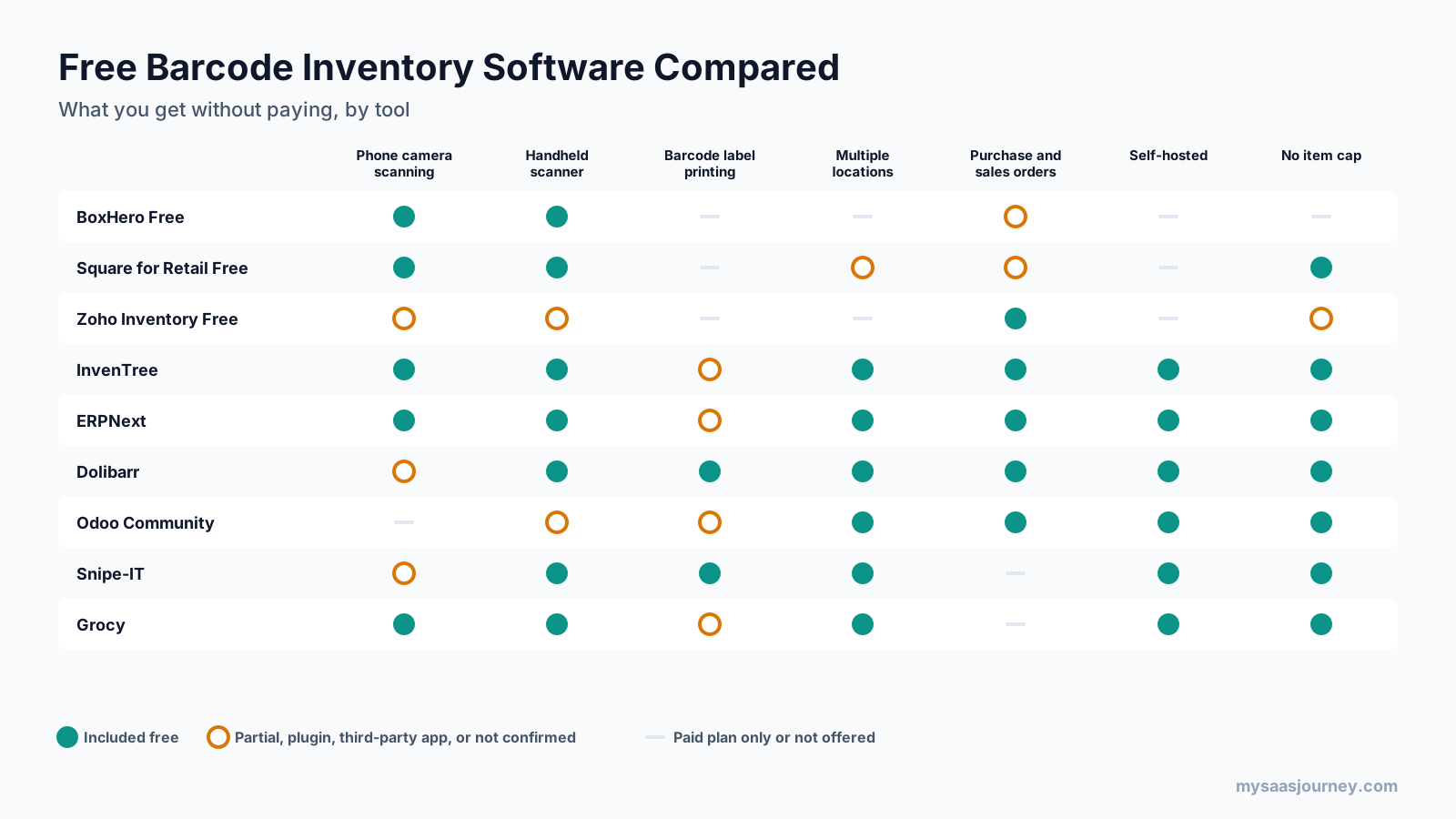
The free cloud plans are quickest to start but cap items or orders and keep label printing for paid plans. The open-source tools remove those caps and add multiple locations and orders, but you run the server. Dolibarr and Snipe-IT include barcode label printing in their free software, while InvenTree, ERPNext, and Grocy handle labels through plugins, print formats, or other tools.
Other Free Options We Considered
A few popular tools did not make the main list because their free versions do not include barcode scanning, or because their barcode features were not confirmed.
- Sortly: a popular visual inventory app with a free plan for 100 items and 1 user. In-app barcode and QR scanning starts on its Advanced plan at $49 a month, so the free plan does not meet the scanning requirement.
- Odoo Enterprise and Odoo Online: Odoo’s official Barcode app is part of Odoo Enterprise, which is a paid subscription, so it is not a free option even though Odoo’s Community edition is.
- OpenBoxes: an open-source warehouse and supply chain system originally built for healthcare facilities. We could not confirm its barcode scanning features from its public repository, so check its documentation if you work in healthcare logistics.
- Spreadsheets with a scanner: a USB scanner types codes into any spreadsheet cell, so a shared spreadsheet can work for a very small stockroom. It lacks stock history, alerts, and safeguards against mistakes, which is why most teams move to a dedicated tool quickly.
Who Should Use Free Barcode Inventory Software?
Free barcode inventory tools fit several kinds of users well:
- New and very small businesses with a few hundred items or fewer that want to stop counting by hand
- Shops already using a point of sale system with a free tier, such as Square
- Makers, labs, and small manufacturers that track parts and components and are comfortable self-hosting
- IT teams tracking laptops, phones, and peripherals across staff
- Nonprofits, schools, and community groups with small budgets
- Households and home labs that want order in the pantry, garage, or server rack
Free tools are a weaker fit for businesses with many users, several warehouses, high order volumes, or strict audit requirements. In those cases, the time spent working around limits or maintaining a server often costs more than a paid plan.
Free Cloud Plans vs Open-Source Software
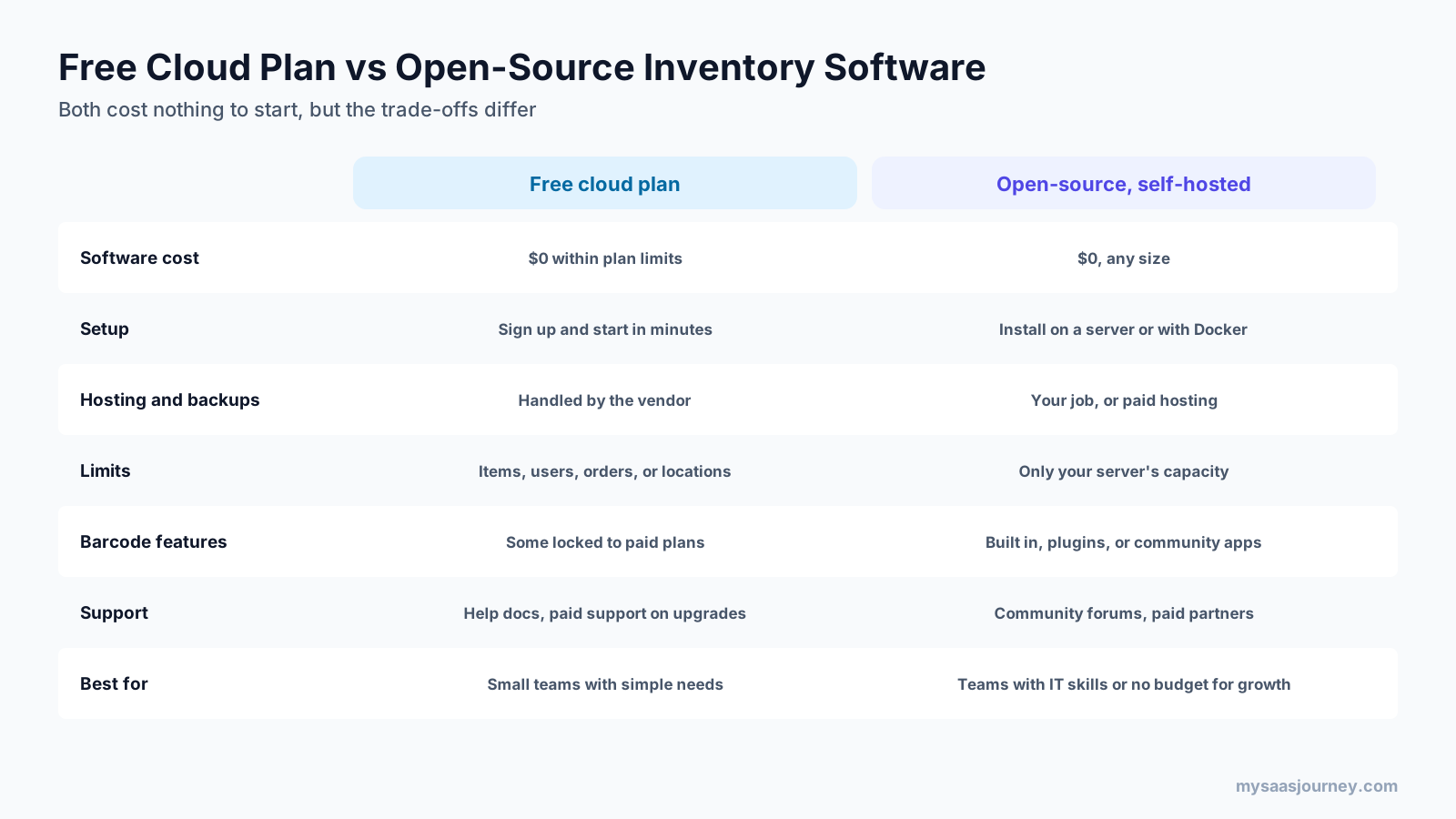
| Factor | Free cloud plan | Open-source, self-hosted |
|---|---|---|
| Software cost | $0 within plan limits | $0 at any size |
| Setup | Sign up and start in minutes | Install on a server or with Docker |
| Hosting and backups | Handled by the vendor | Your job, or paid hosting |
| Limits | Items, users, orders, or locations | Only your server’s capacity |
| Barcode features | Some locked to paid plans | Built in, plugins, or community apps |
| Support | Help docs, with more support on paid plans | Community forums and paid partners |
| Best for | Small teams with simple needs | Teams with IT skills or that expect to grow |
Open source is free to download but not free to run. You need a server or a cloud host, regular updates, backups, and security patches. If nobody on your team is comfortable with that, a free cloud plan, or paid hosting for an open-source tool, is usually the safer choice. Our explainer on what cloud computing is covers the hosting trade-offs.
The software license also matters. MIT and LGPL licenses are permissive for most business use, while GPL and AGPL require you to share changes under certain conditions, such as distributing modified code or offering it as a network service. For normal internal use, this rarely affects a small business, but check with your developer if you plan to customize heavily.
Which Barcode Types to Use for Inventory
The barcode format you choose affects which scanners can read it and how much information it holds. Most free tools support the common formats below.
- UPC and EAN: the standard retail product barcodes in North America and most other markets. Scan them to identify products you buy for resale. If you sell your own products through retailers, they usually expect GS1-issued UPC or EAN codes.
- Code 128: a compact format that holds letters and numbers, good for internal SKUs, part numbers, serial numbers, and bin locations.
- Code 39: an older alphanumeric format that many systems and scanners still support, often used for asset tags.
- QR codes: two-dimensional codes that can hold more data or a link to a record. Snipe-IT, for example, puts a QR code on asset labels that opens the asset record on any phone.
For internal labels, keep codes short and consistent. A simple pattern such as a prefix for the item type followed by a number is easier to read, print, and troubleshoot than long descriptive codes.
Barcode Scanning Hardware
You do not need special hardware to start. Every tool in this guide works with at least a phone camera or a basic USB scanner.
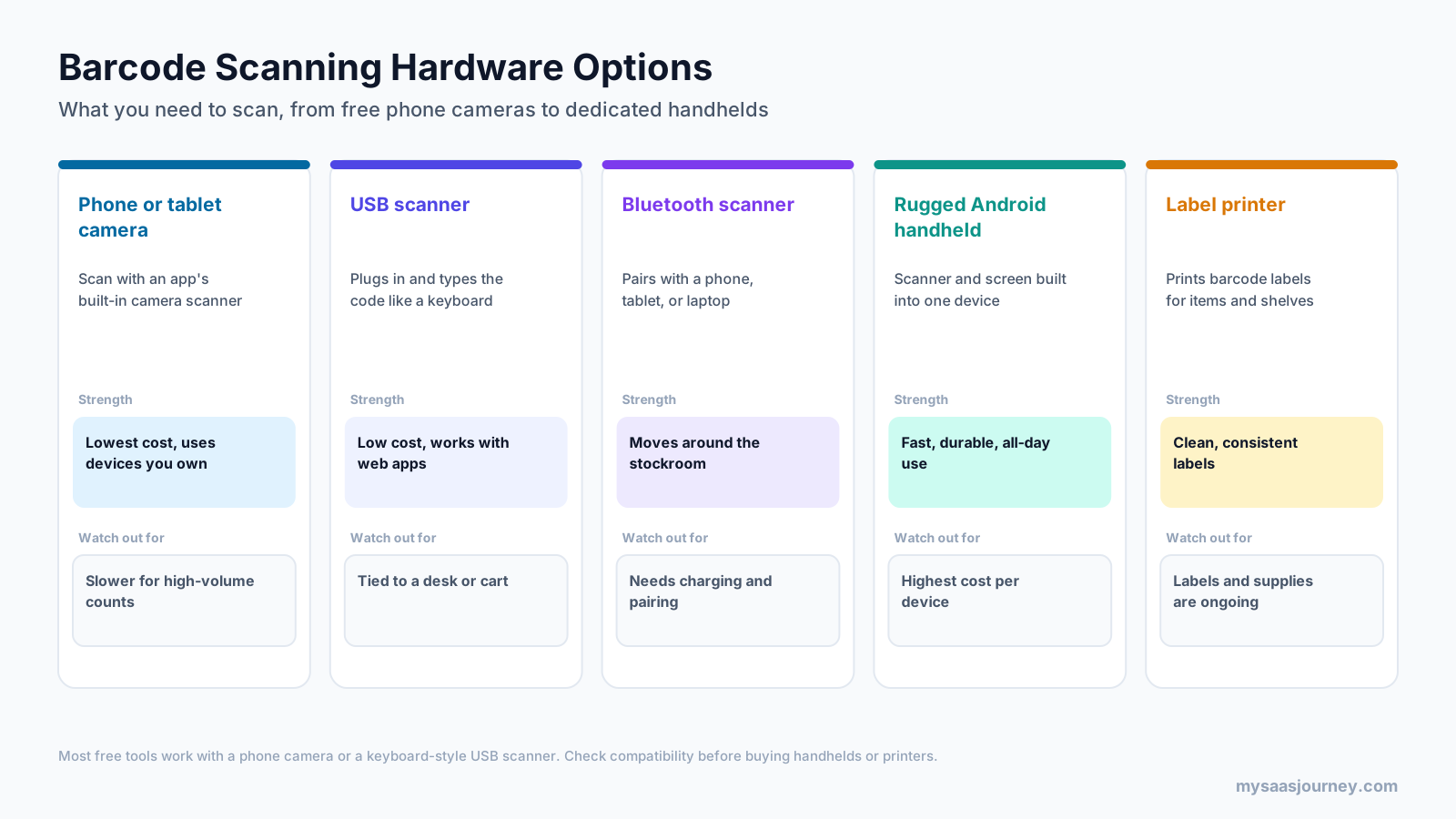
- Phone or tablet camera: the lowest-cost option, using devices you already own. It is slower for high-volume counts.
- USB scanner: plugs into a computer and types the code like a keyboard, which is called keyboard wedge or HID mode. It works with almost any web-based tool but keeps you near a desk or cart.
- Bluetooth scanner: pairs with a phone, tablet, or laptop so you can move around the stockroom. It needs charging and pairing.
- Rugged Android handheld: a scanner and screen in one device, built for all-day use. It costs the most per device.
- Label printer: prints barcode labels for items, shelves, and bins. Labels and supplies are an ongoing cost.
Start with phone cameras and one USB scanner, then add Bluetooth scanners or handhelds only if scanning volume justifies them.
How to Set Up a Free Barcode Inventory System
- Choose what to track first. Pick one location or product group, such as a stockroom, a parts shelf, or IT equipment.
- Decide which barcodes you will use. Use manufacturer UPC or EAN codes where items have them, and plan your own codes for everything else.
- Pick a tool and import your items. Most tools accept a CSV import, so clean up names, SKUs, and quantities in a spreadsheet first.
- Print and attach labels for items, shelves, and bins without barcodes, starting with the busiest areas.
- Test scanning on the devices your team will use, including in poor lighting and at the far end of your Wi-Fi.
- Run a full count by scan to set accurate starting quantities.
- Agree on simple rules for receiving, moving, and using stock, so every change gets scanned.
In practice, starting small makes a big difference. Scanning one stockroom correctly for a month teaches you more about your labels, devices, and habits than labeling everything at once.
How to Choose
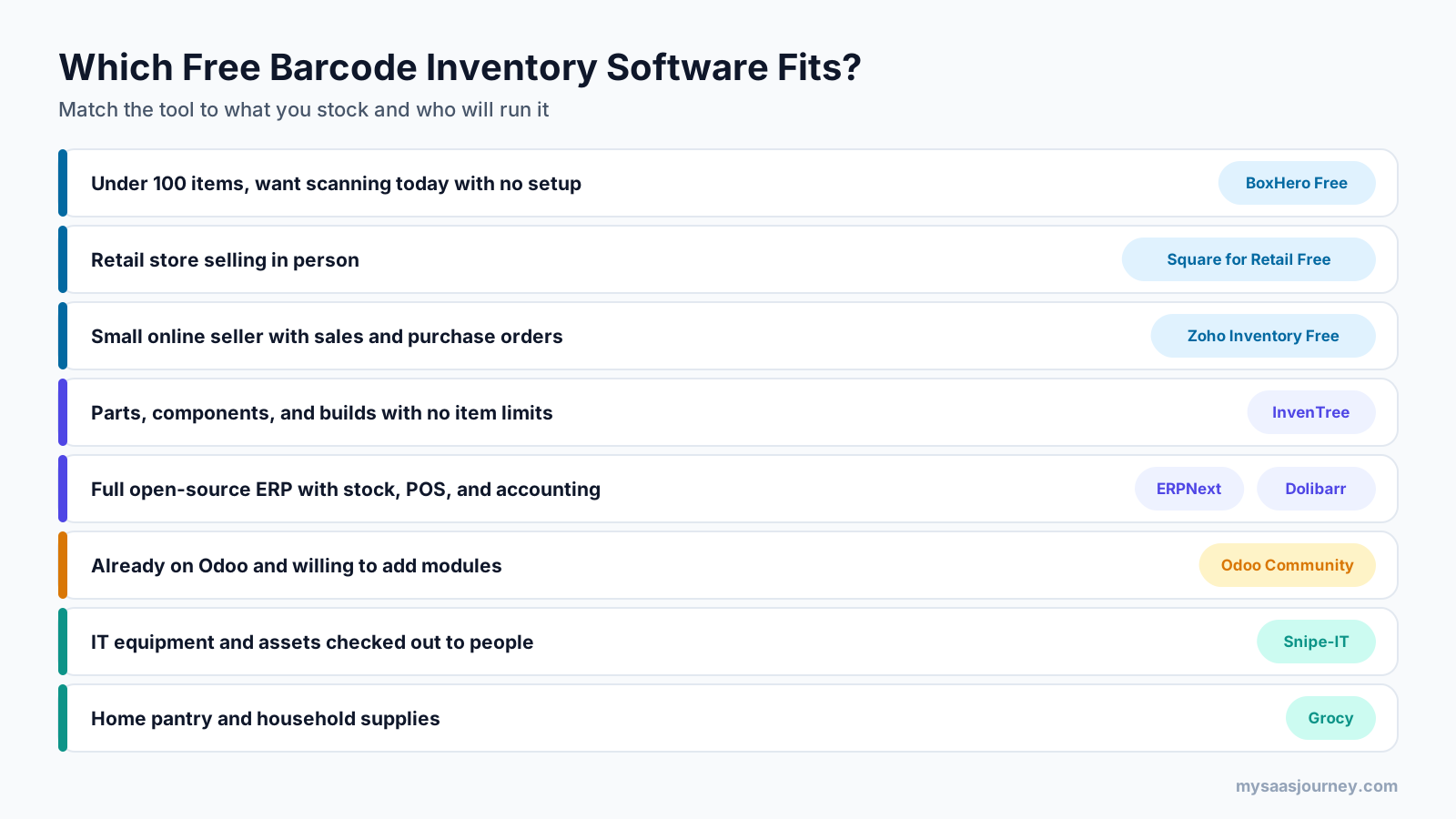
- Under 100 items and want scanning today with no setup: BoxHero Free
- Retail store selling in person: Square for Retail Free
- Small online seller that needs sales and purchase orders: Zoho Inventory Free
- Parts, components, and builds with no item limits: InvenTree
- Full open-source ERP with stock, POS, and accounting: ERPNext or Dolibarr
- Already on Odoo and willing to add modules: Odoo Community
- IT equipment and assets checked out to people: Snipe-IT
- Home pantry and household supplies: Grocy
For a broader framework, see our guide on how to choose the right software for your business.
When to Upgrade From Free
Free tools work well until you hit a limit that slows the team down.
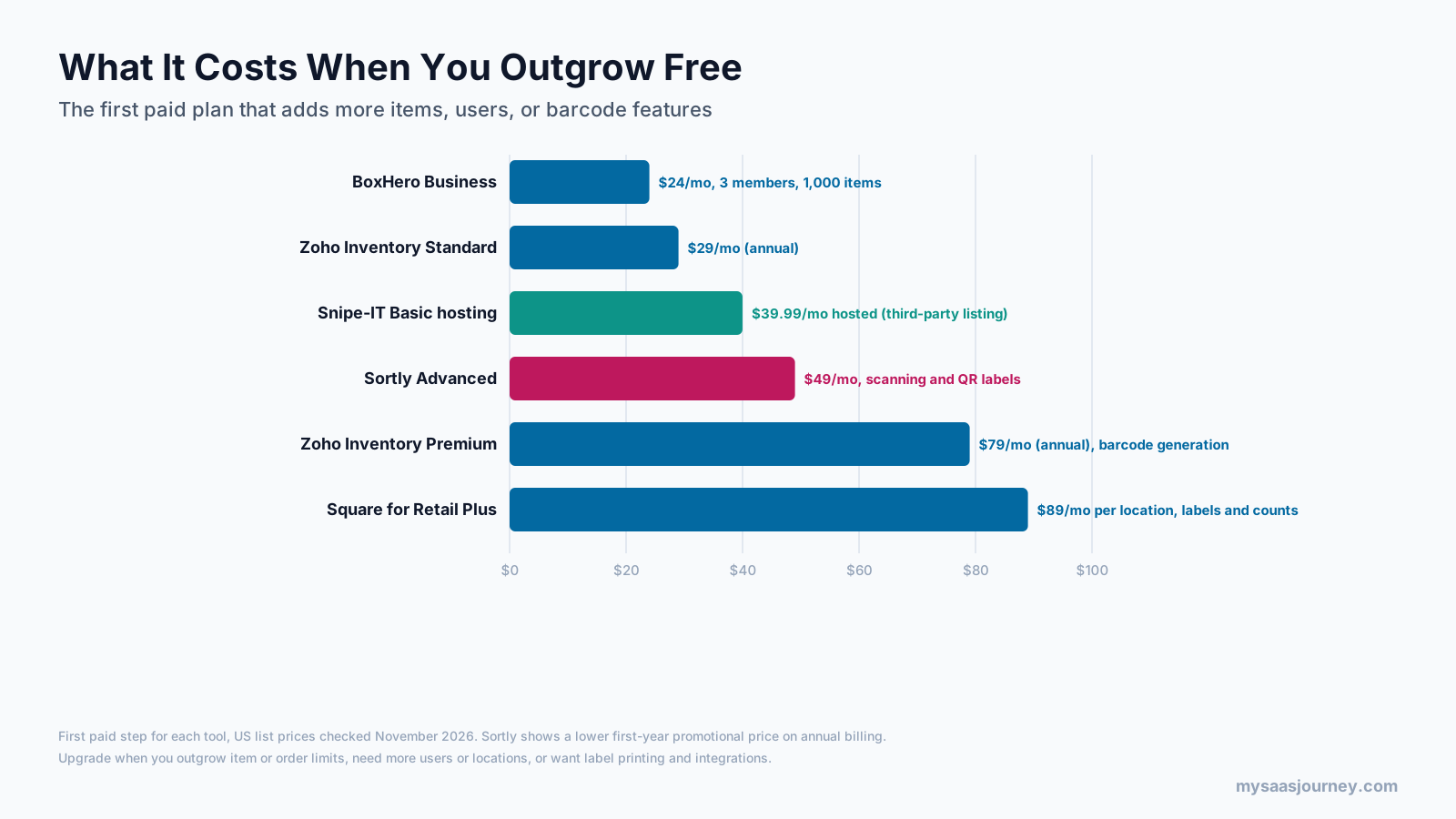
Common signs it is time to pay:
- You pass an item, order, user, or location cap.
- You need barcode label printing built into the tool.
- You need integrations with accounting, ecommerce, or shipping software.
- Nobody has time to maintain a self-hosted server, or you need guaranteed support.
| Tool | First paid step | What it adds |
|---|---|---|
| BoxHero | Business, $24 a month | 3 members, 1,000 items, 3 locations, label printing, low-stock alerts |
| Zoho Inventory | Standard, $29 a month (annual) | More orders, users, and warehouses |
| Snipe-IT | Hosted, from $39.99 a month (third-party listing) | Managed hosting and support |
| Sortly | Advanced, $49 a month | 500 items, 2 users, in-app scanning, QR labels |
| Zoho Inventory | Premium, $79 a month (annual) | Barcode generation and more capacity |
| Square for Retail | Plus, $89 a month per location | Label printing, inventory counts, advanced tools |
If you also need accounting alongside inventory, our guide to free bookkeeping software covers options that pair with these tools. For tagged equipment at larger scale, our guide to RFID asset tracking software explains when RFID beats barcodes.
Tips for Accurate Barcode Scanning
- Place labels in the same spot on similar items, so people know where to scan.
- Use durable labels for items that get handled often or stored in cold, damp, or dusty areas.
- Label shelves and bins as well as items, so moves between locations can be scanned too.
- Set scanners to add a suffix such as Enter or Tab after each scan if your tool expects it, which speeds up data entry.
- Turn on the tool’s duplicate barcode warnings, if it has them, to avoid two items sharing a code.
- Review stock adjustments weekly at first, so you spot items that are being used without a scan.
Common Mistakes With Free Barcode Inventory Tools
- Choosing a free plan without checking whether barcode scanning is included, as with Sortly’s free plan
- Underestimating item caps, then hitting them in the first month
- Self-hosting open-source software without backups or a plan for updates
- Printing labels before deciding on a consistent code format and naming system
- Skipping a starting count, so the system never matches the shelves
- Expecting phone cameras to keep up with high-volume warehouse scanning
Final Thoughts
You can run a working barcode inventory system without paying for software. BoxHero Free, Square for Retail Free, and Zoho Inventory Free are the quickest starts, with limits on items, orders, or features. InvenTree, ERPNext, and Dolibarr remove those limits if you can host them, Odoo Community needs a third-party barcode module, and Snipe-IT and Grocy are free choices built for IT assets and households.
Check what the free version includes before you commit, start with one location and a phone or USB scanner, and run a full count by scan. When you outgrow free, the first paid step is usually modest, and the habits you build now will carry over to any system you choose later. Clean item records, consistent labels, and a team used to scanning every movement are what make any inventory system accurate, free or paid.
Frequently Asked Questions
Is there a free app to scan barcodes for inventory?
Yes. BoxHero’s free plan includes barcode scanning with a phone or scanner for up to 100 items, and Square for Retail’s free plan includes a built-in barcode scanner. Open-source tools such as InvenTree and Grocy also support camera scanning, and InvenTree has a free mobile app.
What is the best free inventory software with a barcode scanner?
BoxHero Free is the best quick-start option for small stockrooms, Square for Retail Free suits retail stores that sell in person, and InvenTree is the best open-source choice with no item limits. ERPNext and Dolibarr are better if you also need orders and accounting.
What is the best open-source inventory software with barcode support?
InvenTree is the strongest open-source choice for barcode-driven parts and stock control, with web and mobile scanning. ERPNext and Dolibarr are open-source ERPs with barcode support, and Snipe-IT is the leading open-source option for IT assets.
Does Odoo have free barcode scanning?
Odoo Community is free and includes an Inventory module, but Odoo’s official Barcode app is part of Odoo Enterprise only. Community users can add third-party barcode modules from the Odoo Apps store, some free and some paid.
Does Sortly’s free plan include barcode scanning?
No. Sortly’s free plan includes 100 unique items and 1 user, but in-app barcode and QR code scanning starts on the Advanced plan at $49 a month. QR label creation also starts on Advanced.
What is the best barcode inventory system for home use?
Grocy is the best free barcode system for home use. It tracks groceries and household supplies, supports camera and USB scanning, and looks up unknown products through Open Food Facts. It is free and open source under the MIT license.
Do I need a barcode scanner, or can I use my phone?
You can start with your phone. Most tools in this guide support phone camera scanning, either built in or through an app. A USB or Bluetooth scanner becomes worth buying when you scan many items a day or run frequent full counts.
Can I print barcode labels for free?
Yes, but only with some tools. Dolibarr and Snipe-IT can print barcode labels in their free open-source software. BoxHero and Square for Retail keep label printing for paid plans, while InvenTree uses label plugins.